

Quarterly Business Review (QBR) Guide: Basics to Best Practices


A sales one-pager is a single-page document that gives prospects everything they need to understand your offer, see the value and take the next step.
That single page has to work hard, because B2B buyers are hard to impress. They are busy, skeptical and drowning in sales content. A well-built one-pager gets past all that and makes a strong first impression in a few seconds.
It also works anywhere in the funnel. Send one to follow up after a cold email, recap a discovery call, support a proposal, or hand a champion something they can share internally with the decision-makers they answer to.
In this guide, you'll find 18 real sales one-pager examples, along with a breakdown of each type and when to use each one. Plus, several templates in different formats that you can customize in minutes with Visme.
Before we dive in, watch this video where we uncover the secret to creating compelling one-pagers that drive results.
Here's a short selection of 8 easy-to-edit one pager templates you can edit, share and download with Visme. View more templates below:


A sales one-pager is used by salespeople to share information, promotional offerings, educational content and more with prospective clients and customers.
The purpose of a sales one-pager is to push prospects to take the next step, like scheduling the next conversation, requesting more information or making a purchase.
So, what makes one-pagers different from other types of sales enablement content? The fact that it’s a single page.
Technically, you can add any information to a sales one-pager.
However, an effective one-pager would utilize the limited space to:
The one pager example below is a product overview for a coffee machine. It showcases features, accessories and prizes won. The BUY button at the bottom is primed to be turned into a button simply by adding a hyperlink to the shopping page.
The sales one-pager wasn’t always as expansive as it is now. For starters, it used to be a printed sheet that reps handed out at events and conventions. They were also used as brochures. But just as sales content evolved with digitization and the internet, so did the sales one-pager.
From the printed sheet, it became a static PDF and then a digital PDF. Now, it can be a lot more than that. You can create a sales one pager as a living document that you share via a live link. Additionally, this document can be an interactive PDF or even a microsite under your domain.
Logan Hendrickson, Senior Director of Product Marketing at Overhaul, has lived through that transition and shared his thoughts about it on the Product Marketing Life podcast:
"I've sent my fair share of one pagers. But back in the day, when I was sending those things, would I have rather sent a really good dynamic web page that's trackable and has video or interactive product tours or customer stories that we can swap in and out? Totally. What can a one pager do that a web page can't do? Unless you're going to print it and put it on a booth, let's just put it on the website."
Regardless of the technicalities of how you create a one pager, you still need to know exactly what type you need to make.
"Sales one-pager" is a broad term that encompasses many styles, purposes and functions. Ultimately, the format, purpose and timing all depend on where your prospect is in the funnel. It’s meant to follow the conversation you just had and help them move to the next step.
If you send the wrong one at the wrong moment, you can slow a deal down instead of moving it forward. Here’s how to actively align your one pagers with each part of the funnel.
As for how you create each one pager depends fully on how your organization’s sales team communicates with prospects.
Here's a visual breakdown of the most common types, when they are needed and who on the sales team uses them.
| Type | Funnel Stage | Best Used When | Who Uses It |
|---|---|---|---|
| Product Overview | TOFU | After cold outreach generates initial interest or a positive response. | |
| SDRs, BDRs | Data Sheet | TOFU & MOFU | Prospects want technical specifications or product details after showing interest. |
| SDRs, Solutions Engineers | Persona-Specific Pitch | TOFU & MOFU | Engaging different stakeholders with tailored messaging and priorities. |
| SDRs, Account Executives | Demo Follow-Up | MOFU | Immediately after a demo to reinforce key takeaways and next steps. |
| Account Executives | Use Case Overview | MOFU | The prospect has identified a specific challenge and is exploring solutions. |
| Solutions Engineers, Account Executives | Competitive Comparison | MOFU & BOFU | The buyer is evaluating competing vendors or alternative solutions. |
| Account Executives | Objection Handling / FAQ | MOFU & BOFU | Deals are slowing down or prospects have concerns that need addressing. |
| Account Executives, Sales Enablement Teams | |||
| Case Study Highlight | BOFU | Prospects need proof, validation and confidence before making a decision. | |
| Account Executives | ROI / Business Case | BOFU | Finance, procurement or executive stakeholders need a clear value justification. |
| Account Executives, Sales Leaders | Pricing Breakdown | BOFU | The prospect is evaluating costs, packages and purchasing options. |
| Account Executives | |||
| Pilot or Trial Overview | BOFU | Prospects want to test the solution before making a commitment. | |
| Account Executives, Customer Success Managers | Onboarding Preview | Post-Sale | The contract is signed and implementation planning is underway. |
| Customer Success Managers, Account Executives | Renewal / Upsell Summary | Post-Sale | Preparing for renewal discussions or identifying expansion opportunities. |
| Customer Success Managers, Account Executives |
Let’s take a look at some real-life sales one-pager examples to see how different companies design theirs. These will give you lots of ideas for your own one pager layouts.
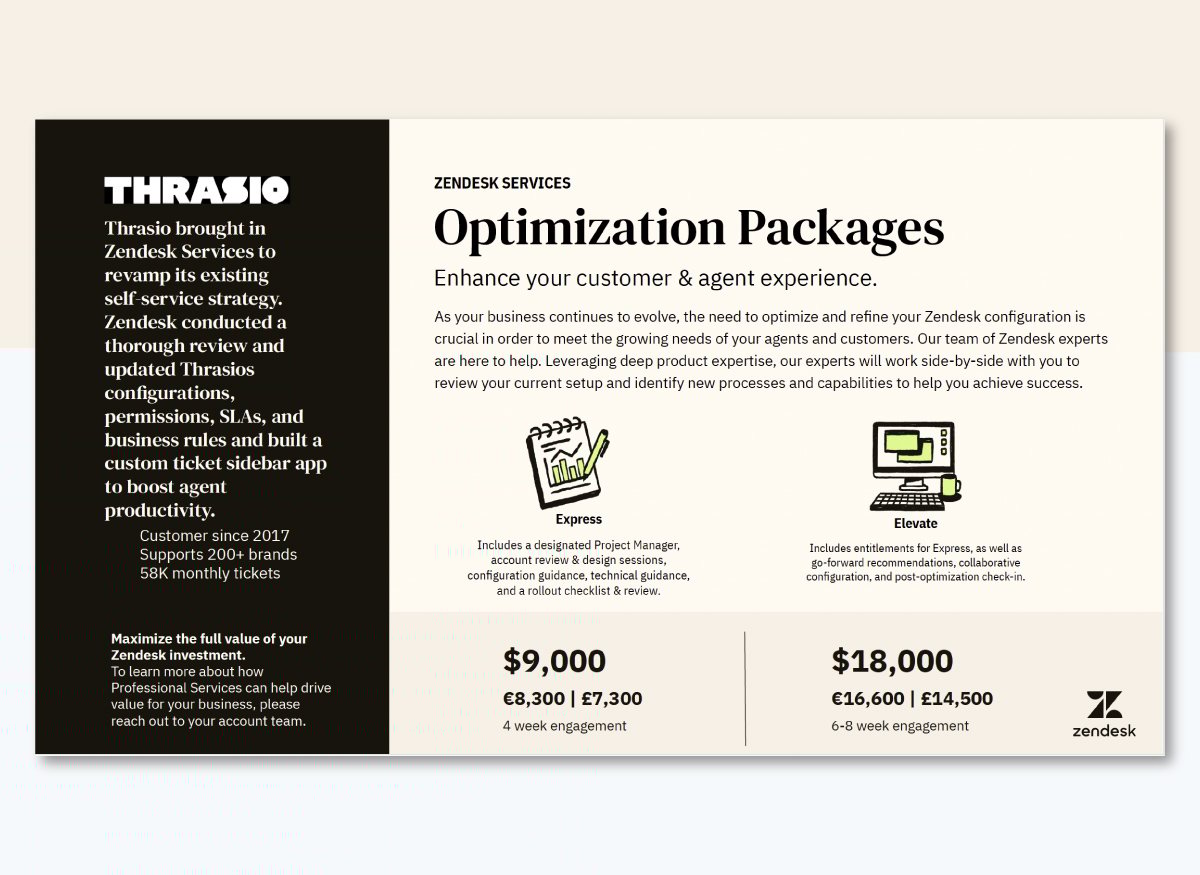
What it is: A bottom-of-funnel pricing product one-pager for Zendesk's professional services packages, sent to existing customers looking to get more out of their investment.
Why it works: The left column leads with a case study overview of a real customer story from Thrasio, which used Zendesk to revamp its self-service strategy. By leading with proof, you ensure that when the prospect reaches the $9,000 price point, they've already seen how the product can help.
The two-tier structure (Express vs. Elevate), along with a relevant icon and descriptions, also makes the decision feel easy to achieve.
Actionable takeaway: If you're selling a service with multiple tiers, anchor your pricing with a named customer result first. It reframes cost as an investment before the prospect has a chance to object.
Source: Outreach
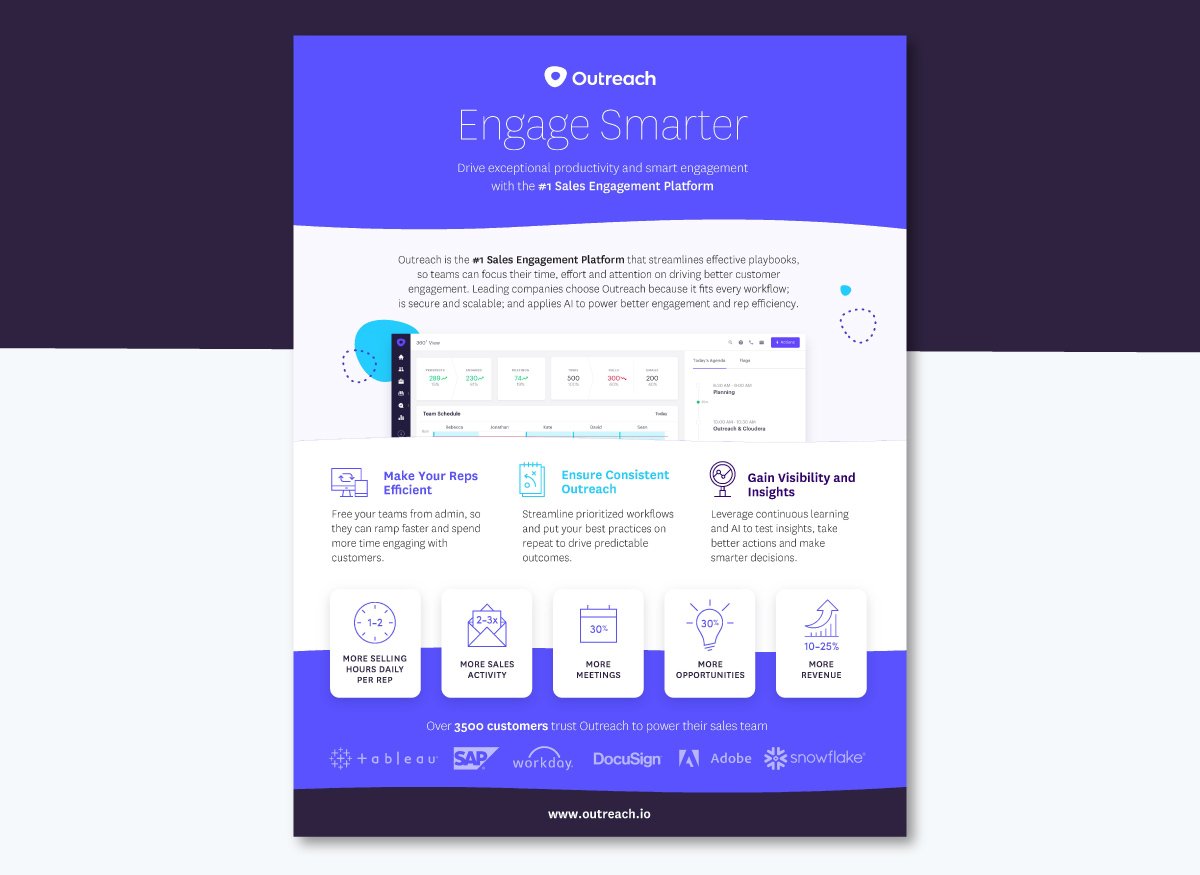
What it is: A top-of-funnel product overview one-pager for Outreach's sales engagement platform, aimed at sales leaders evaluating tools to improve rep productivity and pipeline flow. It also stays true to Outreach’s brand with its signature colors and typography.
Why it works: On a layered section over a central screenshot of their platform, Outreach lists three benefits that speak directly to the three things a VP of Sales loses sleep over: efficiency, consistent outreach and gaining visibility.
What adds proof to these claims? Real changes clients can expect by choosing the platform, including more sales activities, more opportunities and more revenue.
Finally, the customer logo strip at the bottom closes the credibility loop with real, recognizable brand names.
Actionable takeaway: Structure your benefits around your buyer's actual priorities, not your product's feature list. Then, back each one with relevant information and the clients who already use the platform successfully.
Source: Scale
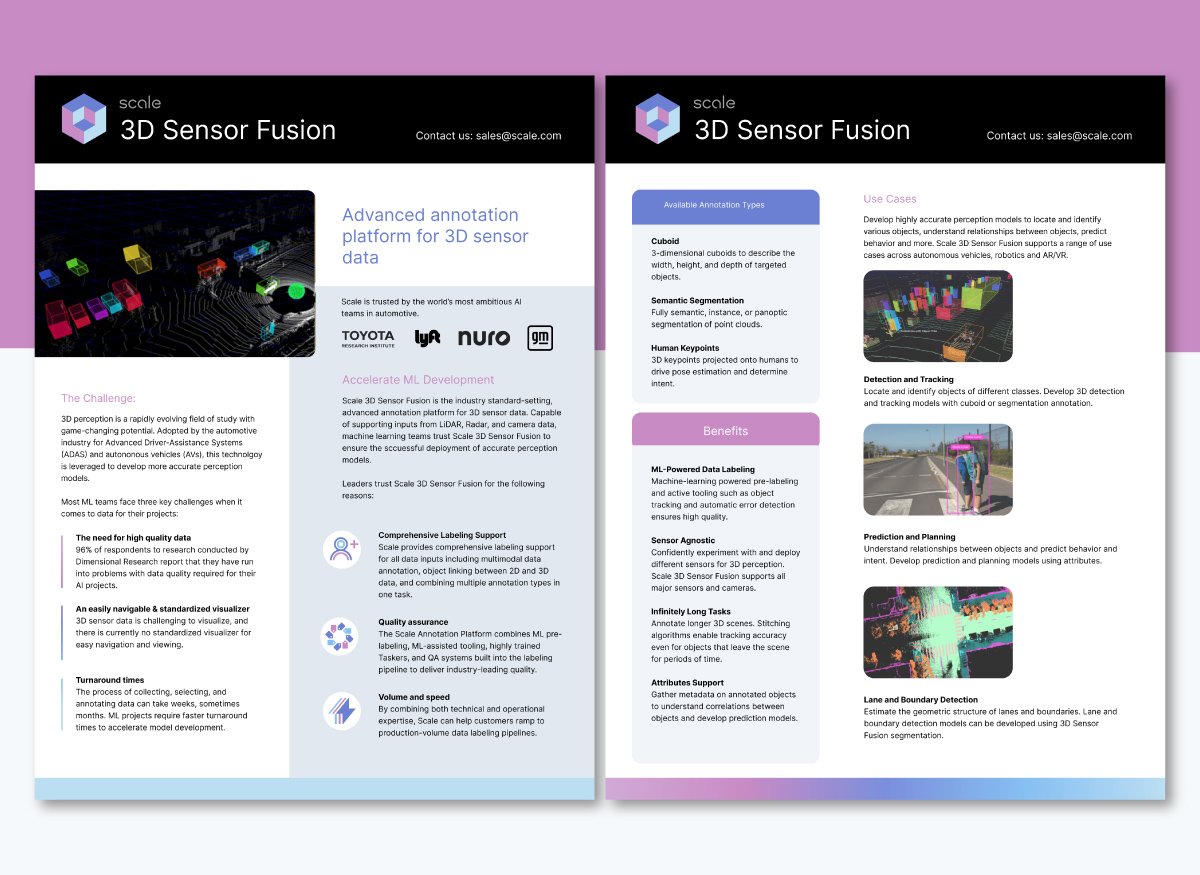
What it is: A top-of-funnel product one-pager (with two front and back sides) for Scale AI's 3D Sensor Fusion platform, targeting ML engineers and product teams building autonomous vehicle perception systems.
Why it works: Scale’s one pager uses the challenge > solution > benefits > use cases format to showcase their product directly to their target market. Page one is all about the problem, while page two focuses on why the product is the right fit to solve it.
The visuals (images and shapes) help separate the content into snackable chunks, each with its own topic and function.
Actionable takeaway: Map your one-pager to the way your buyer thinks. Lead with what keeps them up at night, then show how you solve it. Using visual cues and separations will help share the information in sections that make sense and flow organically.
Source: WordPress
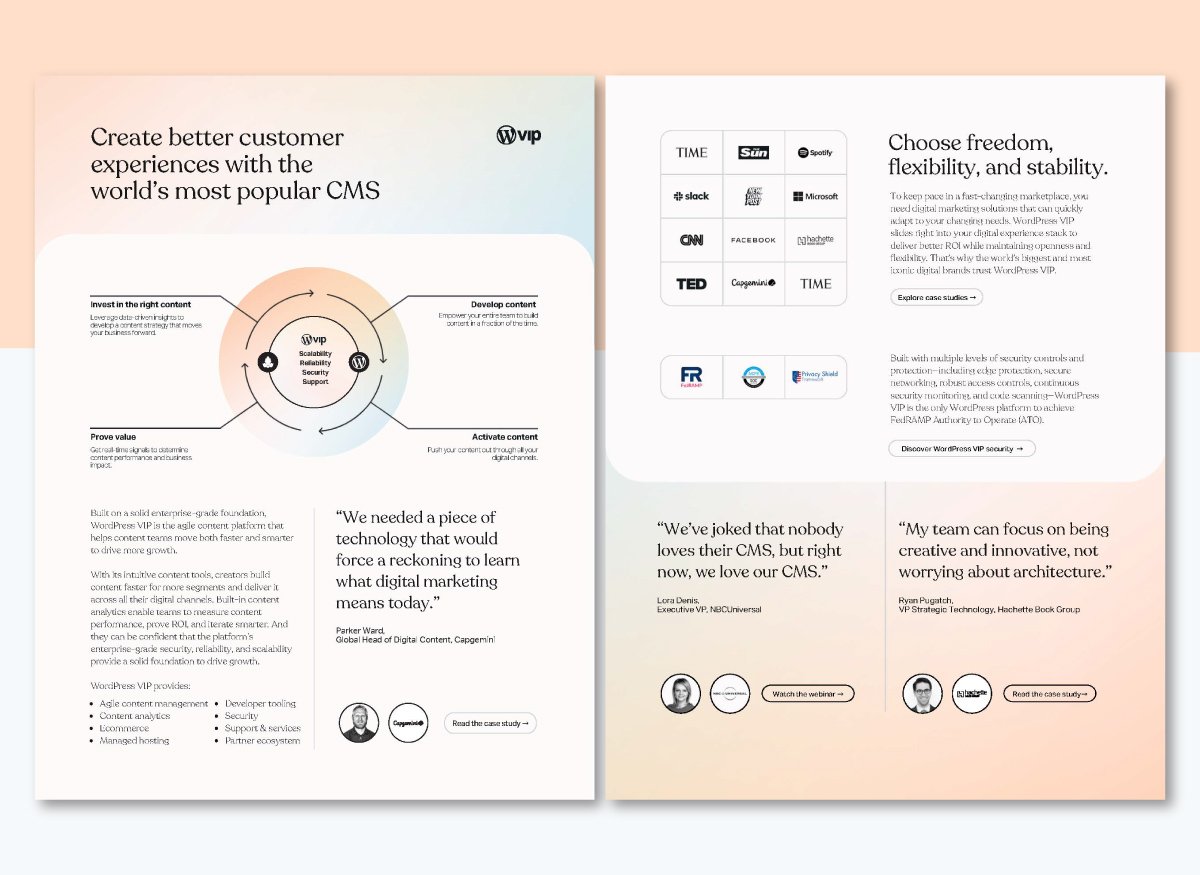
What it is: A mid-funnel product one-pager for WordPress VIP's enterprise content platform, targeting digital content teams already using WordPress who are evaluating the upgrade to VIP.
Why it works: The layout walks the buyer through a complete content lifecycle: invest in the right content, develop it, activate it and prove value. That framework positions WordPress VIP as a strategic platform rather than just a tool.
The three customer quotes from NBCUniversal, Capgemini and Hachette Book Group give the whole thing immediate credibility with the exact audience it's targeting. Finally, since this one pager is digital, it has several call-to-action buttons to obtain further information.
Actionable takeaway: If you're selling an upgrade to an existing tool your prospect already uses, lead with what they're leaving on the table. The one-pager should make staying put feel like the riskier choice. Use storytelling to paint the "after" picture, the way WordPress VIP does with "Choose freedom, flexibility and stability." Three words that speak directly to what content teams are missing about their current setup. Frame your upgrade pitch around the future state, and let the prospect connect the dots back to your product.
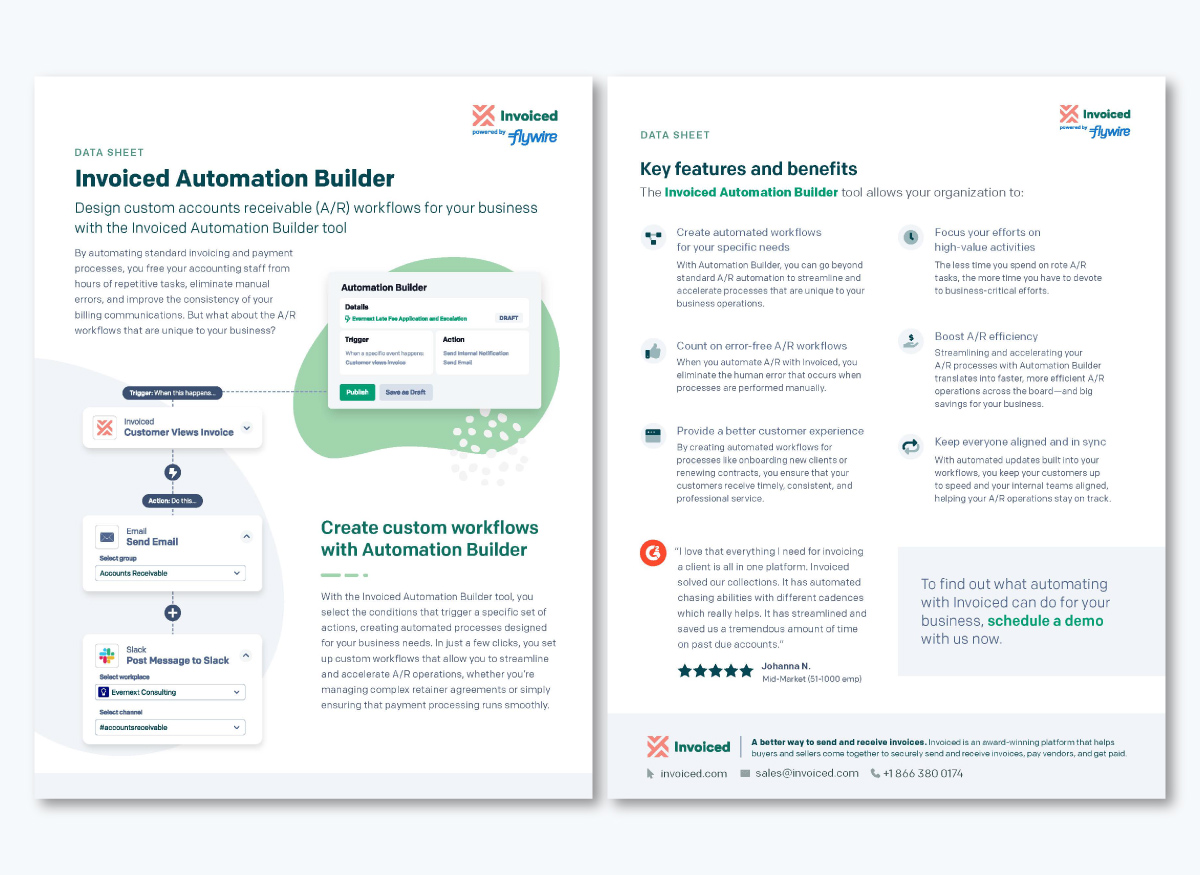
What it is: A mid-funnel data sheet for Invoiced's Automation Builder tool, targeting finance and accounting teams evaluating ways to reduce manual accounts receivable work.
Why it works: The one-pager leads with the problem accounting teams know too well: hours of repetitive tasks, manual errors and inconsistent billing. It then presents six specific benefits tied directly to those pain points, each with its own heading, making it easy to scan.
The final customer quote from a mid-market user adds ground-level credibility and the “schedule a demo” CTA is clear and low-friction.
Actionable takeaway: The workflow diagram on the first page clearly illustrates how the tool operates, eliminating the need for the reader to imagine it. If your product has a process worth showing, a diagram will always outperform a bullet list.
Build yours with Visme's diagram maker, or map it out first on Visme's whiteboard using Story Points to walk a prospect through the flow step by step.
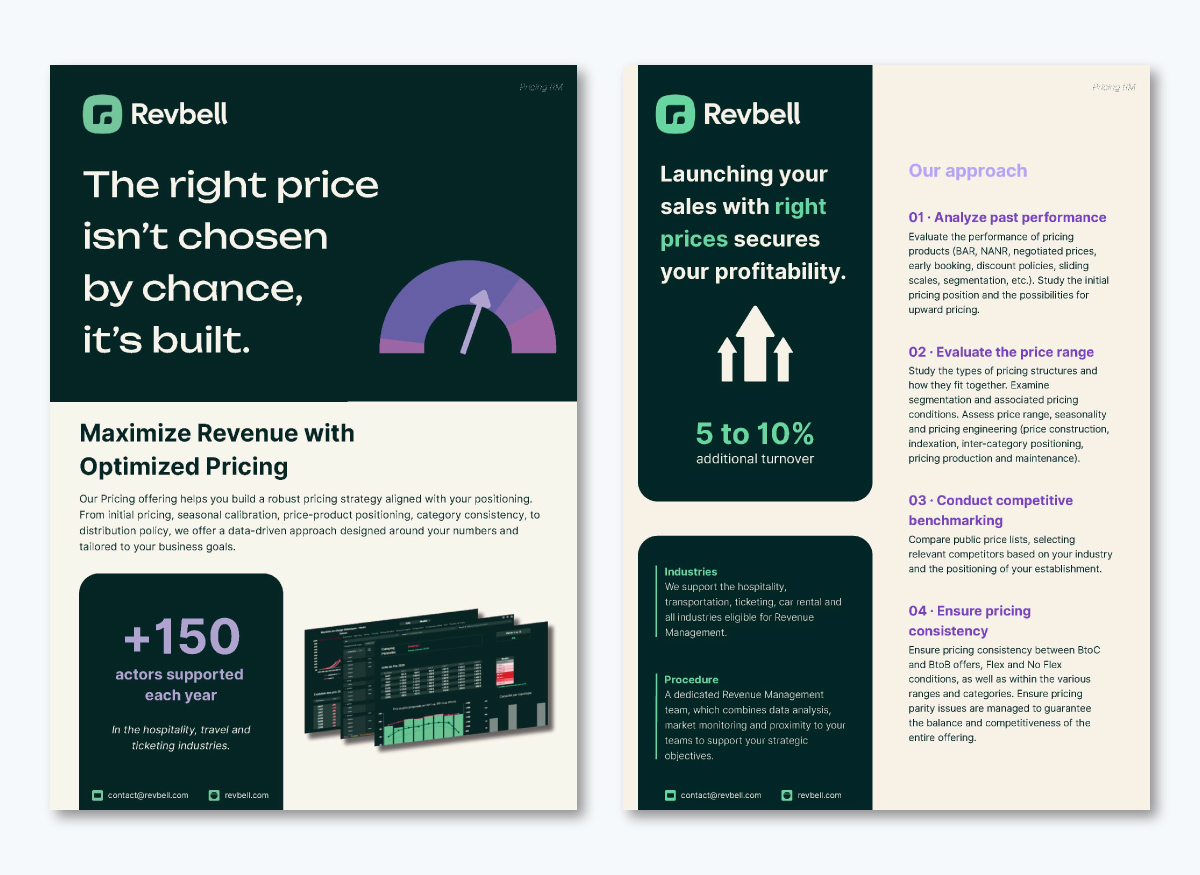
What it is: A top to mid-funnel service overview one-pager for RevBell's revenue management consulting offer, targeting pricing and revenue leaders in hospitality, travel and ticketing who are already familiar with the company or evaluating a specific engagement.
Why it works: The headline "The right price isn't chosen by chance, it's built" immediately speaks to the frustration of pricing done by gut feel. The suggested four-step process (analyze, evaluate, benchmark, ensure consistency) gives the prospect a clear picture of what working with RevBell entails, reducing the perceived risk of hiring a consulting firm. Then the highly visual outcome metric, 5 to 10% additional turnover, is the perfect closing argument.
Actionable takeaway: Share important statistics in a large, noticeable font. This one pager has two instances where a large number stands out in the layout, telling the story of their product. Achieving this technique is easy; just ensure that your numbers contrast with the background and are large enough to be seen quickly.
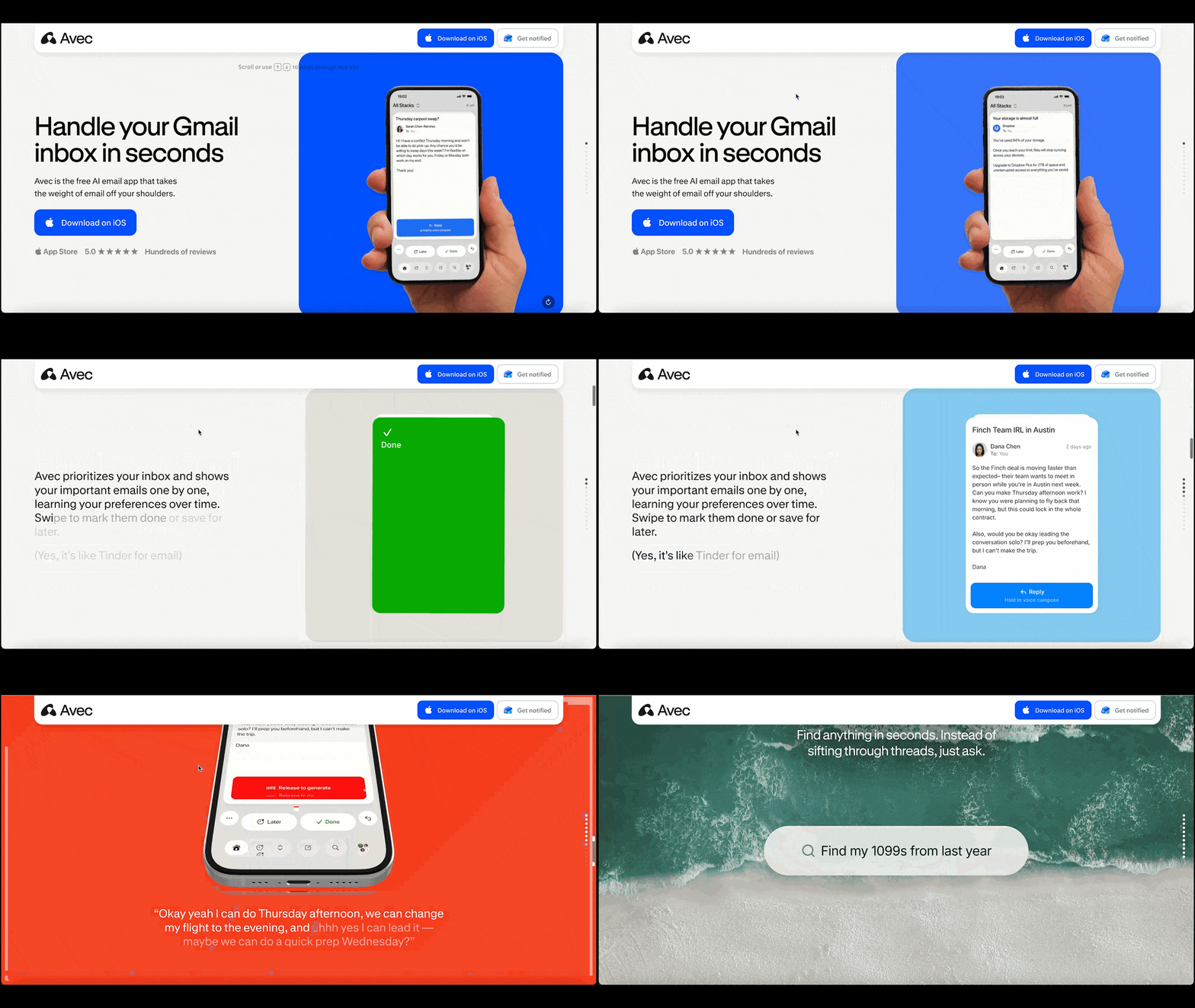
What it is: A top-of-funnel product overview built as a scrolling microsite for Avec, an AI email app targeting Gmail users who feel buried in their inbox.
Why it works: As you scroll the microsite, each section reveals itself through animation to demonstrate one feature at a time. Each one, including inbox prioritization, voice compose, AI drafting and smart search, is all visualized with a live product mockup.
The animated "Stack Challenge" in the second section shows visitors how to sort emails by swiping, like a “Tinder for email”. The download CTA is static at the top and shows up again at the bottom.
Finally, the App Store reviews at the end close the loop with social proof.
Actionable takeaway: A scrolling microsite one-pager gives you something a PDF never can: the ability to show your product in action rather than describe it. Publish yours as a Visme microsite and share it as a live link so prospects can get a better experience.
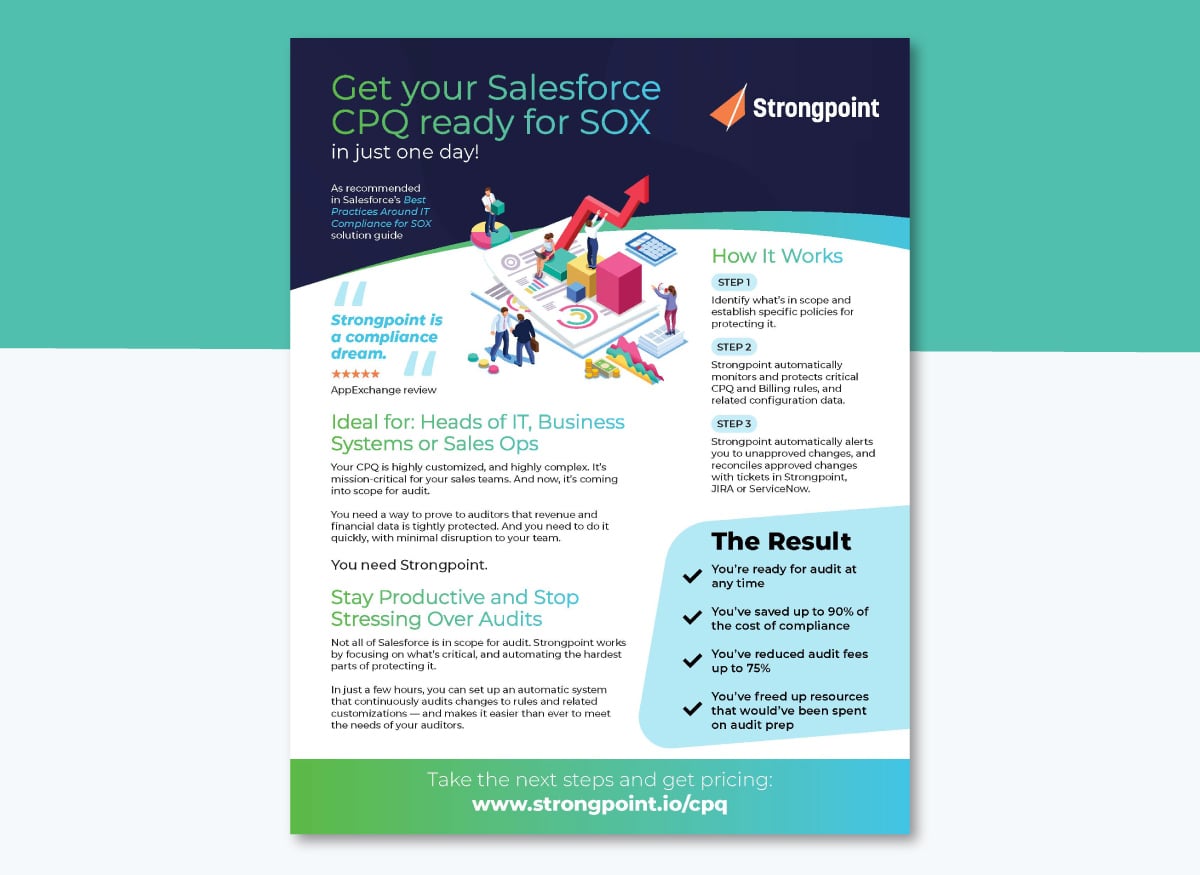
What it is: A bottom-of-funnel problem-solution one-pager targeting Salesforce admins and compliance teams whose CPQ configuration is coming into scope for audit.
Why it works: At this stage, the prospect isn't browsing. They have a deadline and a problem. This one-pager skips client education entirely and opens with the exact situation the reader is already in: a highly customized CPQ coming into scope for audit.
The three-step setup process answers their next logical question: how fast can we fix this? And the outcome stats- 90% cost reduction, 75% fewer audit fees- give the champion the numbers they need to justify the purchase internally.
Actionable takeaway: Bottom-of-funnel one-pagers don't need to explain what you do. Open with the exact situation your prospect is already in, then quickly answer how you fix the problem. Structure the rest around the outcome metrics their internal champion needs to justify the purchase.
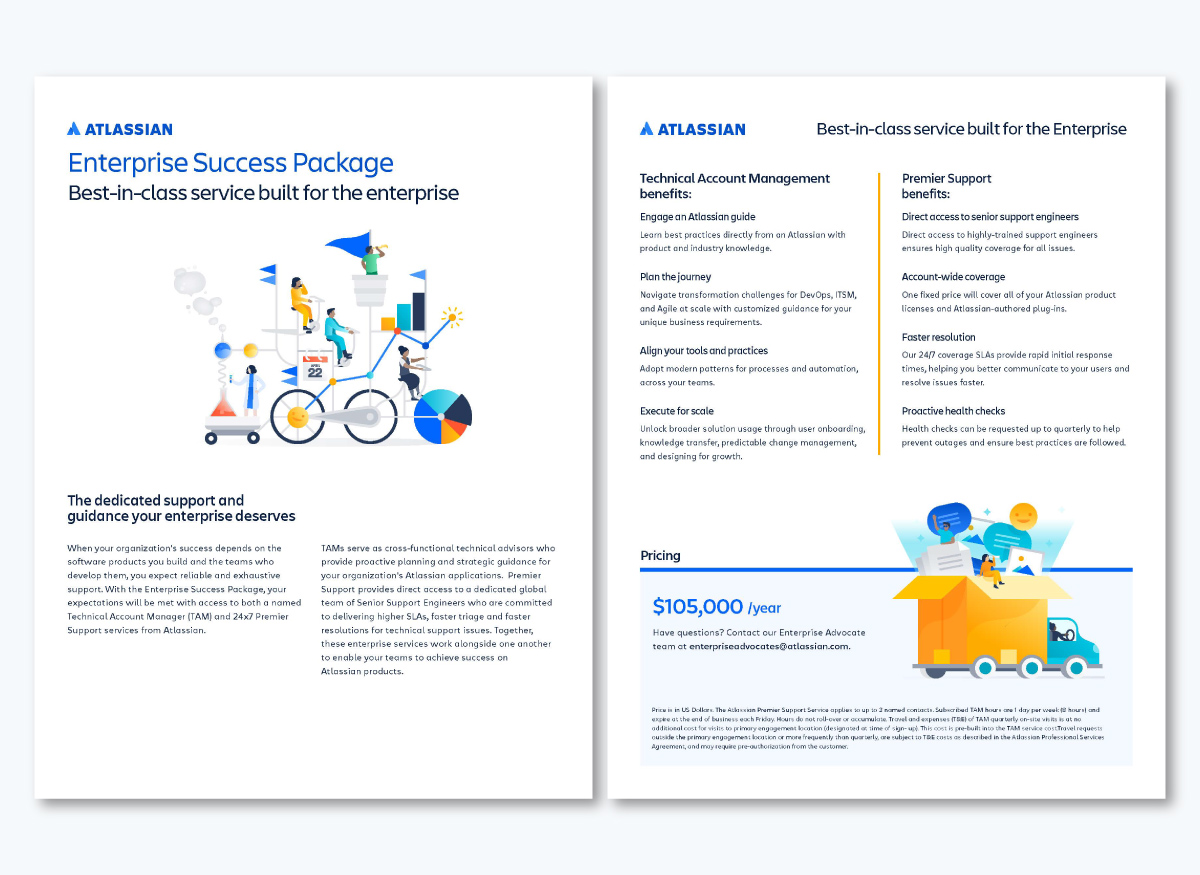
What it is: A bottom-of-funnel pricing one-pager for Atlassian's Enterprise Success Package, targeting IT leaders and engineering managers at large organizations already using Atlassian products.
Why it works: Atlassian is selling a high-touch, personalized service. The one-pager uses simplicity to reflect its importance. It’s just a clear explanation of what you get, who delivers it and what it costs. For an enterprise buyer who already knows and trusts Atlassian, that simplicity signals confidence. There’s no need for anything else.
Actionable takeaway: When your brand already carries weight, let it do the work. A minimal one-pager, free of clutter, signals that you're confident enough in your offer to let it speak for itself. Strip out anything that doesn't directly support the decision you want the prospect to make.
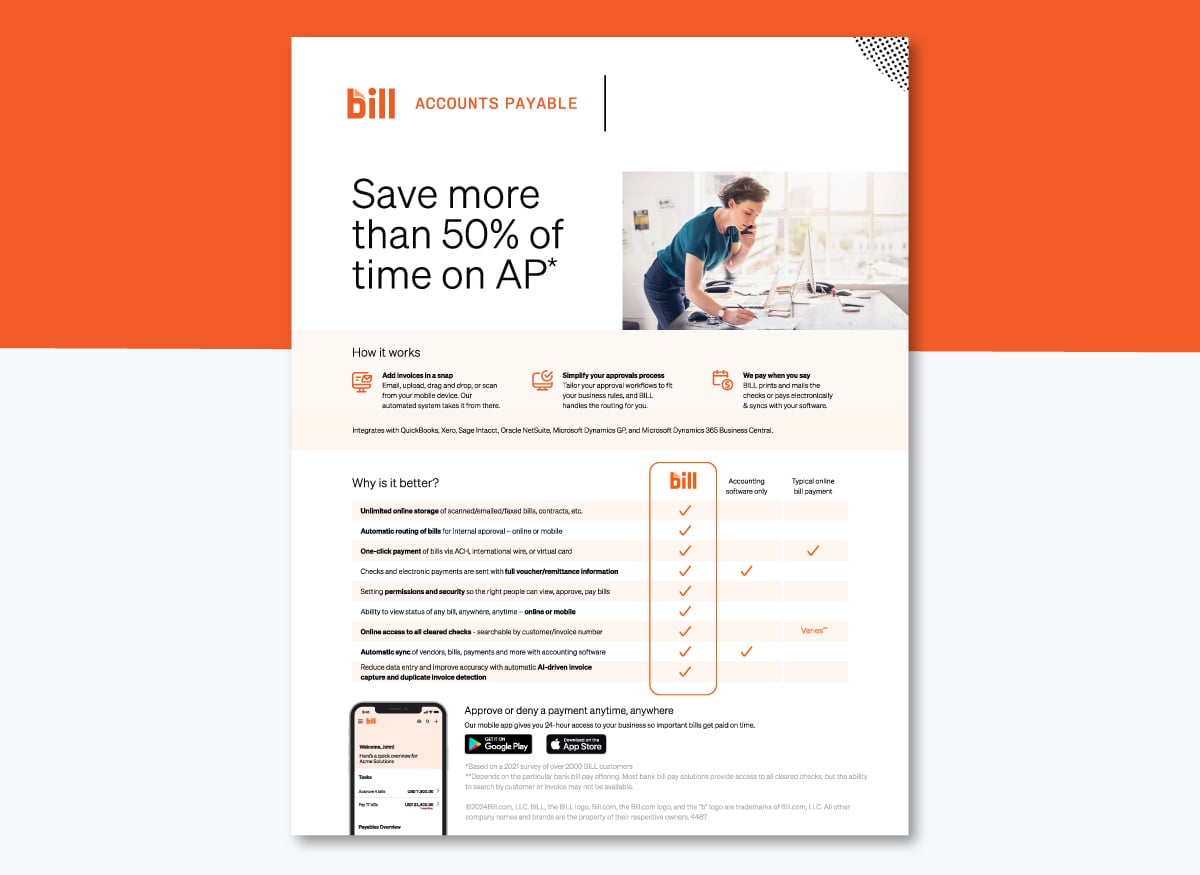
What it is: A mid-funnel use case one-pager for Bill.com's accounts payable product, targeting finance teams and accountants evaluating ways to reduce manual AP work.
Why it works: The comparison table is the centerpiece of this one pager. It successfully compares accounting software only, typical online bill payment, and Bill.com without naming a single competitor.
Then, the "How it works" section keeps the process to three steps, which makes a complex workflow feel approachable. And finally, the stat anchoring the whole thing, “Save more than 50% of time on AP,” coming from a survey of over 2,000 customers, gives tons of credibility.
Actionable takeaway: A comparison table that puts your product against generic alternatives rather than named competitors lets the prospect draw their own conclusions. It's less aggressive and often more persuasive than comparing to other names.
Made with Visme Infographic Maker
What it is: A mid-funnel case study one-pager showing how WOW Inc., a broadband provider, cut design tool costs by 79% and reduced content creation from hours to 15-20 minutes after switching to Visme. Our reps use this one pager when speaking to prospective customers considering a Team subscription.
Why it works: Shared as a live link, this one pager is interactive with animations and an embedded video. A regular PDF can’t do any of that. The interactivity calls attention fast. Right at the top, the three outcome stats appear on the page one by one in large, high-contrast text, so the ROI is impossible to miss. The side-by-side "How does WOW! use Visme" vs. "How Visme Helped WOW!" layout also makes the before-and-after immediately clear.
Actionable takeaway: Your case study one-pager will work harder as a live link than as a PDF. Use Visme to add animations, embedded videos and interactive elements so the prospect experiences the story in a more memorable way.
There are many different ways you can use sales one pager during the sales process.
Provide a sales one-pager at the end of a sales call or meeting to summarize your pitch and keep your business top-of-mind for the prospect.
Steven Khanna, Head of Growth at Endorsely, points out why they are an indispensable tool for reinforcing your message.
Head of Growth at Endorsely
After a meeting or call, your prospect might forget some of the finer details. Attach a one-pager in follow-up emails to provide prospects with a concise summary of your offerings and keep your brand top of mind.
Alexandr Sharilov, CEO of CoinDataFlow.com, points out why they are so effective:
"I think sales one-pagers work best as a way to kick off communication with prospects. Instead of a typical email, they’re a great choice for companies that want to show initiative and a creative approach."
Nathaniel Miller, Head of Marketing at The SEO Marketing Dad says he’s found them incredibly useful during the follow-up phase, where prospects need a quick, visual recap of what’s been discussed. It keeps the conversation moving forward and gives them something tangible to share with other decision-makers.
When onboarding new sales reps, you can use one-pagers as a resource for sales enablement training. They pack a ton of useful info into a bite-sized format, giving your team everything they need to start selling products or services without drowning in details. It helps new hires hit the ground running, stay on track, and feel confident in their pitch.
Kalyn Lewis, Head of Sales and CX at Visme, creates one-pagers quickly on her own to get key information and reference materials out to her Sales and Customer Success team fast.
Head of Sales and CX at Visme
Send one-pagers in cold email campaigns or as part of direct mail strategies to grab attention and provide value upfront. While today’s cold email strategies suggest short email messages, the one-pager allows you to say more and get more visual with the information – which we know builds better information retention and traction. Whether it’s a cold email or a snail mail campaign, a well-designed one-pager is your foot in the door. It makes your pitch feel less like a hard sell and more like a thoughtful intro.
Ben DeLoach from Westover Web explains why they are the perfect tool for starting meaningful conversations with prospects.
Westover Web
Sales one pagers can serve as handouts or visual aids to emphasize important data or provide more context during virtual or in-person presentations. They keep everyone on the same page and double as a tangible reference for your audience to revisit after the presentation.
Likewise, you can tuck a one pager in your sales proposal so busy decision-makers can grasp vital info without having to sift through lengthy documents.
Trade shows can be chaotic, but an eye-catching one-pager can cut through the noise and stick in a prospect’s mind long after the booth lights dim.
Distribute one-pagers like fact sheets or sell sheets at trade shows to quickly share what your business offers to a broad audience.
Head of Growth at Endorsely
A sales one-pager boils down the key selling points, value propositions, and product benefits into a simple, digestible format. Whether it’s the marketing team working on campaigns, the product team building features, or the customer success team addressing client concerns, the messaging stays aligned across various departments.
Offer downloaded one-pagers on your website as a lead magnet. Giving out something free yet valuable is a perfect bait to hook interested prospects and reel them into your lead generation funnel.
Frank Sondors, Founder of Salesforge, highlights how versatile one-pagers are in the sales process.
Founder of Salesforge
The examples above all have one thing in common: they work. And it comes down to more than good design. Sales one-pagers are visual vehicles that give your team exactly what they need to move a deal forward, without asking the buyer to spend more time than they have available.
Let’s take a look at what makes them so effective.
Let’s start with the obvious: no buyer wants to read endless pages of sales content. They already know you want their money; they’re not going to hand over their time too.
But sales one-pagers are more than just summarized documents. They’re excellent visual vehicles that empower your sales team with key insights and information that help move the needle in their deals.
Here’s what makes one-pagers special:
1. Quickly create and adapt: Imagine creating a 10-page document — and then modifying it for every client. That would take a lot of time. In contrast, you can whip up a one-pager in minutes. Like company one pagers, they’re also versatile and easy to adapt to various clients.
Pro Tip: Use Visme’s dynamic fields to automatically replace specific information like key metrics, stats, prices and more when presenting one standard document to multiple clients.2. Provide clarity and engagement: One-pagers summarize key info and highlight only what your audience needs to know. This keeps clients focused and engaged on your core message and value proposition.
Head of Sales and CX at Visme
3. Drive more conversions: Sales one-pagers are easy to read and understand. This helps potential buyers make purchase decisions faster and increases your chances of converting them into customers.
Steven Spieczny, Vice President of Marketing at Kognic, explains that one-pagers are highly effective for driving results:
"From a metrics perspective, we've found that one-pagers have significantly increased engagement and follow-through. For example, we’ve seen a higher conversion rate when prospects receive a personalized one-pager tailored to their stage in the buying journey."
4. Easily share your documents: One-pagers are simple to distribute in any format — print, digital, email or social. This flexibility makes it easy to get your valuable content directly in front of prospects.
Now that you know what makes a strong one-pager, let’s take a look at some templates to help you build yours.
Visme’s template library is full of one-pagers for various industries and purposes.
Below is a list of our favorite sales one-pager templates:
As a solid starting point for top-of-funnel outreach, this one-pager will give potential wholesale buyers a complete snapshot of your company, products and differentiators before they decide whether to move forward. The design was created for a stationery seller but can be adjusted to fit any type of business.
The four-section grid makes it scannable and quick to skim. One box is for listing products; another for explaining why they should choose your company, your target market and all essential contact information.
Don’t forget to incorporate your brand colors so that the one pager aligns with all your communication material.
Built for retail brands pitching to investors, partners or wholesale buyers, this one pager proposal template covers every angle a prospect needs to evaluate your business: product categories, target customer persona, marketing channels, sales funnel and company values.
The layout was designed for a multi-category retailer but works for any product-based business. The funnel section is especially useful for showing prospects exactly how you acquire and convert customers, which builds confidence with your prospect.
If you don’t have the ideal visual, use Visme's AI image generator to replace the photo with one that better matches your brand and audience.
Capture the essence of your startup to impress investors and clients with this startup one-pager template. The key to a successful one pager is using the space effectively between the content you need to share and the feeling you want to impart on the viewer. In this example, the text is encased in a single area, surrounded by photos and graphics that you can align with your brand.
Consider distributing this digitally so you can embed videos directly into the layout for a more dynamic pitch. Or, add animations to text and other elements to make your message stand out at first sight.
Tech pitches need to be sharp and straight to the point, just like the industry. And this professionally designed sales one-pager template gives you exactly that.
Highlight your innovative tech services, the industries you serve and key metrics like NPS score, monthly customers and profit growth. Swap in your own content to build credibility. The data section in the layout includes a map, a percentage widget, an array and a visual metric with an icon. All ready for customization.
Do you want to take things up a notch? Add interactive links and pop-ups to guide your audience to demos or further information.
The bold, high-energy layout in this one pager template will help pitch your fitness center to prospective sponsors in your community. Make it work double time by sending it out digitally via email and on print via direct mail.
By following the stacked block structure, you can list exactly what customers get, what's in it for the partner, and why you are the right gym brand to partner with.
Keep the bullet lists and headings aligned by turning on the canvas rulers, drawing a vertical line at the margin, and toggling smart guides. This will help control the design’s balance easily.

Yes, most one pagers have the document dimensions (US Letter or A4), but there’s no steadfast rule that says they all have to be like that. You can also create a longer one pager as an infographic.
This infographic template, designed specifically for startups seeking traction, will help you lay out your company's values, credentials and story in a clear hierarchical flow.
Use Visme's data widgets to visually represent milestones or accolades, ensuring your startup story resonates with both your brand and prospects.

Here’s another infographic one pager you can use to highlight the excellence of your services. The streamlined design with Visme’s icons is perfect for visually listing core offerings, value propositions and the hardworking team behind it all.
Publish the final version with a Visme live link and share it widely through DMs, email and social media posts. It’s the best way to know whether people are actually looking at it. To make it work even harder, add a hyperlink to a contact form to collect interested leads.

Seeking a fresh way to introduce your business? This vibrant sales one-pager template may be exactly what you need. The layout is easy on the eyes and covers your mission and vision statements, service offerings and key achievements.
If you take a closer look at the cards holding information in the design, you’ll see that they all have a drop shadow. This small feature makes the box stand out from the background, creating depth and improving the visual flow.
Got a product you want to sell?
Use this colorful, engaging one-pager sales template to showcase it creatively. There are two visual sections: a product photo on the left and a tablet-shaped features-and-benefits section on the right. At the top, you’ve got everything you need to visualize units sold, five-star reviews, and social media recommendations, with relevant icons.
Replace the product photography with your own, and use the AI background remover to create a cutout you can place over any background.
Add this one pager to your team's sales enablement strategy and help your sales reps sell products more easily and faster. The design is ideal for for furniture, home goods or lifestyle product brands pitching to retailers or interior buyers.
Making your sell sheet look this good is simple when you have all of Visme’s design assets at your disposal. One particular feature that can help you finish this design is the smart blocks, which come in several layouts that automatically adjust to your content and spatial needs.
Found a template you like? Now it’s time to make it yours.
This is the good part: creating an attractive sales one-pager.
With Visme, you can do it all by yourself — even without any design experience. The drag-and-drop editor and pre-made sales one pager ideas make it as easy as a few clicks.
Follow the steps below to design a sales one-pager with Visme:
First, you need to collect all the necessary information about your business, product or service. This is the foundation of your one-pager and will help you structure the content and design.
Here are some tips to maximize your research efforts:
Organize your thoughts easily with Visme’s whiteboard tool. Collaborate with your sales team and people from other departments to ensure you don’t miss out on any key information.
Here’s how the collaboration feature works in Visme.
Good news — you don’t need to spend hours designing from scratch. Visme offers dozens of ready-made sales and marketing one-pager templates to give you a head start.
Each template in Visme is fully customizable. Tweak colors and fonts, add creative graphics and backgrounds, and move around elements easily in the drag-and-drop editor.
Here are some best practices for choosing the perfect template:
Selecting the right template sets the tone for your sales one-pager. They do the heavy lifting, so you can focus on the fun part: customization.
Think of your template as the backdrop to your sales pitch. If it’s drab, your message might just fade into the background. But if it’s on point? Your content takes the spotlight and keeps your audience engaged.
Prioritize layout and visual hierarchy when selecting a one pager sales template. Daniel Verduga, Graphic Designer, explains why this matters:
Graphic Designer at Visme
Before you start tweaking your template’s design, add in all the text.
Replace the placeholder content with your own and try to stick to the template’s existing layout as much as you can. You might need to edit your content so it fits nicely.
Here are some tips to structure your one-pager’s content:
Pro Tip: Out of words? Use Visme’s AI writer to craft clever copy, headings, CTAs and more to convert your audience.
In Visme, you can easily edit and move around text. Group multiple text boxes, lock specific elements so they stay put, arrange sections with a single click and more.
You can also take advantage of pre-designed text blocks like headers, subheaders and body text to save time and effort.
Your one-pager's design is more than just aesthetics. A well-thought-out design can elevate your content, making it more compelling and memorable.
This is your short sales pitch and a chance to make an impact so every design choice matters. Alejandra Mariscalez, Design Manager at Visme, puts it perfectly:
Design Manager at Visme
Visme provides you with a range of design tools to tweak and customize your one-pager so it fully aligns with your brand and message.
Here are some best practices to enhance your sales one-pager’s design:
Alejandra recommends enhancing your design with eye-catching graphics colors, and data widgets—or even showcasing your product as a focal image.
Design Manager at Visme
With Visme, customizing your design isn't just about making it "look good."
It's about creating a visual experience that complements your content, engages your audience and leaves a lasting impression. This takes us to the next point…
Say goodbye to boring, static one-pagers.
With Visme, you can turn your sales one-pagers from monologues to conversations.
Dazzle clients with dynamic documents that have hyperlinks, hover effects, pop-ups and hotspots, embedded videos, animations and more.
Here are some ways to use Visme’s interactive features in your one-pagers:
Alejandra Mariscalez, Visme’s Design Manager, admits she’s a big fan of the interactive feature that cuts down on clutter and frees up space in your design.
Design Manager at Visme
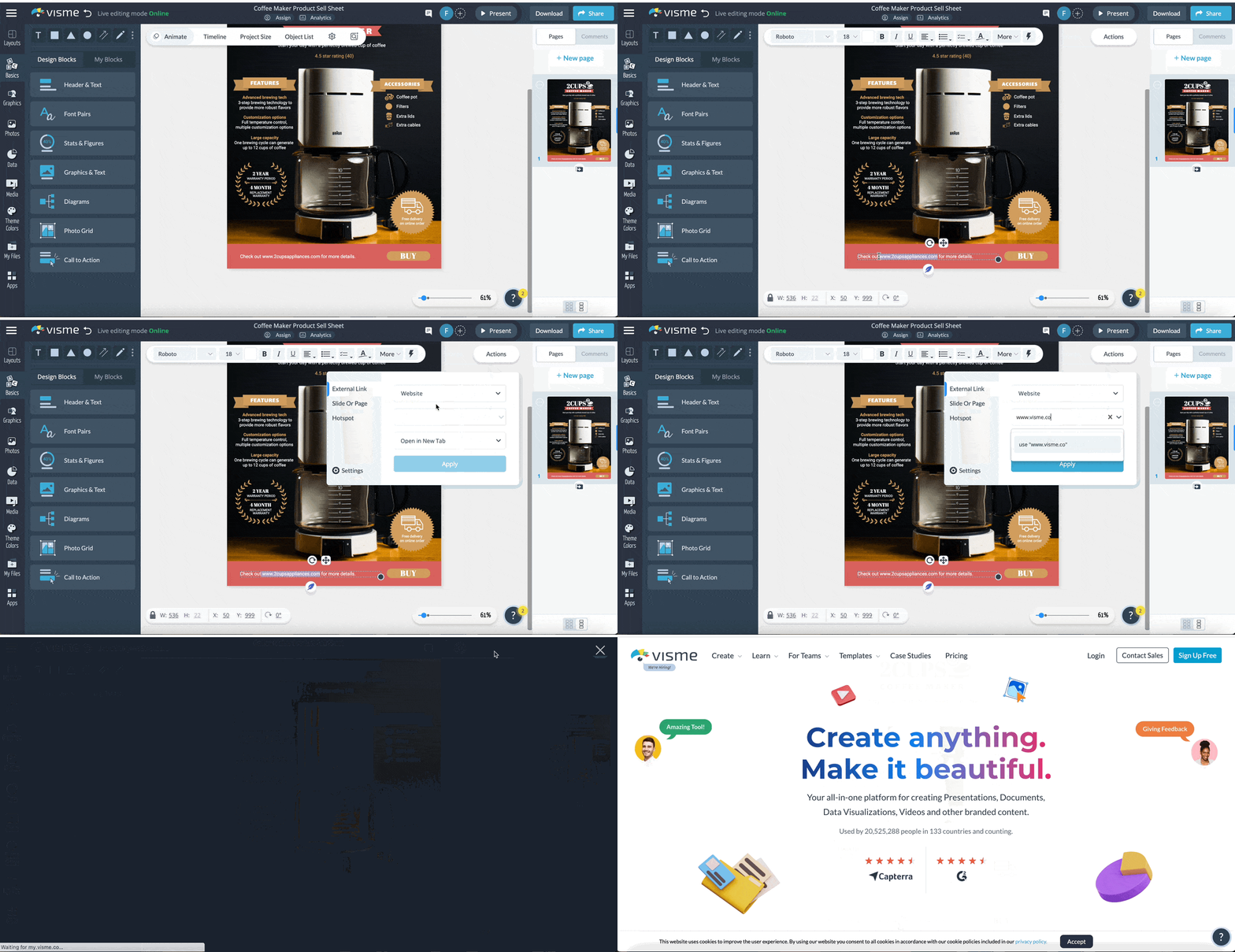
You’re almost done!
Before you can share your one-pager with potential clients, make sure it’s error-free. Here are some tips to review and finalize your sales document:
Use Visme’s preview feature to see how your one-pager will appear to readers. You can even share a draft link with colleagues for feedback.
That’s it! You’re ready to share your sales one-pager with the world. In sales, how you distribute a one pager determines whether it actually moves a deal forward or disappears into someone's downloads folder.
First, let’s take a look at the options Visme offers:
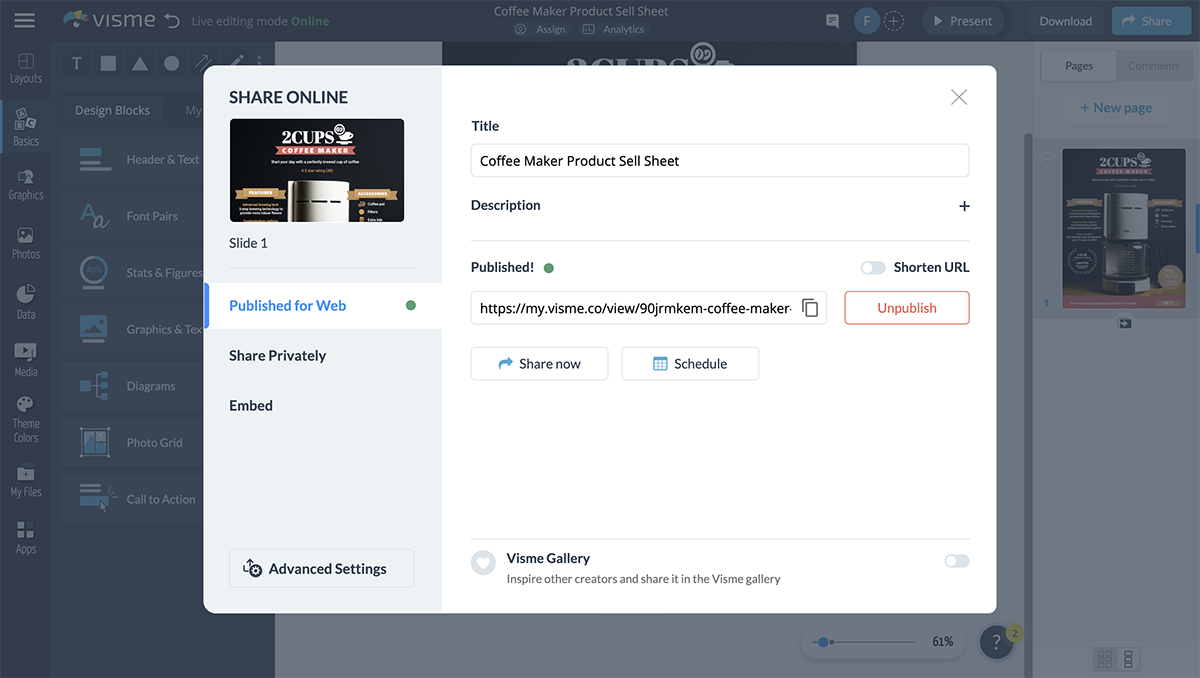
And here are the main channels and how to use each one effectively.
Email outreach: Send the one pager as a live link rather than an attachment after an initial touchpoint. It's less likely to hit spam filters and you can track whether it was opened.
Follow up after a demo or discovery call: Send a tailored one-pager within 24 hours that covers what you discussed and offers suggested next steps.
Sales proposals: Include your one-pager at the beginning of a formal proposal as a quick-reference summary for decision-makers who won't read the full document.
Embedded in your website or landing page: Drop it onto a product page, pricing page, or dedicated resource section so prospects can find it without talking to a rep first.
Customer portals and digital sales rooms: Share via a password-protected private link and drop it into your client portal so the buying committee can reference it between meetings.
LinkedIn and social outreach: Post a shareable link or Visme microsite to your feed, or drop it directly into a DM when the time is right.
In-person events and trade shows: Print the one pager to hand out and add a QR code that links back to the live digital version.
Internal sales enablement: Store the final one pagers and template versions in a shared workspace so reps can access, personalize and send to their prospects in the pipeline.
A sales one-pager should include:
A one-pager is a single-page asset designed to be skimmed, forwarded and digested without a presenter. A pitch deck is a multi-slide presentation meant to be walked through live. Use a one-pager to open or advance a deal; use a pitch deck when you have the room.
A good sales pitch leads with the prospect’s problem, not your product. It connects a specific pain point to a measurable outcome, keeps the message tight and makes the next step obvious. A sales one-pager is one of the most effective formats for delivering that pitch. It provides clarity, respects the buyer’s time and gives them something concrete to act on or share internally.
A well-crafted sales one-pager can be the difference between a missed opportunity and a sealed deal. With Visme, you're equipped to create compelling, concise and captivating sales one-pagers that resonate with your clients.
Our all-in-one content creation platform offers thousands of templates, an intuitive drag-and-drop editor, AI design tools, interactivity, collaboration features and more.
Ready to transform your sales approach and leave a lasting impression? Dive into Visme for Sales and empower your sales team to stand out and sell better.
Design visual brand experiences for your business whether you are a seasoned designer or a total novice.
Try Visme for free