

Visme Forms Walkthrough: Build a Form That Routes, Syncs and Converts


Traditional training formats like static slide decks and PDFs do a decent job at delivering information. But they rarely help people learn it, remember it and apply it on the job.
Interactive training tools change that. They help teams turn training into an experience. One that invites participation and adapts to different learning styles.
In this article, we’ll break down what interactive training tools are, why they matter in 2026 and the eight best interactive training tools to consider today. I’ll also share real interactive content examples you can draw inspiration from and show how AI can help you speed up training content creation without sacrificing quality.
Let’s get started.
*Disclaimer: The comparisons and competitor ratings presented in this article are based on features available as of January 29, 2026. We conduct thorough research and draw on both first-hand experience and reputable sources to provide reliable insights. However, as tools and technologies evolve, we recommend readers verify details and consider additional research to ensure the information meets their specific needs.
Interactive training tools are platforms that help you create learning content people can actively engage with.
So instead of clicking through static slides or passively watching a bar graph, learners can actively engage with the content.
With interactive training tools, learners can:
And since interactive content is designed around participation, you can use interactive training tools across a wide range of use cases.
Teams use them to onboard new employees, educate customers, deliver compliance training, support sales enablement, document standard operating procedures (SOPs) and even upskill teams.
Check out this video to learn how you can make your e-learning more interactive:
Essentially, anywhere learning needs to be quicker and more memorable, interactive training tools make a real difference.
There are many benefits to creating immersive interactive experiences at work. Here are some of the biggest benefits teams will see in 2026 when they adopt interactive training tools:
Interactive training increases motivation and focus because learners are doing something with the content.
In fact, research shows active learning environments can produce up to 16x higher non-verbal engagement and 62.7% participation rates compared with passive formats.
This is especially true for employee training that incorporates polls, chats and decision-making elements.
Interactive learning supports deeper cognitive processing, which leads to stronger memory encoding and recall.
An Oxford study shows that interactive and e-learning formats significantly improve retention over passive methods, with some blended e-learning formats showing retention increases of up to 60% compared with traditional approaches.
Interactive employee training tools let them learn in context, at their own pace and based on their role.
So, instead of sitting through one-size-fits-all sessions, learners can move quickly through familiar topics, spend more time where they need it and revisit content when needed. It speeds up onboarding and upskilling without overwhelming learners.
According to a Brandon-Hall Study, digital training can reduce the time employees need to learn new material by 40% to 60% compared with traditional classroom instruction. This makes interactive training sessions especially valuable for growing teams and distributed workforces.
Interactive training tools make it easier to deliver consistent training experiences across teams and regions. With reusable training materials templates, shared content libraries and built-in brand controls, organizations can ensure every employee receives the same quality of content.
For example, you can standardize an onboarding checklist template for new hires or roll out customer onboarding training that follows the same structure, visuals and messaging across departments. This reduces duplicated effort, minimizes inconsistencies and helps teams stay aligned on processes and values.
Before you scale interactive training, it helps if you understand how corporate training is typically structured and delivered. Watch this video to learn everything you need to know about employee training:
Interactive training tools have come a long way, with most platforms now capable of helping teams create engaging training content better and faster than ever.
Here’s what to look for when evaluating an interactive training platform.
In short, choosing the right interactive training tool means finding one that fits your workflows today and can scale with your training needs tomorrow.
Check out this video to learn how you can make effective and engaging training materials for your employees:
To make this list as fair and useful as possible, I used the same hands-on testing approach across all platforms. Here’s a quick overview of my testing methodology:
Note: This article isn’t based on copied feature lists or AI-generated summaries. Every tool was evaluated hands-on or through reliable, first-hand resources to avoid repeating the same marketing claims you’ll find on product pages.
| Name | AI Functionality | Other Key Features | Pricing | G2 Rating |
|---|---|---|---|---|
| Visme | AI presentation maker, AI writer, AI image generator, AI image editor, AI designer, AI resize, edit with AI, brand wizard | Interactive presentations, animations, hover effects, quizzes, forms, interactive charts, collaboration, analytics, SCORM & xAPI export | Free; paid from $12.25/mo | |
4.5/5 (460+ reviews) |
||||
4.6/5 (790+ reviews) |
||||
4.6/5 (60+ reviews) |
||||
4.5/5 (135+ reviews) |
||||
4.7/5 (605+ reviews) |
||||
4.6/5 (540+ reviews) |
||||
| SC Training | AI course builder, AI voice narration, AI translation | Mobile-first microlearning, templates, gamification, analytics, SCORM export | Free; paid from $5/learner/mo | 4.7/5 (220+ reviews) |
4.7/5 (375+ reviews) |
Let’s discuss each interactive training tool in detail now:
Visme is an AI-powered content creation platform that works especially well if you want to create interactive training content like presentations, onboarding materials, SOPs and visual learning resources. And if you care about your training looking modern and trendy, Visme is one of the best tools out there.
It comes with 10,000+ professionally designed templates you can pick and customize for your audience and training goals. There’s a strong selection built specifically for communication, training and internal documentation use cases, so you can get started quickly.
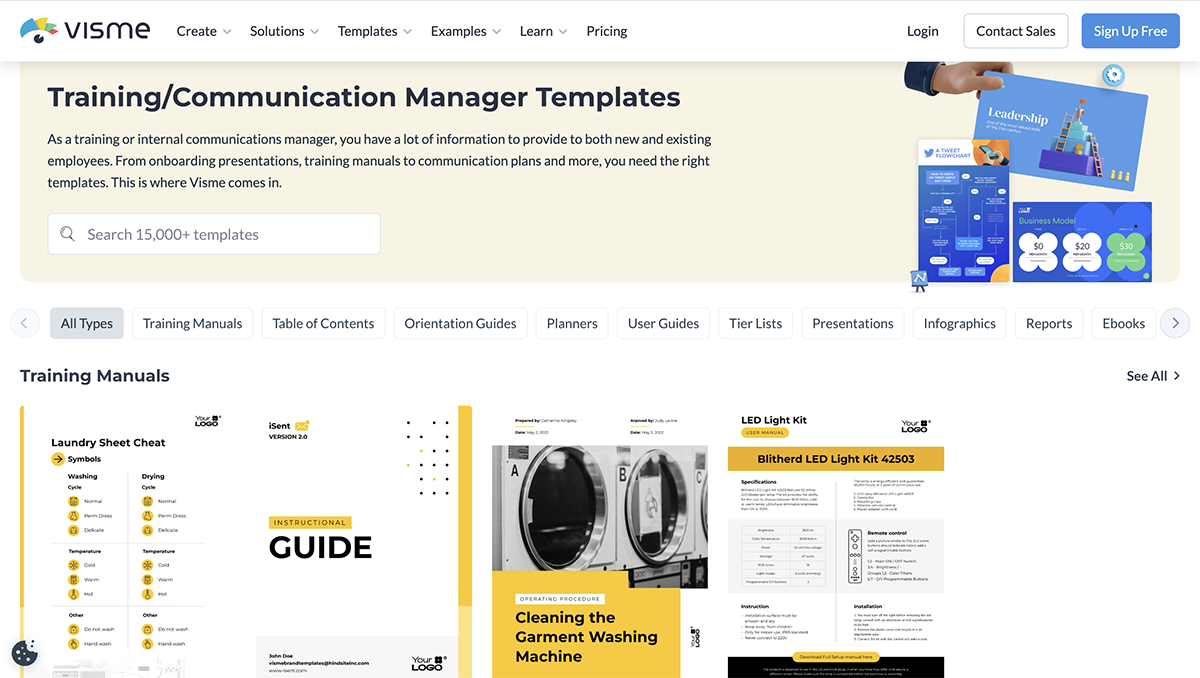
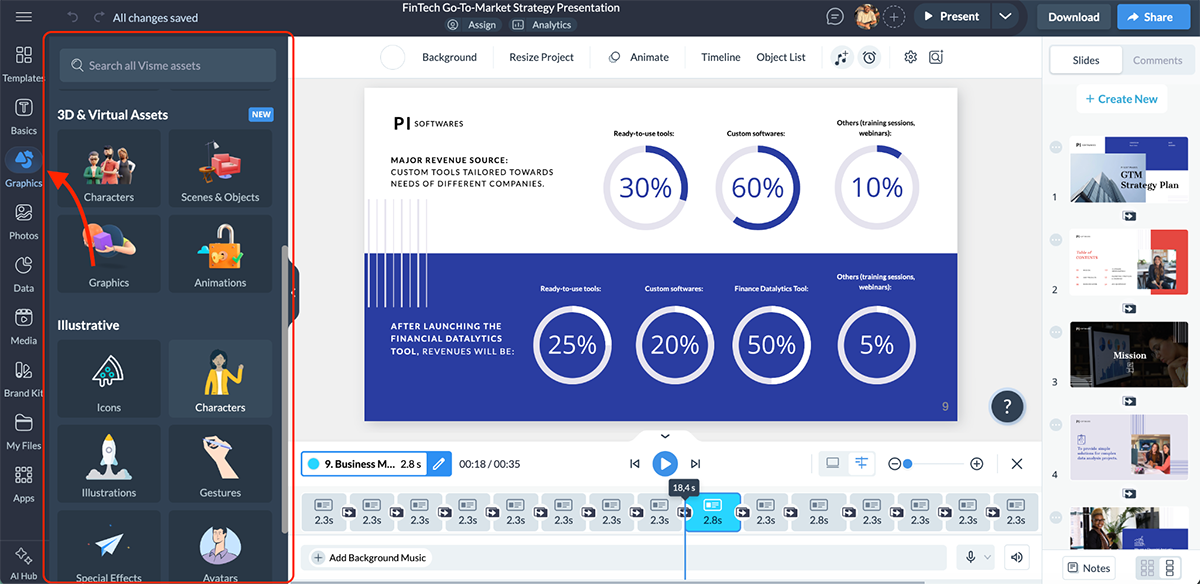
To elevate the quality of your training content, Visme offers an intuitive interface, a dedicated icon library with static icons, animated icons and 3D options, along with a high-quality stock photo and video library.
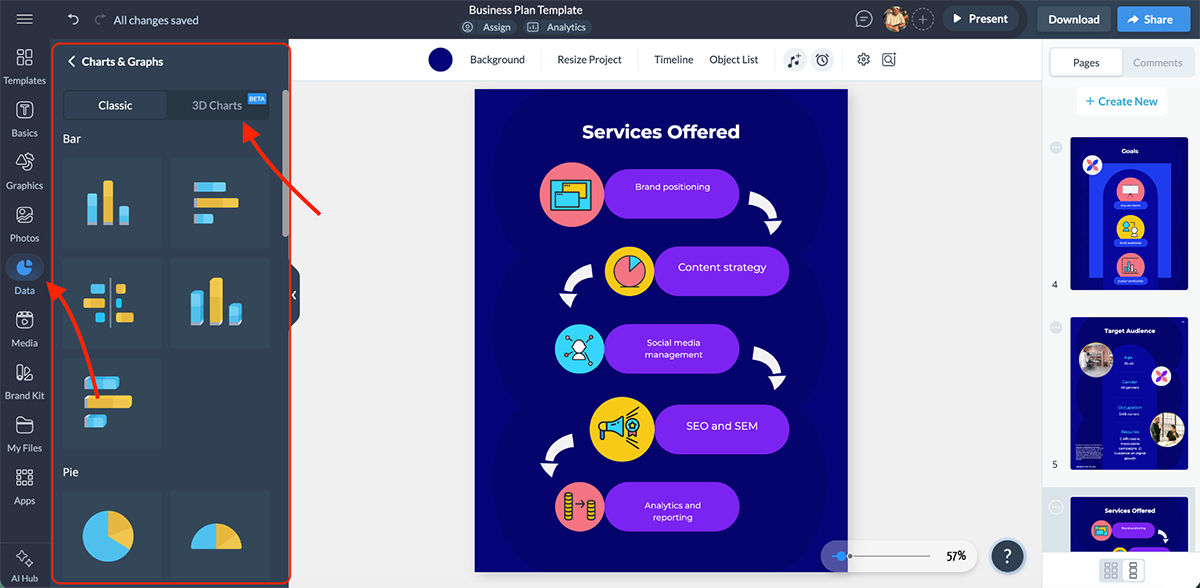
You also get advanced data visualization tools with 40+ chart and graph types, including interactive and even 3D charts and graph options, which is useful when your training content involves metrics, performance data or reporting.
Now that the visuals are in place, it’s time to bring your training content to life with Visme’s animation and interactivity tools. You can add clickable elements, hover effects, custom navigation paths and embedded third-party content like videos or articles.
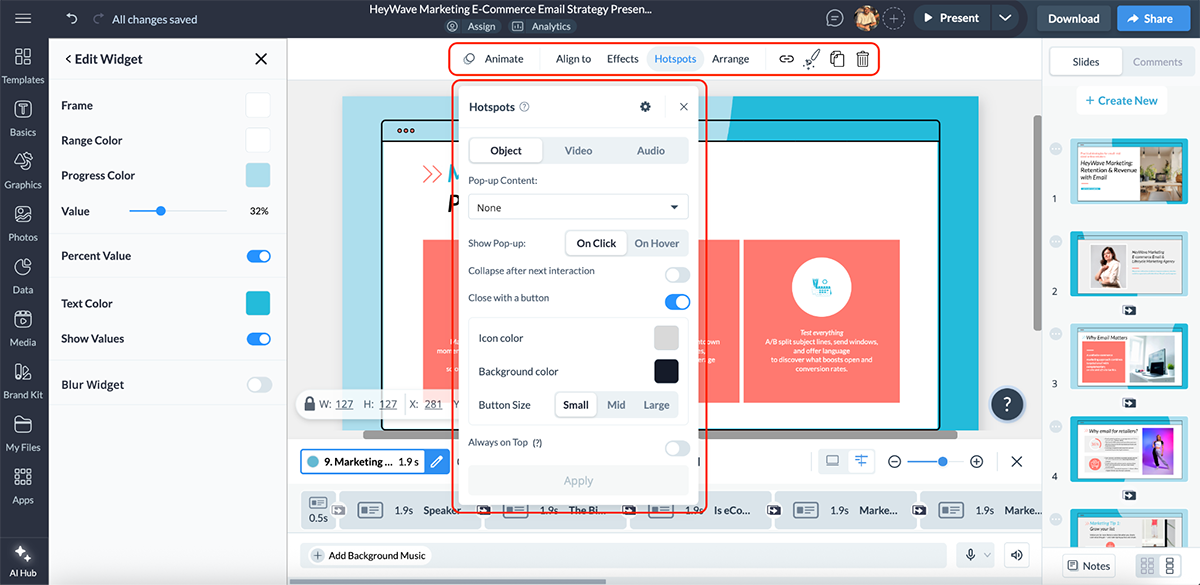
It also supports quizzes, feedback forms, polls and branching-style navigation so learners can explore content at their own pace. There are even pre-built animations and slide transitions to keep everything smooth without overdoing it.
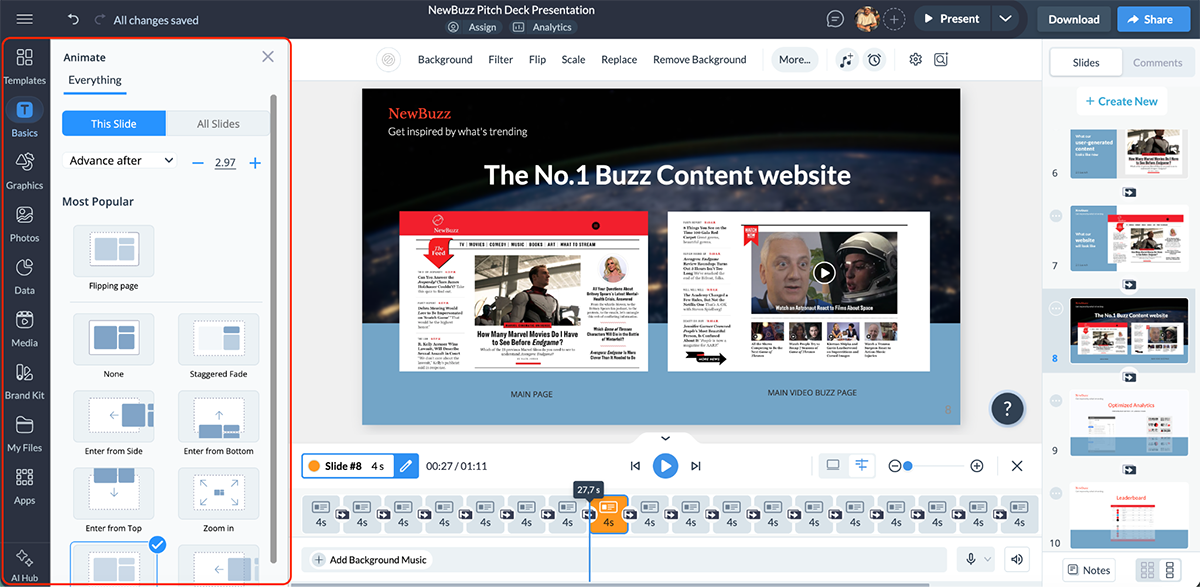
If you think that’s where it ends, there’s more.
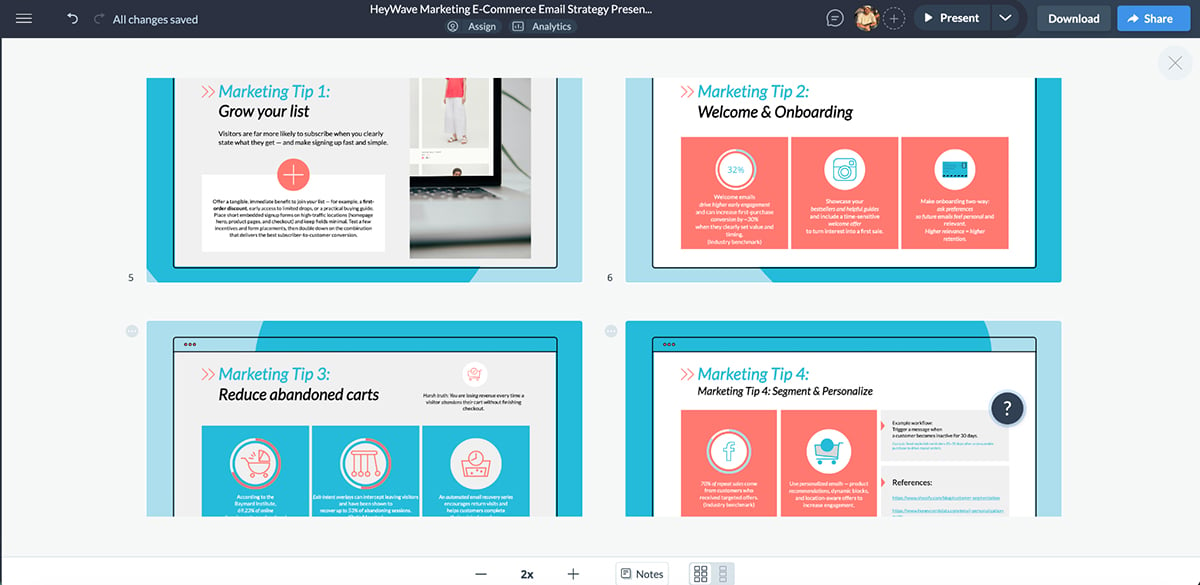
Visme includes a comprehensive AI Hub that’s purpose-built to speed up content creation. The AI suite includes:
Here’s a presentation I made using Visme AI:
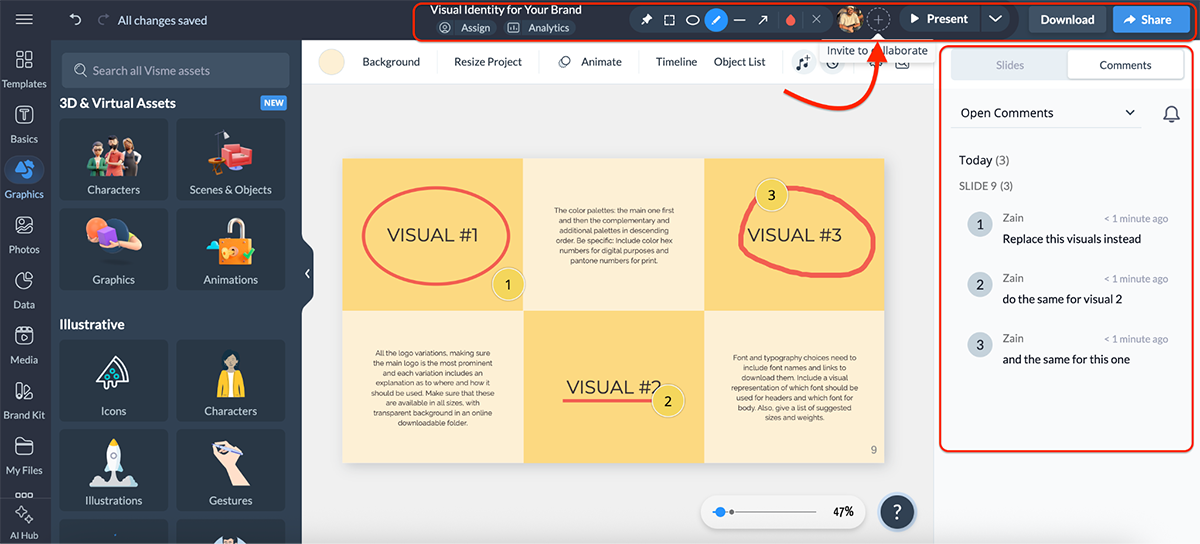
Collaboration is another strong area. Visme supports comments, reviews and shared workspaces, which makes it easier for training and development teams, HR and subject matter experts to work together without sending files back and forth.
When your training is ready, you can share, publish or embed content using live links, secure access controls or embed codes. If you’re delivering training directly to employees or customers, Visme also lets you track analytics such as views, engagement and interaction behavior.
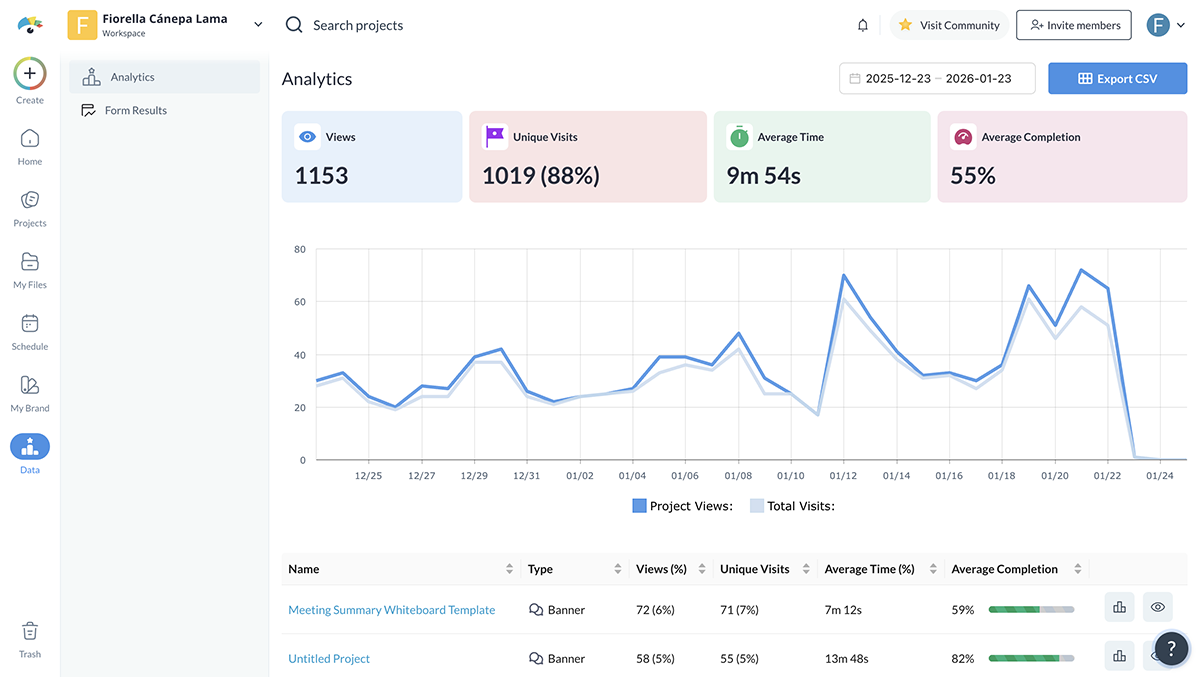
And if you’re using an LMS, Visme supports SCORM and xAPI exports, so it’s super easy to plug interactive training content into existing learning systems.
All in all, Visme is a strong starting point if you want interactive training that looks modern, feels engaging and is easy to update. And if you already use an LMS, Visme fits neatly alongside it as a powerful content creation layer for building better, more immersive training experiences.
TalentLMS is an easy-to-use learning management system that’s ideal for teams that want structured training with built-in interactivity and strong AI support.
Once you sign up, you can start creating a course right away. You can either build one from scratch or let AI do the heavy lifting.
Here’s a course I made using TalentLMS’s AI course generator:
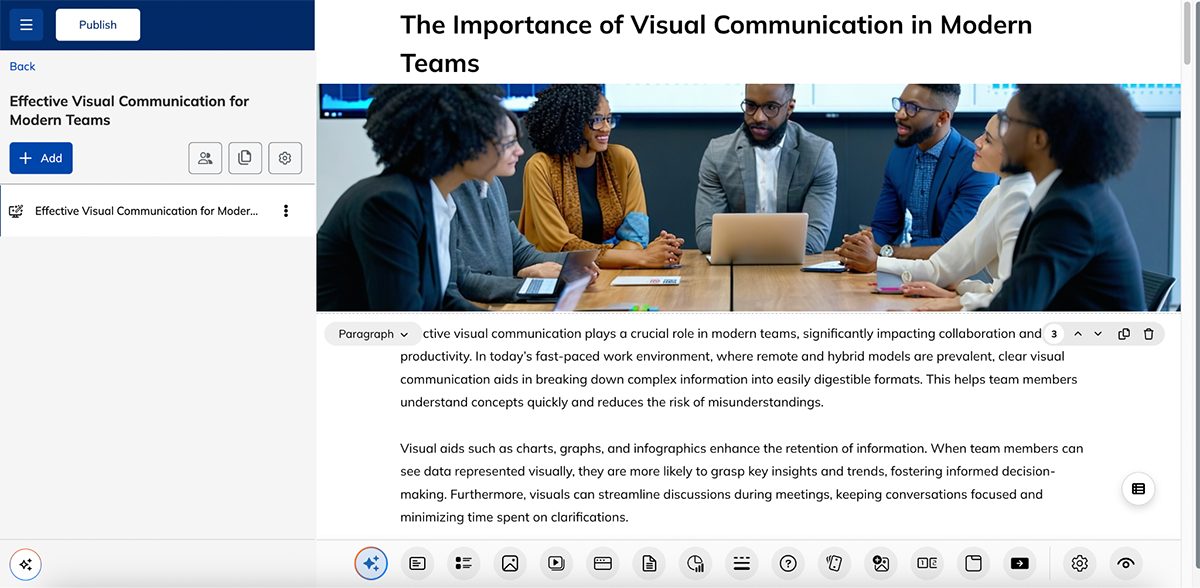
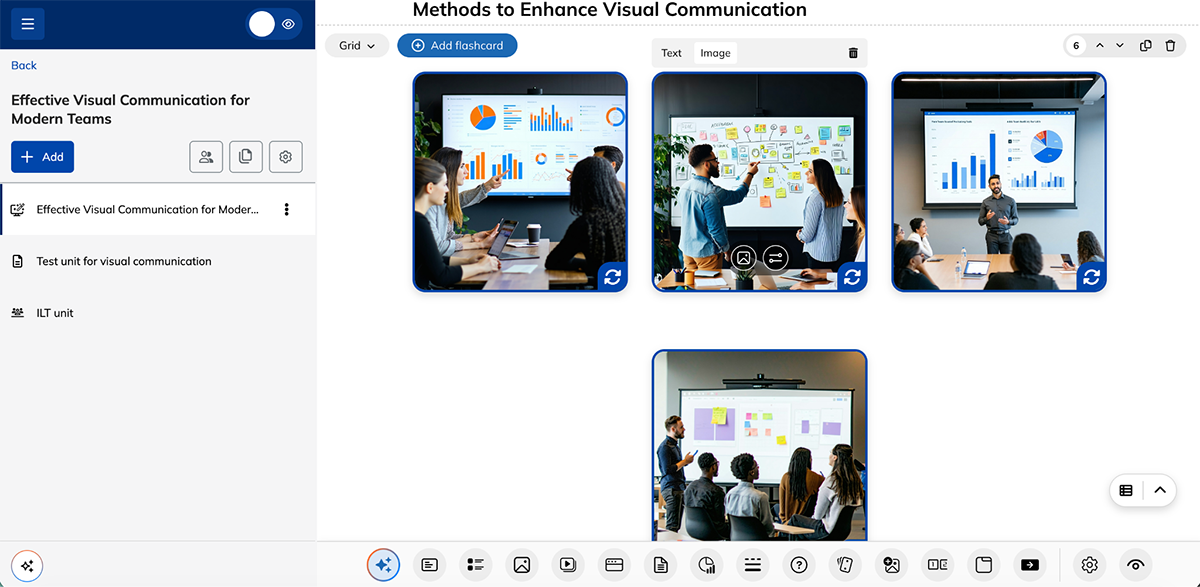
The lesson flow was logical, and I like that it generated quizzes on its own. However, the AI-generated images look so fake and morphed, and you’ll probably need to change them.
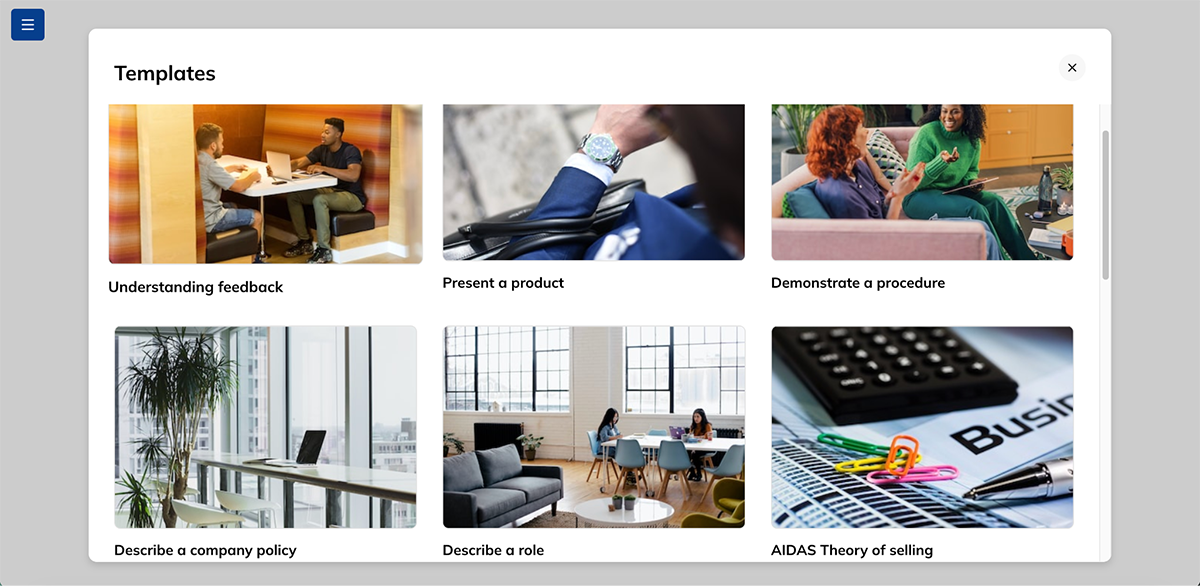
TalentLMS also offers a small set of pre-made course templates you can customize, which helps speed things up if you don’t want to start from a blank page.
The course editor itself is intuitive. You can add flashcards, questions, multimedia, tabs, charts, dividers and more with just a click. Most of these elements can also be generated using AI through built-in prompts like:
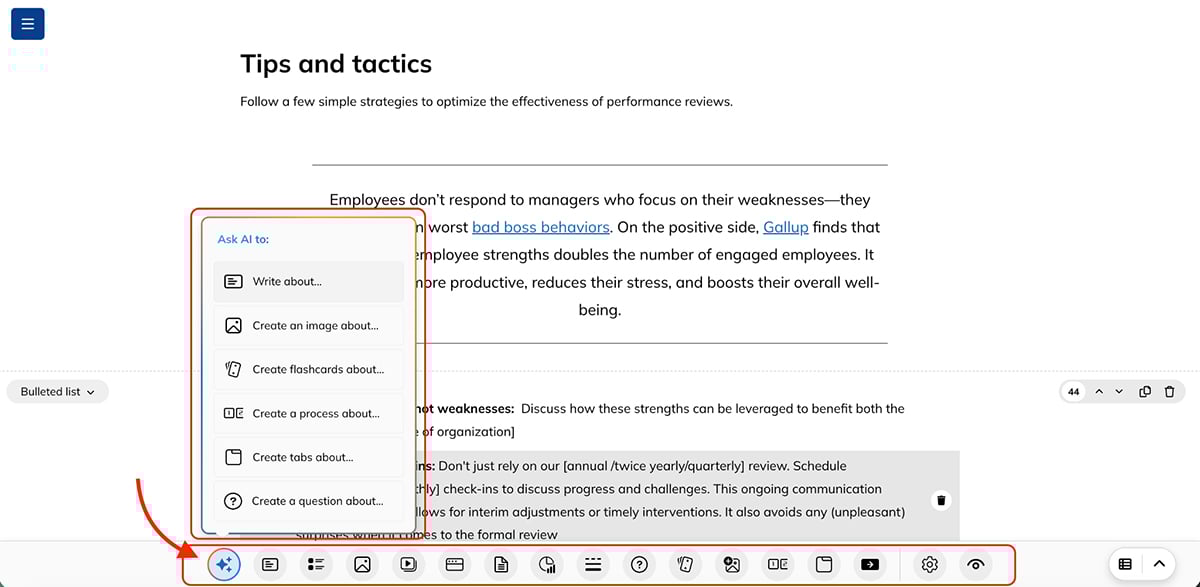
You can also add multiple lessons to create full learning units and attach activities to each one.
That said, even with AI-powered writing and course generation, you’ll notice that TalentLMS is text-heavy. There aren’t icons, 3D characters or advanced animations to choose from. If highly visual or design-led training is a priority, you’ll likely want to pair TalentLMS with a dedicated content creation tool like Visme.
One TalentLMS feature I really like is the AI Coach, which is available to learners once a course is published. Learners can basically ask questions like “Explain this in simpler words,” “Give me an example related to my role,” or “Help me understand this section better.” This is perfect for any scenario where learners may need extra clarification without waiting for a trainer.
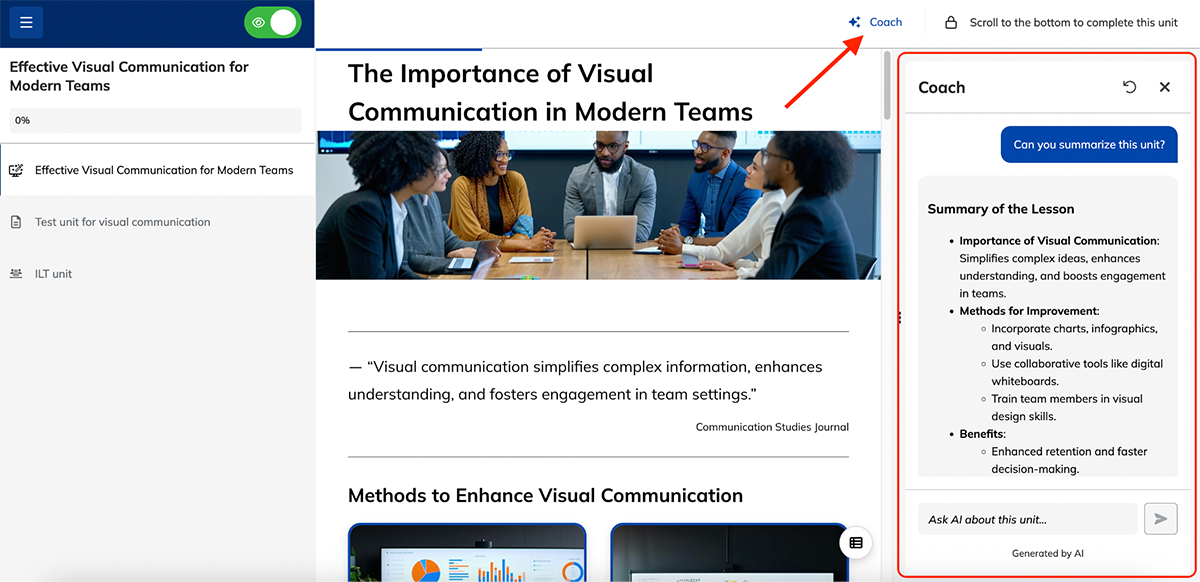
Beyond course creation, TalentLMS includes features for managing and scaling training, such as learning paths, groups, automations, reports and skills tracking. It also supports SCORM and xAPI, making it easy to host interactive training content created in other tools.
Overall, TalentLMS is a solid choice if you want quick, AI-assisted course creation and reliable training management.
Genially is a design-first tool built for turning traditional training content into interactive, exploratory experiences. These could be interactive training presentations, microlearning, gamified learning or even scenario-based training.
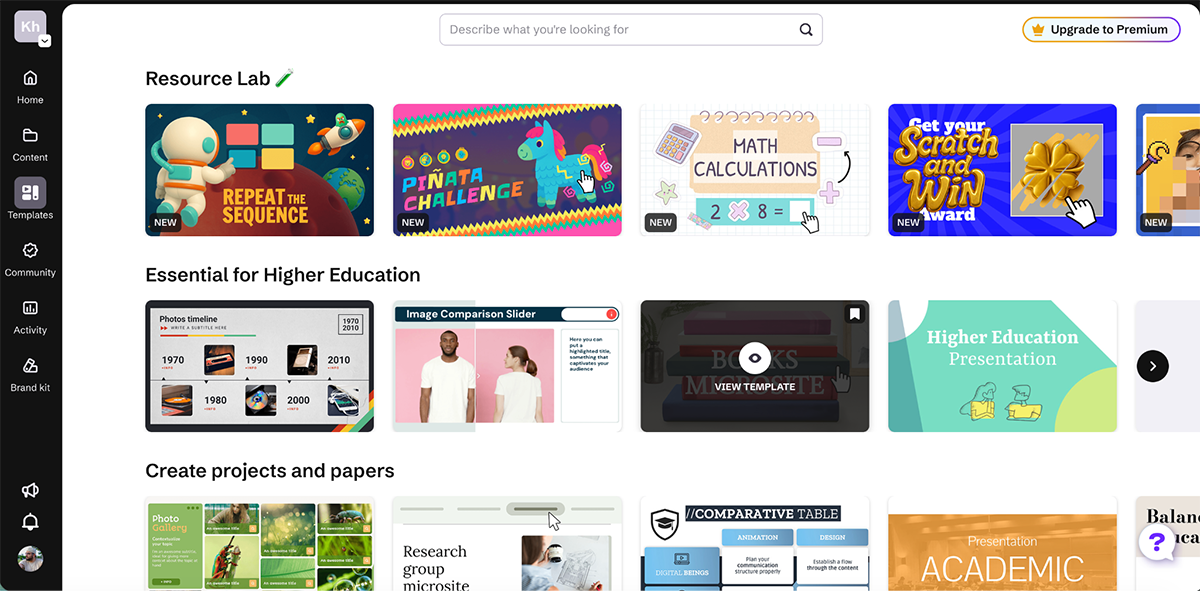
You can start from scratch or choose from a wide range of templates designed specifically for learning and training. There are solid options for quizzes, courses, branching scenarios, challenges and interactive explainers.
The editing experience is intuitive. Fonts, media, interactive elements, widgets and questions all live in a single side panel.
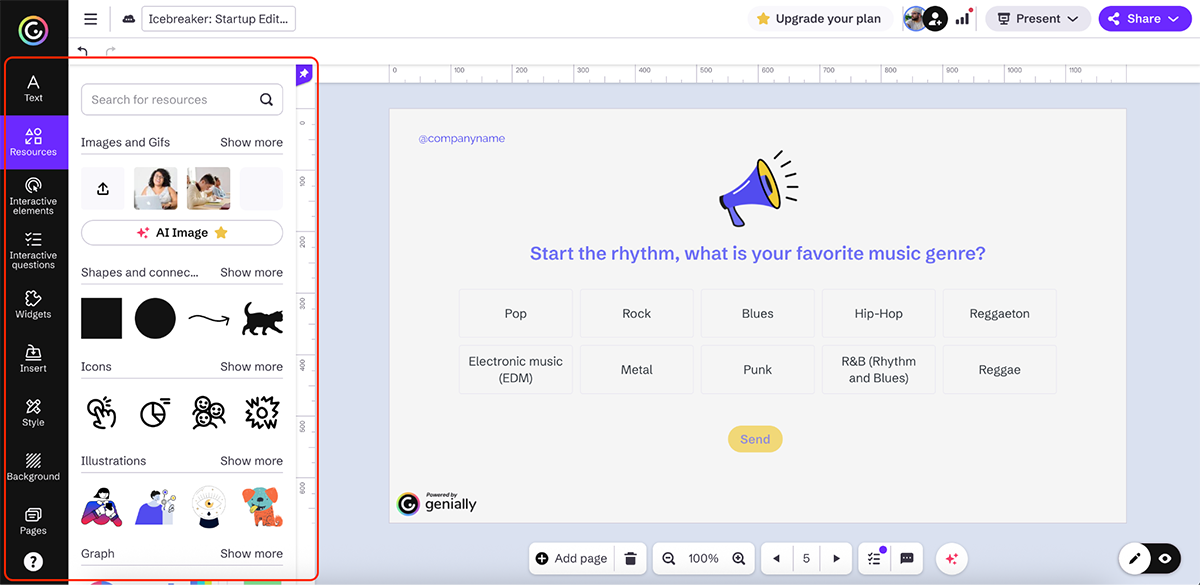
Adding interactivity is straightforward. You can layer buttons, hotspots, tooltips, pop-ups and branching navigation onto almost any element, which works well for exploratory or choose-your-own-path training.
One of Genially’s biggest strengths is animation. You can apply entry animations, hover effects and continuous motion to charts, icons and visuals with just a few clicks. This makes it easy to turn static training slides into dynamic, engaging experiences.
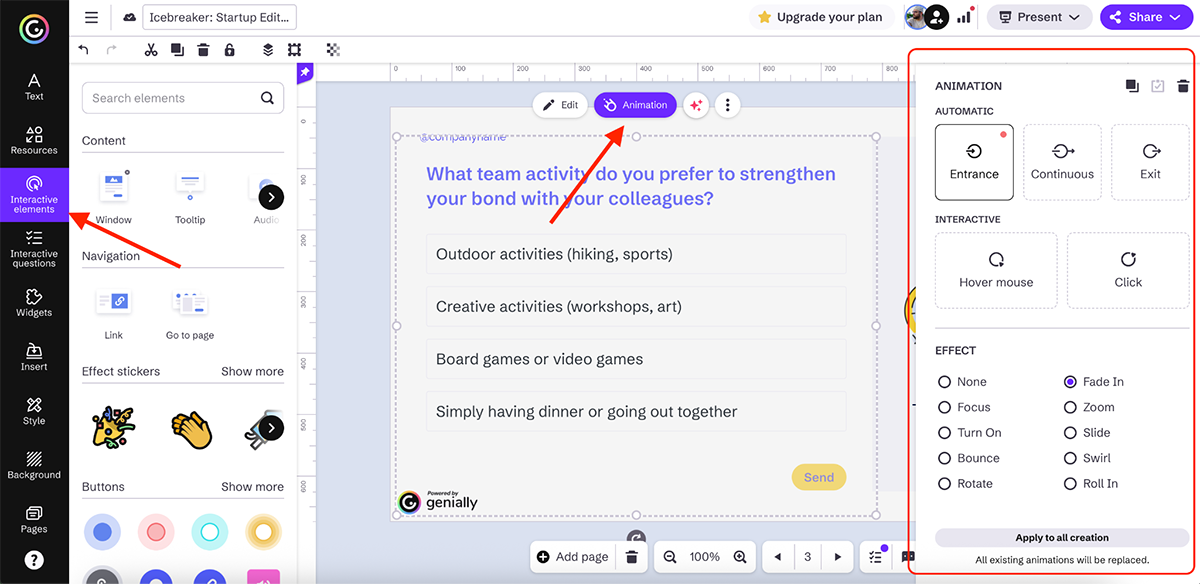
Genially also supports quizzes, interactive widgets and gamified elements, which work well for knowledge checks and engagement-focused training. There are even options for live polls and challenges, which can be useful in facilitated or workshop-style sessions.
On the AI side, Genially offers a solid set of tools to speed up content creation. You can:
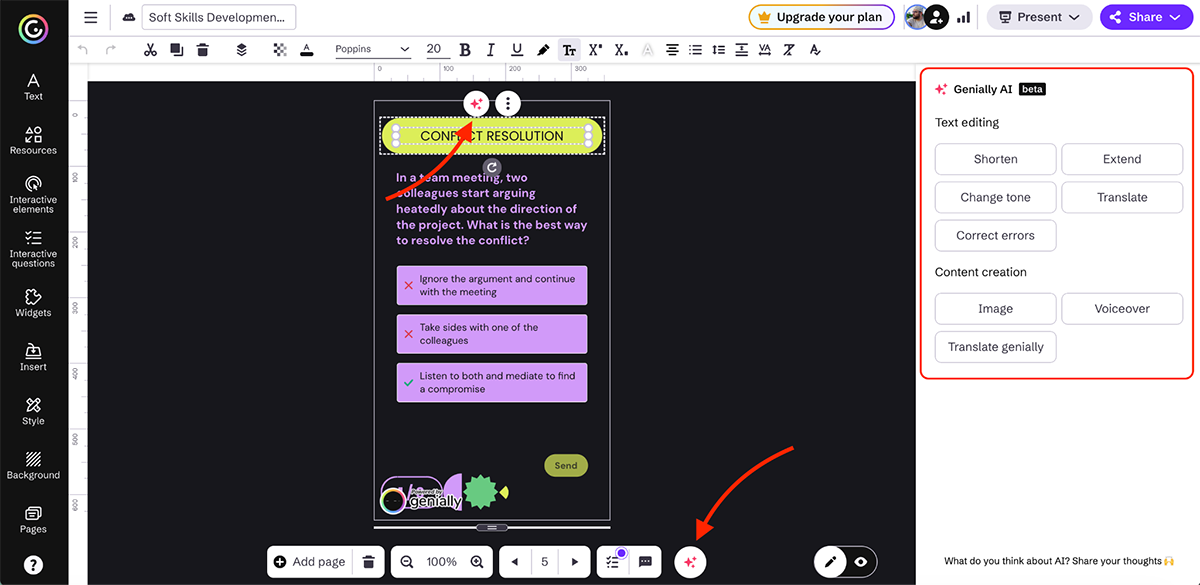
Collaboration features let teams work together on training projects, and built-in analytics track views and interactions so you can see how learners engage with your content.
Genially also supports LMS integration via SCORM and LTI and adheres to GDPR-compliant security and privacy standards, which is just enough for enterprise teams that need basic LMS connectivity.
All in all, if engagement is your top priority and you want learners clicking, hovering and choosing their own paths, Genially is a solid option for interactive training content.
Next up on our list of the best interactive digital training tools is iSpring LMS.
It’s simple enough for smaller teams to adopt quickly, but structured enough to support more complex L&D needs as organizations grow.
You can easily switch between the user portal and the admin portal. The user portal shows learners the courses they’re enrolled in or have completed. The admin portal is where training managers and L&D teams create training courses, assign training, build learning paths, manage enrollments and track performance.
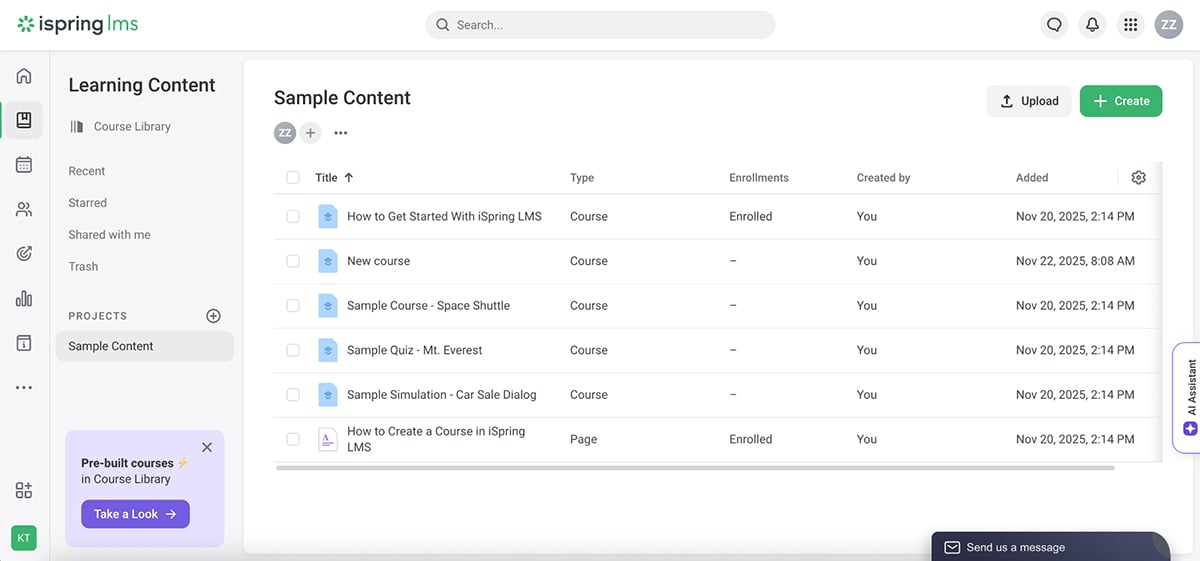
One important thing to know upfront is that course creation inside iSpring LMS is manual. There’s no built-in AI course generator within the LMS itself. If you want AI-assisted content creation, that comes from iSpring Suite, a separate authoring tool that integrates directly with the LMS.
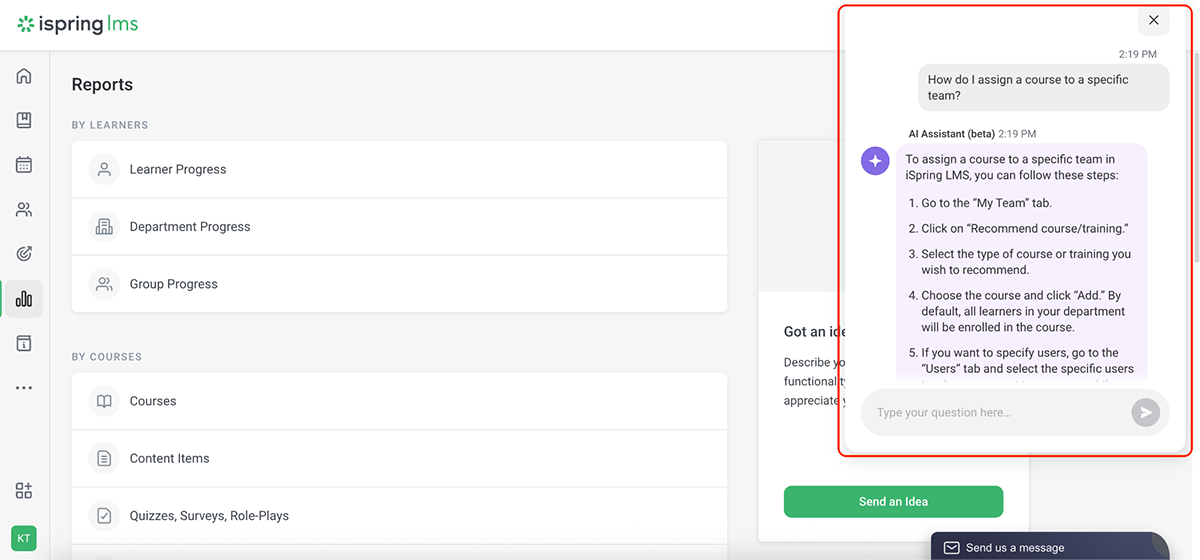
That said, one feature I really like is the AI assistant inside the admin portal. Instead of guessing where a setting lives or digging through help documentation, you can ask questions like how to assign training, run a report or manage re-enrollments. The assistant gives step-by-step guidance and links you directly to the right screen. It genuinely feels like a built-in help desk for admins.
Reporting is another strong point. The dashboard gives you a snapshot of what’s happening at a glance, including courses, users, activity, new hires and ungraded assignments. From there, you can drill into detailed reports such as:
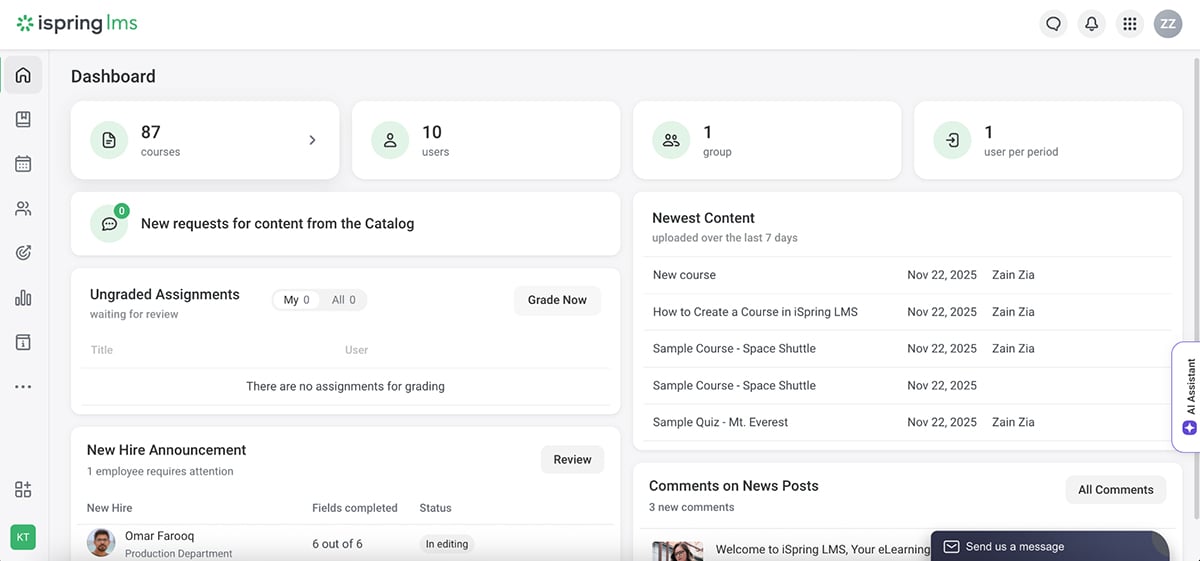
iSpring LMS also includes a built-in knowledge base, which is useful for organizing SOPs, policies and job aids in one searchable place.
For content creation, iSpring LMS integrates seamlessly with iSpring Suite, which works directly inside PowerPoint. This is a big advantage if your team already relies on slide decks for training. With iSpring Suite, you can:
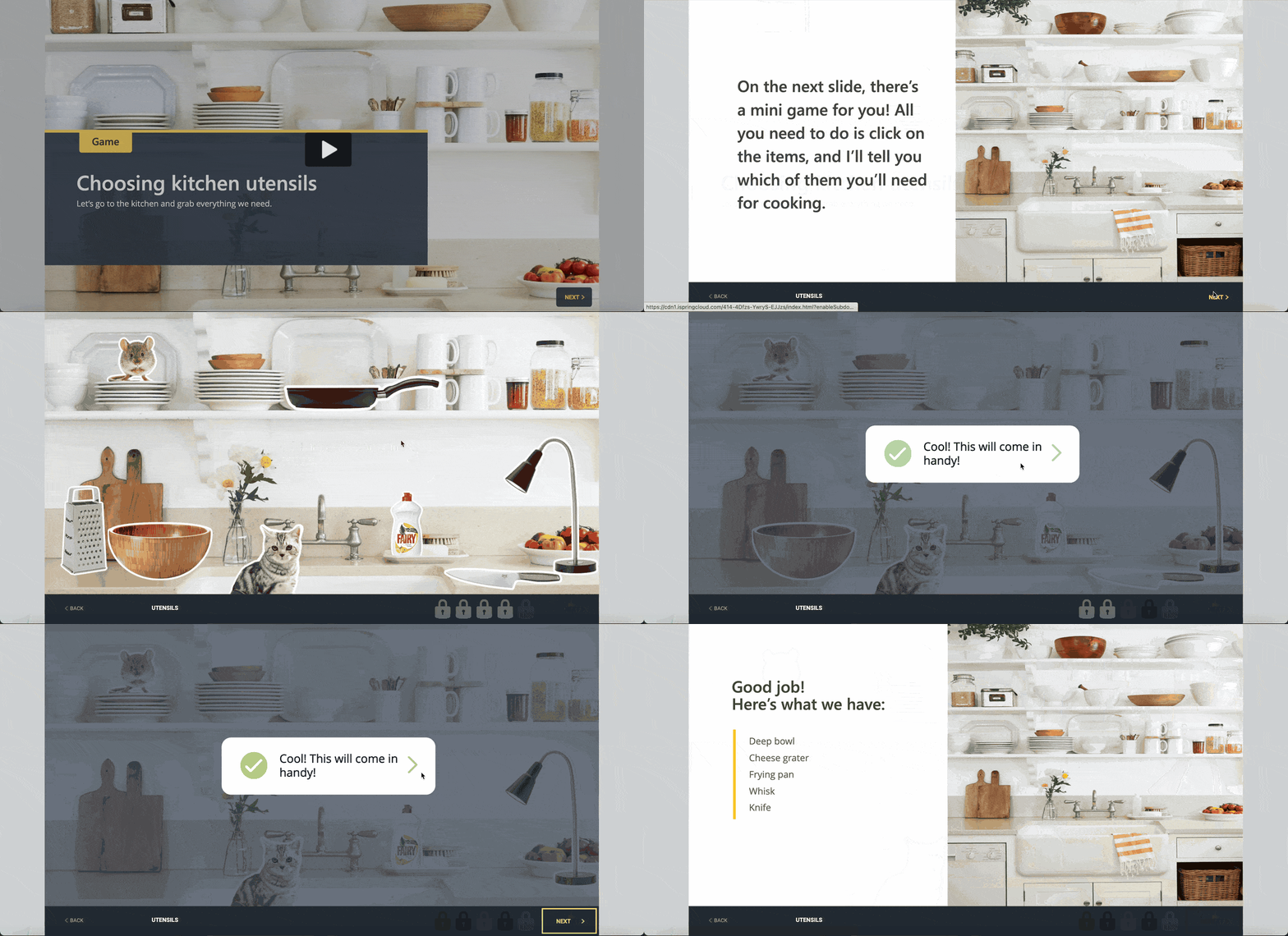
There’s also a dedicated content library with templates, icons, characters and backgrounds, plus the ability to create interactive games and simulations like this:
From a delivery standpoint, iSpring LMS supports SCORM and xAPI. Branding options are available, too, so you can customize the learner experience.
Overall, iSpring LMS is a strong choice for teams that want reliable training delivery, strong reporting and a smooth path from content creation to tracking, especially if PowerPoint already plays a central role in their training workflow.
Articulate 360 is one of the most well-known tools in the eLearning space, especially for teams that need granular control, advanced logic and scenario-based learning.
It isn’t a single tool, but a suite with two core products: Storyline 360 and Rise 360. Each is designed for different training needs.
Storyline 360 is where most of the heavy-duty interactive training happens. It’s desktop-based software available on Windows that gives you precise control over how learners move through content.
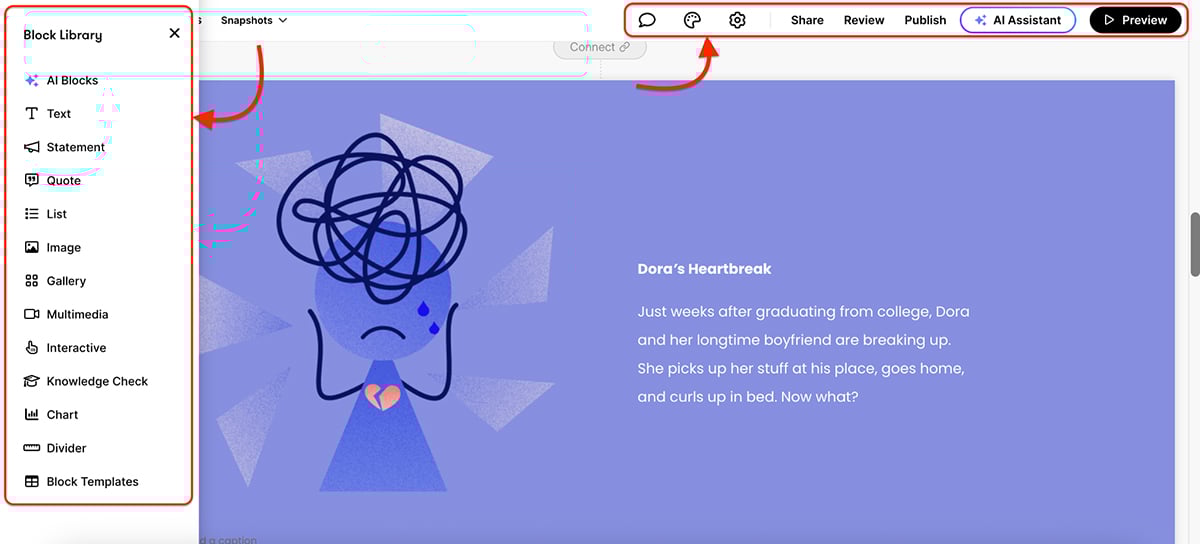
With Storyline 360, you can:
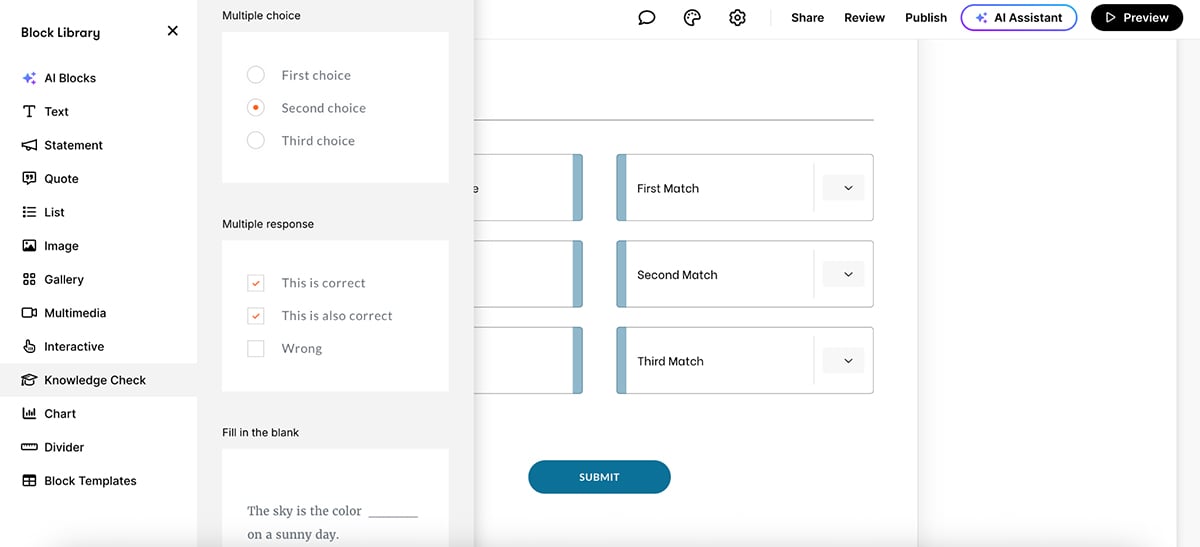
You also get a full animation timeline, motion paths and the ability to trigger animations only when specific conditions are met. For experienced L&D teams, this opens the door to highly customized training experiences.

Check out this video by Learning Dojo to learn how to animate in Storyline 360:
Alongside Storyline, Rise 360 offers a more streamlined option. It’s web-based and designed for speed. You build responsive, mobile-friendly courses using pre-built blocks like tabs, timelines, flashcards and quizzes.
You lose some creative control compared to Storyline, but gain ease of use and faster production.
This flexibility is one of Articulate’s strengths. Teams can choose between precision or speed depending on their training requirements.
That said, there is a learning curve. Storyline, in particular, can feel intimidating if you’re new to instructional design. The interface sits somewhere between PowerPoint and a motion design tool. So, if you’re not comfortable with layers, timelines and trigger panels, it will take time to get comfortable.
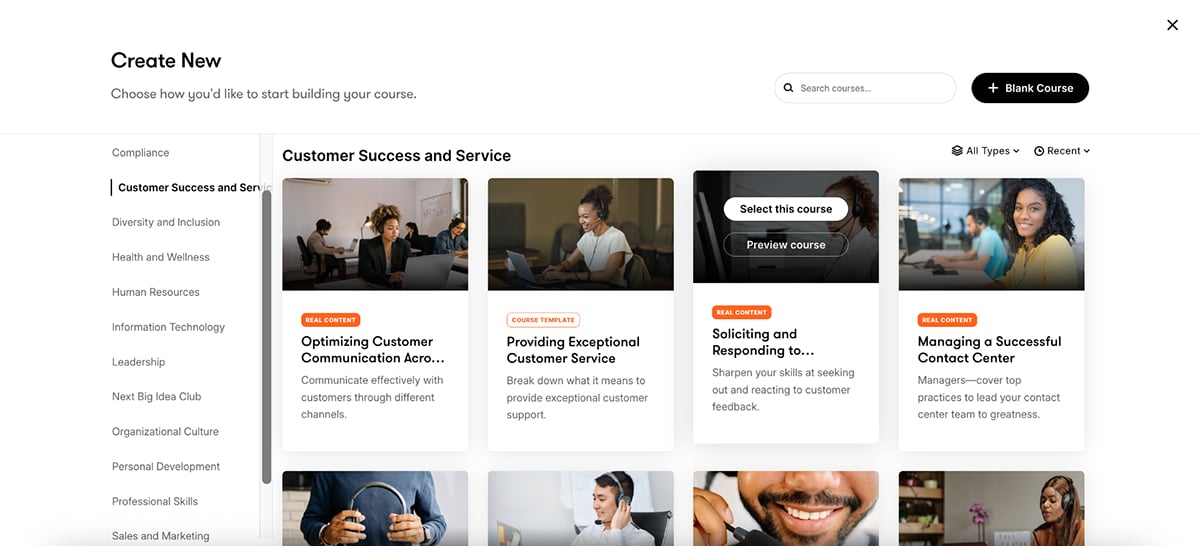
Articulate helps ease that with a large Content Library that includes slide templates, stock photos, videos, icons and customizable characters. Teams can also upload their own images, videos, screen recordings and audio files, which makes it easy to mix brand-specific visuals with ready-made assets.
Articulate Review then lets stakeholders comment directly on training courses during the review process.
For delivery, Articulate supports SCORM, xAPI, AICC and cmi5, making it compatible with almost any LMS. Reporting and learner tracking are handled by the LMS rather than Articulate itself.
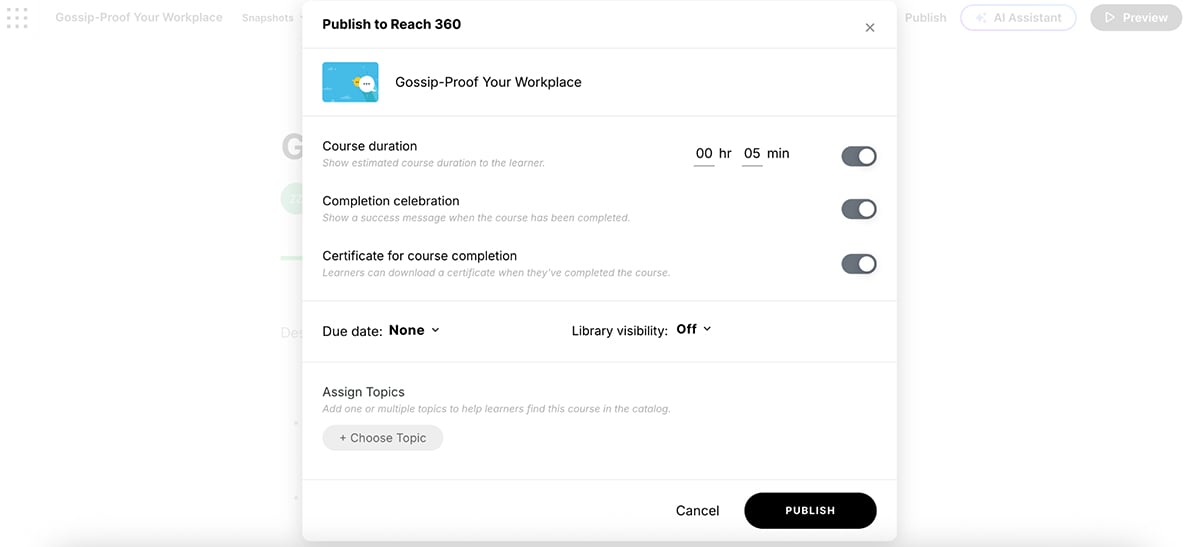
It’s also worth noting that some users have reported stability issues in community forums, particularly when working with shared files.
“I’ve always had issues with Storyline. It has infinite glitches, always crashing, didn’t properly save one of my coworkers’ projects and she lost the whole thing.”
Overall, Articulate 360 is one of the most capable tools available for building highly interactive, logic-driven training. It’s best suited for experienced L&D teams or organizations with dedicated instructional design resources.
360Learning sits somewhere between an LMS and an LXP, with a strong focus on collaborative, peer-driven learning. So, if your training relies heavily on internal experts and continuous feedback, this is where 360Learning really shines.
It comes with an impressive AI-powered course builder. You can either upload an existing document and convert it into a course or start from scratch using AI. I went with the second option.
The process is straightforward. You simply follow the on-screen steps to build a complete course with multiple lessons and activities. In under five minutes, I had a full course structure generated, including content sections and learning activities.
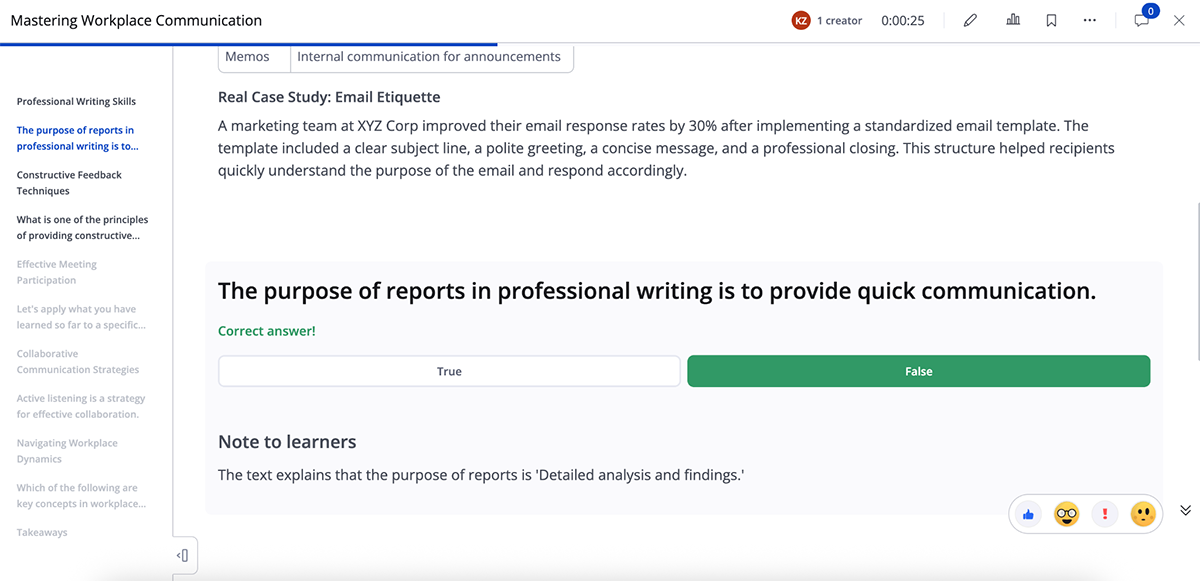
The content structure made sense, and the quizzes and learning prompts were surprisingly relevant. Plus, everything is editable.
The editor itself is easy to use. You can jump into any section, add or swap images, tweak layouts or adjust activities. Teams can upload their own media or reuse visuals across online courses, but it's important to note that 360Learning doesn’t offer a large built-in asset library like other design-first tools on the list like Visme or Genially.
360Learning also doesn’t offer a dedicated AI writer for rewriting individual paragraphs, but the platform does a good job getting you to a solid first draft quickly. Any edits here will have to be done manually.
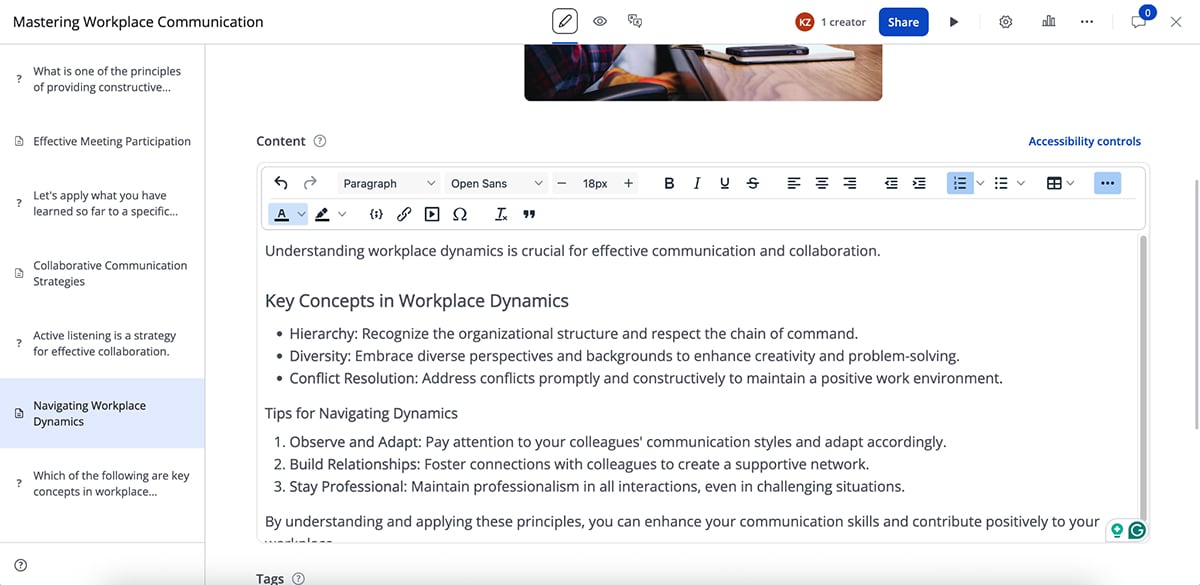
One AI feature I particularly liked is the AI question generator. It scans your course content and automatically creates relevant questions. It’s fairly accurate and can save a lot of time, especially when building longer training programs.
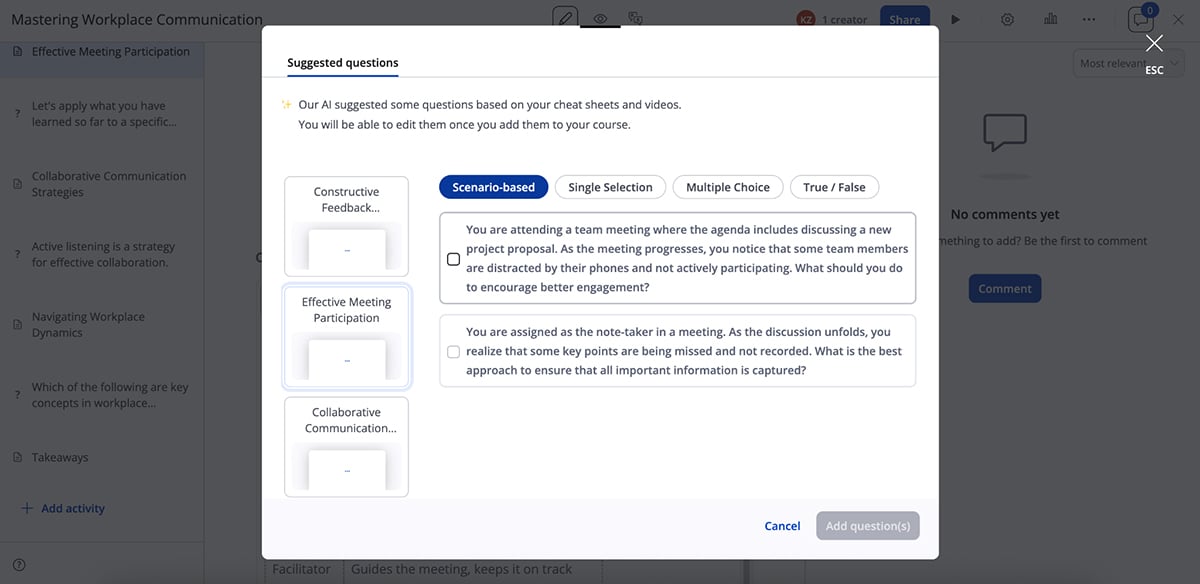
Beyond course creation, 360Learning leans heavily into collaboration. Subject matter experts can contribute directly to courses, leave comments and respond to learner feedback. Learners can also ask questions and interact inside the course.
Other AI-driven features include:
From a management perspective, 360Learning includes learning paths, automated assignments and solid reporting. You can track completions, engagement and participation across teams.
Design-wise, 360Learning doesn’t offer advanced animations, 3D visuals or character-based interactivity. But it does support SCORM and xAPI, so you can pair it with a design-first content creation tool.
All in all, 360Learning is best suited for teams that value peer input, continuous learning and AI-assisted course creation over highly produced, design-heavy training experiences.
Next up is SC Training (formerly EdApp). It’s built around a single core idea: training should be short, interactive and easy to consume on any device.
SC Training is a mobile-first platform designed for microlearning. Training is broken into short lessons that learners can complete in minutes.
I tested the AI course builder, and in about five minutes, the user-friendly platform generated a complete course with multiple lessons, a quiz and a clean, logical flow.
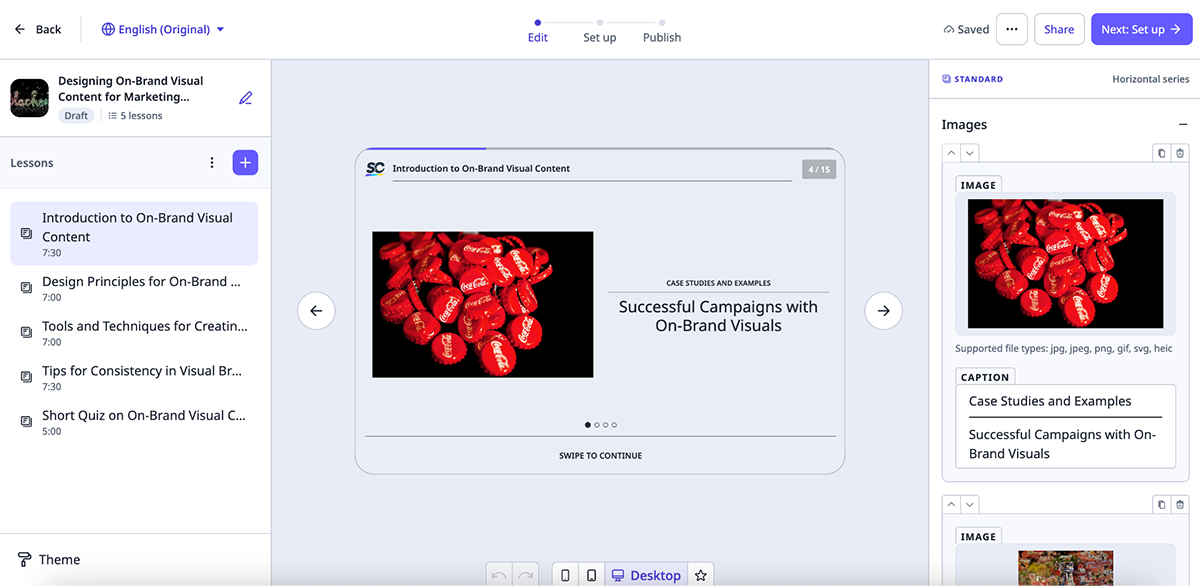
One thing I immediately appreciated was how easy it is to toggle between mobile, tablet and desktop views while editing. Since many learners will consume this content on their phones, being able to design with mobile users in mind from the start is a big advantage.
The content followed the prompt closely and was good enough to use as a strong first draft. Lessons included practical explanations and mixed interaction types, and everything is fully editable. You can upload your own media or use SC Training’s built-in templates and content blocks.
There’s also an option to generate AI voice narrations, which are particularly helpful for audio-first or hands-free learning scenarios.
Beyond AI course creation, SC Training includes:
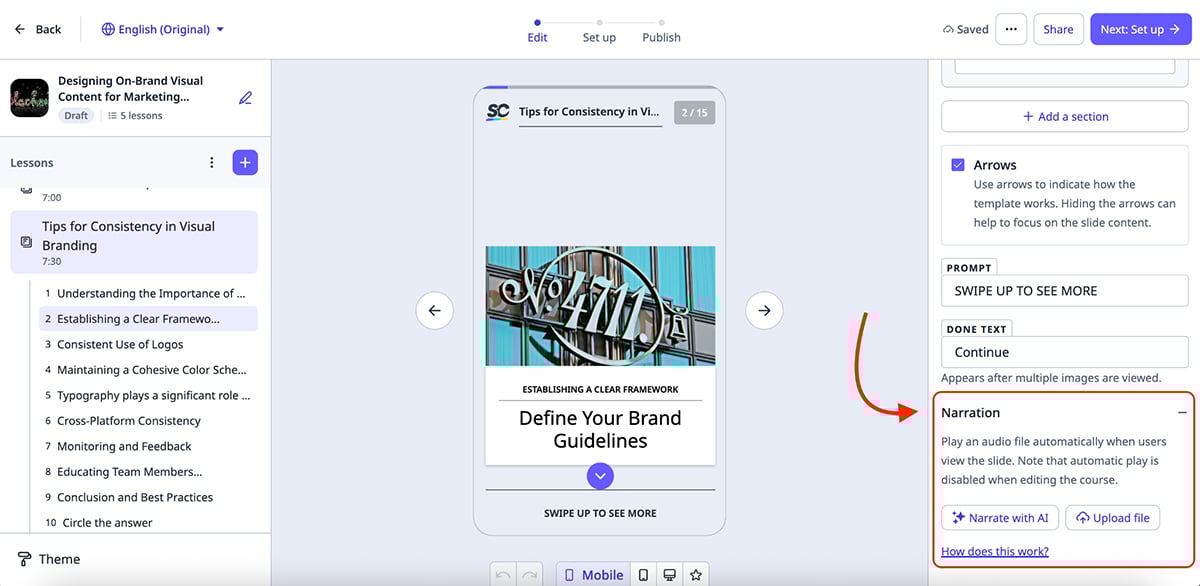
Unlike Visme, you won’t find advanced animations, 3D visuals or rich visual storytelling features here.
SC Training supports SCORM export, which means you can integrate it with an LMS or use it as a standalone training solution.
All in all, SC Training is a strong choice if you’re looking for quick, mobile-first interactive training that’s easy to roll out and scale across teams.
LearnWorlds is built for teams that want more control over the entire training experience, not just individual courses. It lets you create interactive courses as well as full training websites from a single platform.
Naturally, I started with the website builder, which is my favorite LearnWorlds feature and where the platform really stands out.
The templates are modern, with solid typography and clean layouts. You can upload images, videos, audio files and other media, or use LearnWorlds’ built-in media options. As you build, the built-in AI assistant can rewrite text, expand sections, summarize content or adjust tone on the fly.
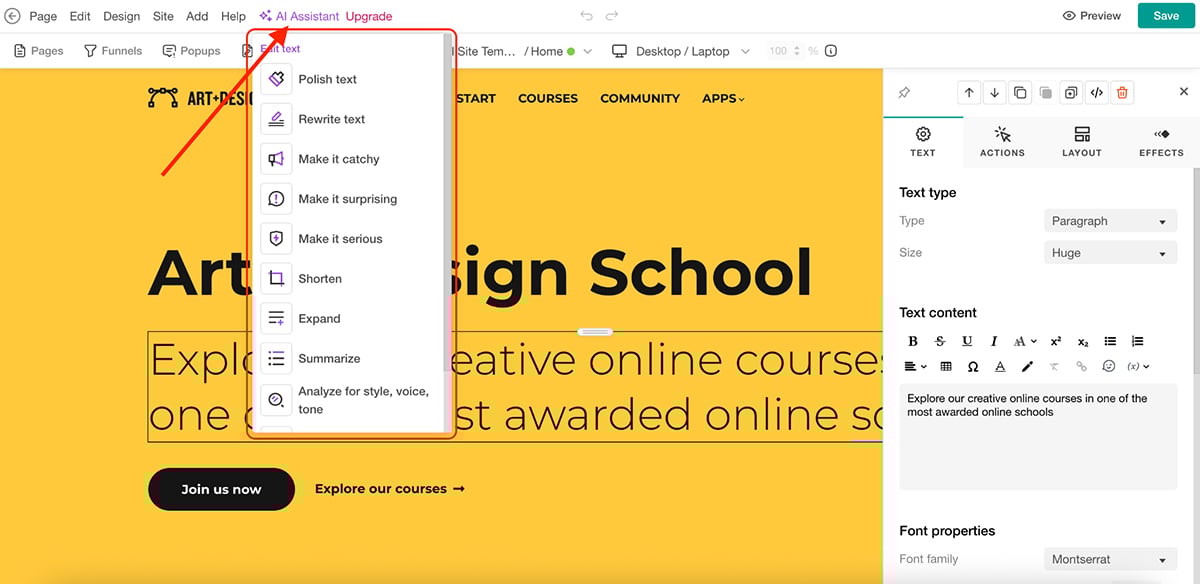
For L&D teams, this is a big advantage. You can basically create branded onboarding hubs, internal academies, certification portals or resource libraries without any technical know-how.
LearnWorlds also includes an AI course builder. You start by defining the basics, then control things like difficulty level, tone of voice, number of sections and the types of learning activities you want included.
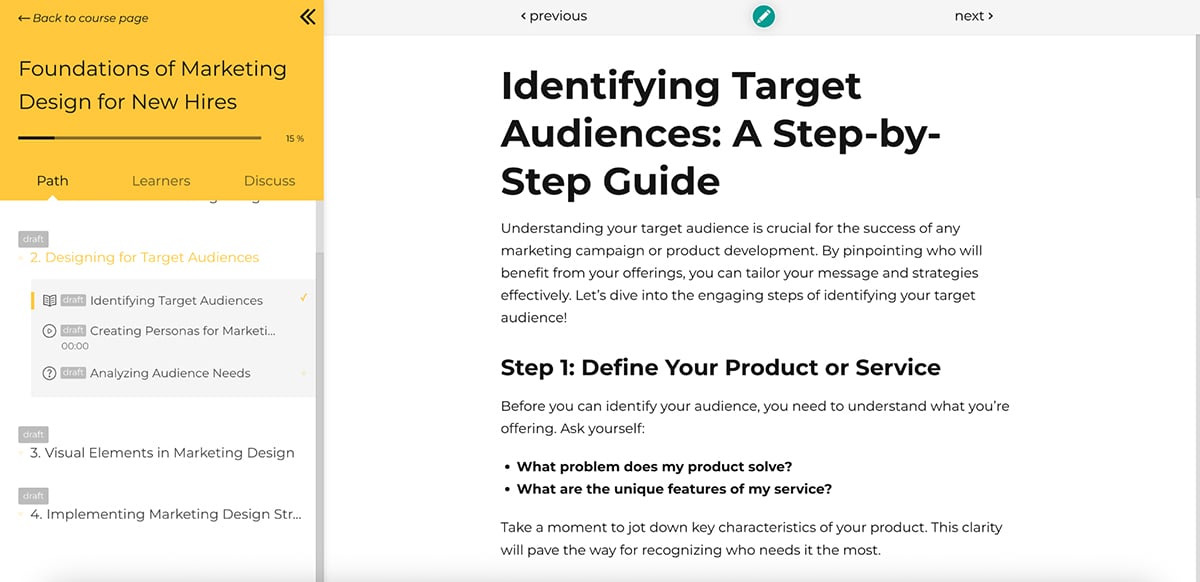
From there, the platform generates a complete course structure that you can refine using AI or edit manually.
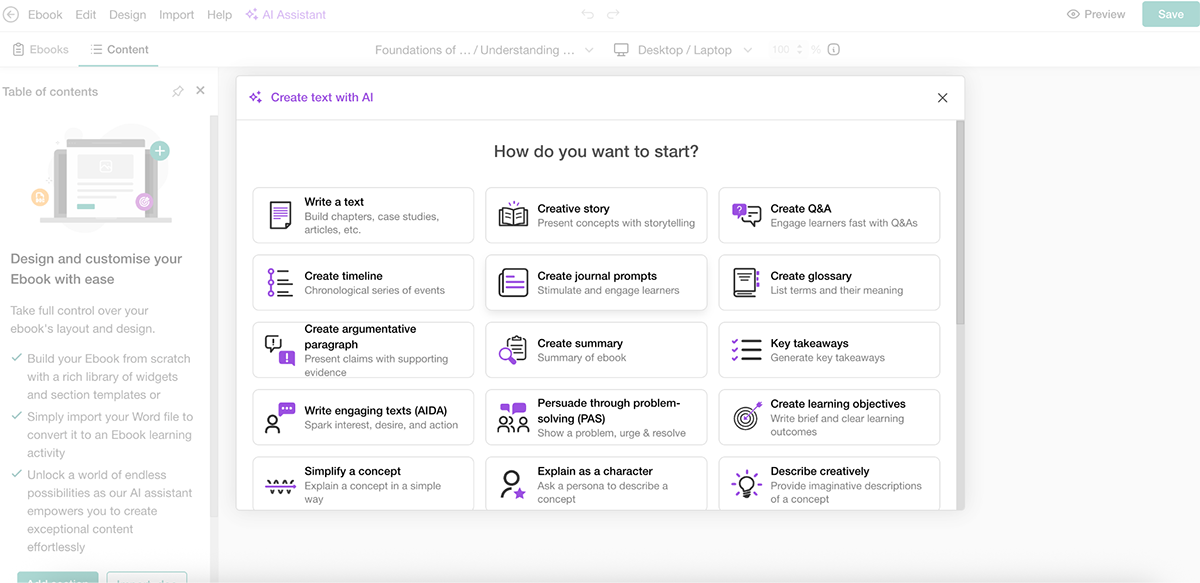
The output is solid and gives you a strong foundation to work from without starting from a blank page.
LearnWorlds supports interactive video as well. You can add questions, buttons and overlays directly inside videos, which works especially well for walkthroughs, product training and scenario-based learning.
Another standout feature is AI-powered course insights. Instead of exporting reports and guessing what’s working, you can analyze learner activity directly inside the platform. The AI helps surface engagement patterns, identify drop-off points and highlight sections that may need improvement.
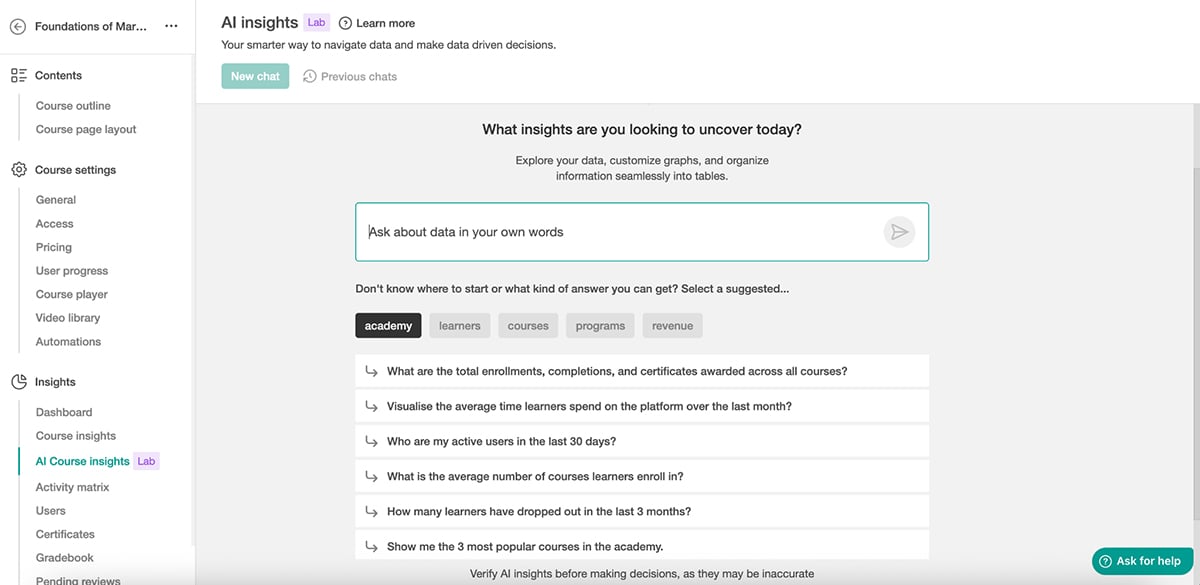
Overall, LearnWorlds is a solid pick for teams that want an AI-powered platform combining course creation, interactive content and a full learning environment in one place.
Anyone can use Visme to create highly interactive training content. Below are a few real-world examples from Visme users showing what interactive training can look like when it’s done well.
At Embry‑Riddle Aeronautical University, instructional technologist James Brack used Visme to turn traditional course materials into interactive learning experiences that improved student engagement.
Instead of static slides, the courses included hotspots, clickable buttons, pop-ups, hover effects and embedded content to encourage students to explore the material at their own pace.
James Brack summed it up perfectly:
“The ease of using Visme facilitated the process of adding interactivity to the courses.”
This is a great example of how interactive training can make even complex academic content more approachable.
IRISS, a global safety solutions manufacturer, used Visme to replace expensive physical materials with a fully immersive digital experience center.
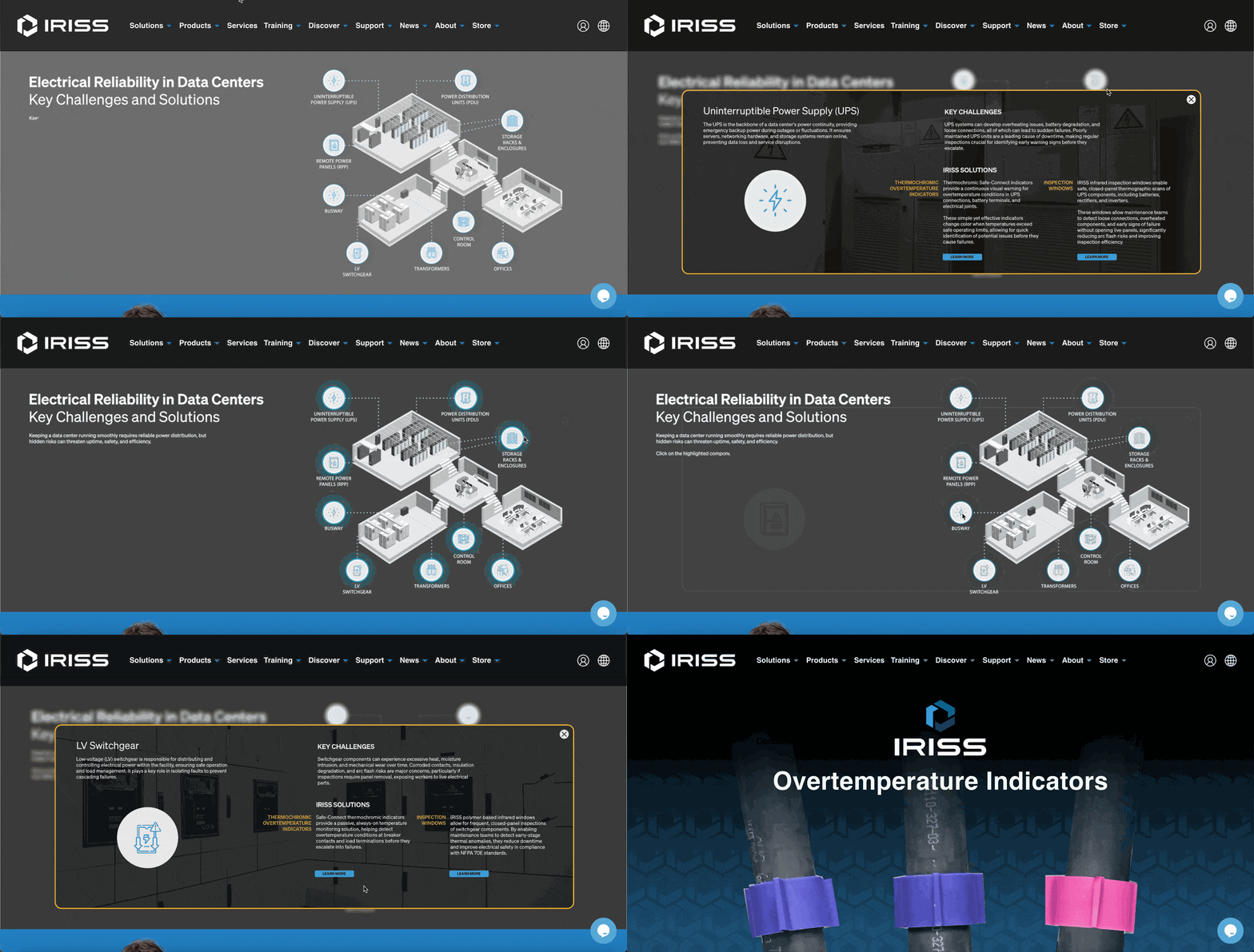
The team created interactive product demos, virtual booths and clickable presentations to showcase features, comparisons and workflows.
According to Lee Murray, Creative Director at IRISS, says:
“Visme helped me bring these interactive ideas to life. It became a major extension of this project. Visme provided a better way to make our message land and stick.”
While this example focuses on product engagement, the same approach works extremely well for customer training, technical onboarding and product education.
At Krowne, teams use Visme to create interactive guides, checklists and training materials that employees and customers can personalize based on their needs.
Instead of long manuals or PDFs, Krowne builds interactive content that lets users click through steps, reveal details on demand and follow guided workflows. This makes training faster, clearer and easier to apply in real-world situations.
Jenna Daneker, BarPro Team Lead at Krowne, explains:
“We use Visme’s interactivity a lot. Let’s say I’m trying to show someone where a product is on our website. I can add a clickable logo inside the presentation, and when they click it, it opens a new window and takes them right to the page they need.”
This example shows how interactive training doesn’t have to be complex. Even simple checklists and guides become far more effective when learners can interact with them.
Check out this interactive new hire onboarding experience we created using Visme:
Made with Visme Presentation Maker
We all know AI can write copy. Thanks to tools like ChatGPT and Claude, that part isn’t exactly groundbreaking anymore. Here are some of the most useful ways to use AI beyond basic writing:
If you already have PDFs, case studies, SOPs or old pitch decks, AI can help you turn them into usable training much faster.
Say you have a long SOP or internal document. You can use Visme’s AI Writer to summarize the content, reorganize sections, pull out key points and break everything into smaller, more interactive pieces. You can also generate short captions or supporting copy for related visuals, such as quick reference slides or internal social posts.
This makes it easier to transform static documents into presentations, microlearning modules or onboarding content without rewriting everything from scratch.
Writing quiz questions is one of the most time-consuming parts of training. You need to understand the material, decide what actually matters and frame questions that test real understanding.
AI can scan your content and generate relevant quiz questions. This can save hours while still keeping assessments aligned with learning goals.
AI can speed up translation for global teams by converting training content into multiple languages in minutes. This is especially useful for onboarding, compliance and operational training where the same material needs to be rolled out across regions.
Visme, for example, comes with a document translator you can use to upload training materials and instantly translate them into 190+ languages. You can refine the translated content, preserve brand elements like fonts and layout and collaborate with team members to finalize language-specific versions without manually retranslating everything.
While translations should still be reviewed for accuracy and tone, AI removes the bottleneck of manual translation and helps teams scale training faster.
AI makes it much easier to adapt the same training for different teams. You can adjust tone, examples or difficulty level for new hires, managers or customer-facing roles.
This works especially well for onboarding and enablement programs that need role-specific versions but follow the same core structure.
Some online training platforms use AI to analyze learner behavior and highlight drop-off points or low-engagement sections.
Instead of guessing what isn’t working, teams can use these insights to refine content, simplify sections or add interaction where it’s needed most. This turns training into an ongoing improvement process rather than a one-and-done project.
Now that we’ve covered what interactive training is, its benefits and the tools that support it, let’s look at how different departments can actually use interactive training in day-to-day work:
| Department | Interactive Training Use Cases | ||
|---|---|---|---|
| HR & People Ops | New hire onboarding, policy and compliance training (work culture, safety, harassment), pay and benefits walkthroughs, quizzes, feedback loops and internal guidelines. | ||
An interactive training method is any approach that actively involves learners in the learning process. Instead of passively reading or watching, learners interact with the content through quizzes, scenarios, clickable elements, simulations or feedback activities.
An interactive AI learning tool uses artificial intelligence to help create, adapt or improve training content. This can include generating presentations, quizzes, translations, lesson outlines or even complete e-learning courses.
You make training interactive by giving learners ways to engage with the content. This includes adding quizzes, polls, forms, interactive videos, hotspots and branching scenarios that require learners to make choices, respond to prompts or explore outcomes.
The five common types of Information and Communication Technology (ICT) tools used in training are:
Common interactive teaching methods include scenario-based learning, simulations, role-play exercises, quizzes, group discussions, interactive videos and problem-solving activities that require learner input and decision-making.
Interactive training software should include easy content creation, built-in interactivity, collaboration tools, brand controls, analytics, flexible sharing options and support for formats like SCORM or xAPI for LMS compatibility.
Interactive training tools range widely in price. Many offer free plans or affordable tiers for small teams, while enterprise tools cost more.
Training employees and customers is a must. And it’s the job of training and L&D teams to make sure that training actually sticks.
There are plenty of interactive training tools out there, each with its own strengths. The right choice ultimately depends on your use case, your team’s workflow and how much flexibility you need when creating and delivering training.
Visme stands out as an all-in-one, AI-powered content creation platform that makes it easy to build interactive training. You can create interactive presentations, infographics, documents, reports and more in minutes.
Beyond visuals, Visme offers built-in animations and interactivity, collaboration tools for team reviews and analytics to track how learners engage with your content. You can even use dynamic fields to personalize training for individual learners, plus SCORM and xAPI export options to plug your content into an LMS.
Explore how Visme can help your training and development team create interactive training content today.
Design visual brand experiences for your business whether you are a seasoned designer or a total novice.
Try Visme for free
![20 Interactive Presentation Ideas That Will Engage Your Audience [+ Real Life Examples]](https://visme.co/blog/wp-content/uploads/2026/07/BH_Thumb-0726-Interactive-presentation-ideas-and-examples-1-500x280.png)



![20 Interactive Presentation Ideas That Will Engage Your Audience [+ Real Life Examples]](https://visme.co/blog/wp-content/uploads/2026/07/BH_Thumb-0726-Interactive-presentation-ideas-and-examples-1.png)