How to Speed Up Sales Content Production: Insights From 164 B2B Revenue Teams

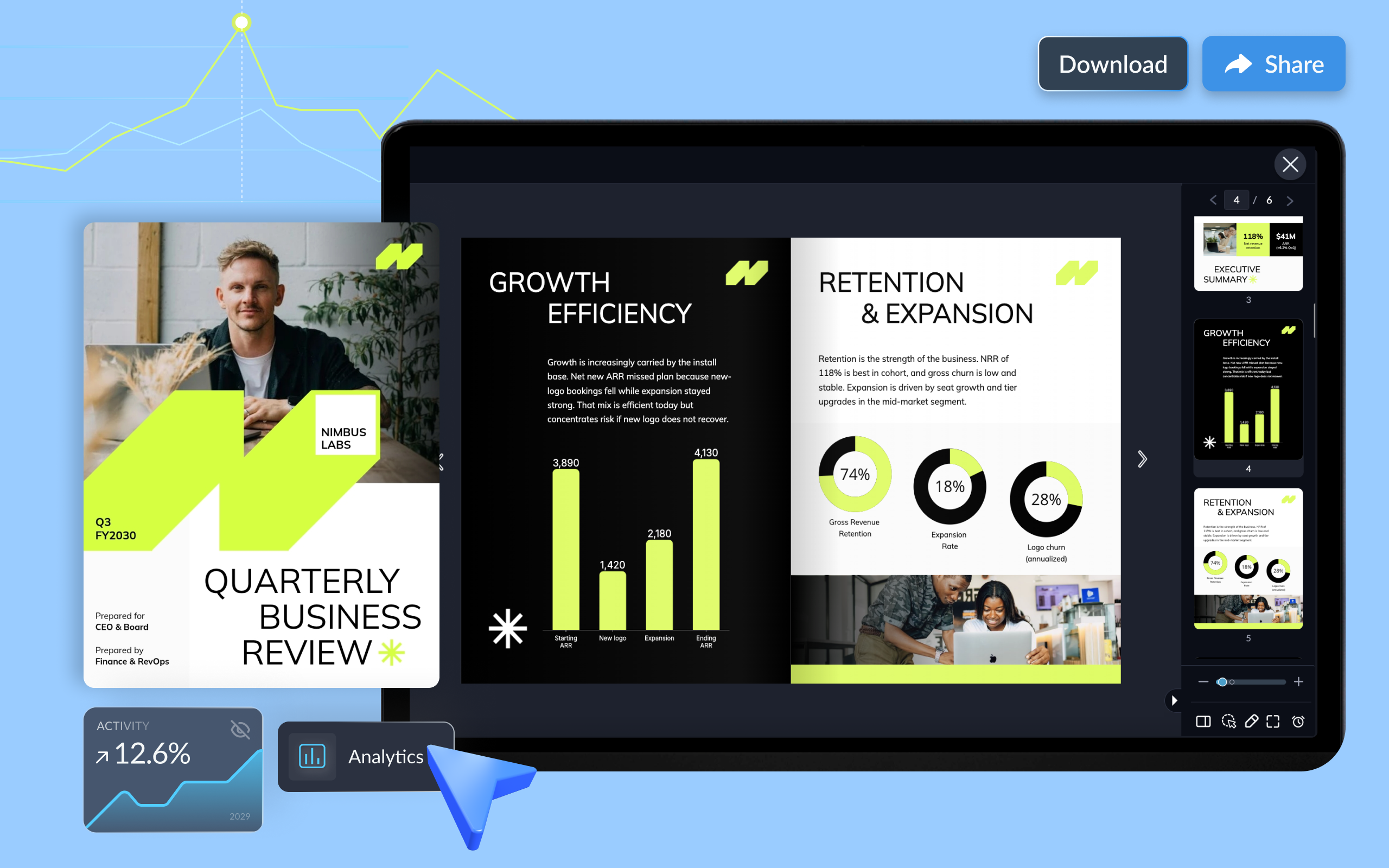
Every quarter, account teams and leadership face the same question: what did we achieve, and what comes next? A quarterly business review makes that conversation easier.
It gives teams and their stakeholders a chance to assess performance, discuss what's working, address challenges, and agree on priorities for the next quarter.
For customer success and account management teams, that means showing clients the value they've received, identifying risks to the relationship and finding opportunities to grow the account. For internal teams, it's a chance to review business results, evaluate progress against goals and decide where to focus resources.
This guide is the starting point of our QBR series. It covers what a QBR is, how it differs from an MBR or EBR, what to include and the stages of the process.
Three chapters go deeper from there: how to prepare and run a QBR, QBR templates and examples, and the best tools for building QBR decks and reports. You'll also find free QBR templates for customer-facing and internal reviews.
It's perfect for anyone who runs a QBR: the CSM presenting renewal numbers to a SaaS client, the agency account manager reporting campaign results or the HR lead reviewing hiring targets with leadership.
A quarterly business review (QBR) is a structured meeting held every three months to evaluate performance against goals, discuss results and agree on priorities for the next quarter. Account teams conduct QBRs with clients, while leadership teams use them internally to review departmental or company-wide performance.
Unlike routine check-ins, QBRs focus on the bigger picture. They bring together performance data, business outcomes, challenges and future priorities to help stakeholders make informed decisions.
For example, a customer success manager might review a client's product adoption data, identify a decline in active users and work with the client's leadership team to agree on steps to improve adoption over the next quarter.
Every QBR is built around four objectives:
What happens in a quarterly business review if one of these is missing? The meeting turns into a status update, and everyone leaves without knowing what happens next.
QBRs, MBRs and EBRs are all structured business reviews. The difference is how often they happen, who attends and how deep they go. A QBR reviews quarterly performance with day-to-day stakeholders. An MBR is a lighter monthly check on progress. An EBR is a less frequent strategic meeting between senior leaders.
Many teams use these terms interchangeably, and some run all three. Which one do you need? It depends on the account size, the relationship and how fast things change. A SaaS company might hold monthly MBRs with a fast-growing enterprise client, QBRs with mid-market accounts and a yearly EBR before each large renewal.
| QBR | MBR | EBR | |
|---|---|---|---|
| Audience | Account managers, CSMs, team leads and relevant decision-makers | Operational contacts, account managers and team leads | Executive sponsors and senior decision-makers |
| Frequency | Every quarter | Every month | Typically once or twice a year, or at key milestones |
| Focus | Quarterly performance, business outcomes, challenges and future priorities | Recent performance, ongoing activities and immediate issues | Long-term strategy, business value and partnership direction |
| Depth | Detailed review of results, trends and goals | Concise operational updates and progress checks | High-level discussion of strategic outcomes and priorities |
| Goal | Evaluate progress and agree on next-quarter actions | Catch issues early and keep momentum between QBRs | Align executive stakeholders on long-term objectives and major decisions |
These reviews can complement one another. For example, a SaaS company might hold monthly business reviews to monitor product adoption and resolve operational issues, and quarterly reviews to assess progress against customer goals. An annual EBR would also be useful for discussing the broader partnership and future investment.
Some organizations combine QBRs and EBRs, particularly when executive stakeholders are actively involved in quarterly planning.
Many sales teams pair an MBR with a monthly sales report to support regular performance reviews.
Quarterly business reviews generally fall into two categories: customer-facing QBRs and internal QBRs.
A customer-facing QBR is run by an account manager or CSM with a client. An internal quarterly business review is run by leadership to assess team or company performance.
Both share a repeatable structure, data that changes every quarter and the need to stay on brand and get approved before they go out.
Within these categories, QBRs can take different forms depending on the team, relationship or business function being reviewed.
For example, customer success QBRs typically focus on product adoption, customer outcomes and account health. Partner and vendor QBRs examine the performance of business relationships, while internal sales, marketing, HR and IT QBRs review departmental results.
The structure may be similar, but the metrics and discussion points vary. A sales QBR might focus on pipeline, revenue and win rates, while an HR QBR could examine hiring targets, employee retention and engagement.
| Customer-Facing QBR | Internal QBR | |
|---|---|---|
| Purpose | Prove value, strengthen the relationship and protect the renewal | Assess performance, align teams and reallocate resources |
| Audience | Client stakeholders and executive sponsors | Executives, department heads and team leads |
| Primary Metrics | Product adoption, ROI, goals achieved, support trends, renewal health | Revenue, pipeline, retention, budget vs. actuals, team KPIs |
| Tone | Consultative and client-focused | Direct and analytical |
| Typical Duration | 45 to 60 minutes | 60 to 90 minutes, sometimes a half day |
| Follow-Up Format | Recap email with a shared action plan or report | Internal summary, updated OKRs and owner assignments |
A customer-facing QBR shows the client what they gained from working with you over the last quarter. It's most common in SaaS, agencies, consulting and B2B services, where renewals depend on proving results.
The focus stays on the client's goals, not your product features. Which outcomes did they care about at the start of the quarter? Report on those first. If a client signed up to cut onboarding time in half, open with how close they got.
If adoption has declined, focus on what's causing the drop and what both teams can do to improve engagement next quarter.
Who attends: the account manager or CSM, the client's day-to-day contact and an executive sponsor on each side. If the client's budget owner isn't in the room, any decision on renewals or expansion has to happen twice.
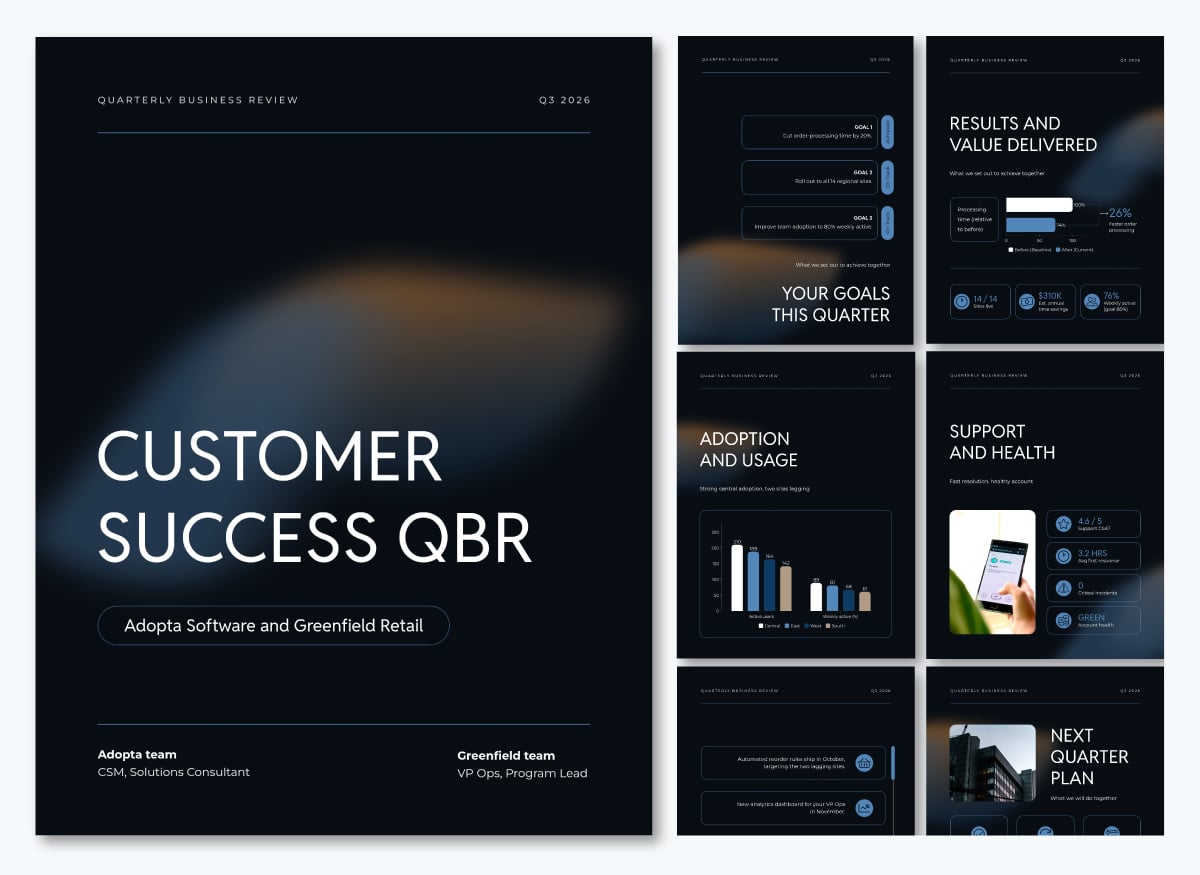
An internal QBR helps leadership see how each team performed and where to adjust. Sales, marketing, HR, IT and support teams all run them. A marketing team, for example, might review pipeline contribution, cost per lead and campaign results against the quarter's budget.
For example, a marketing team might review pipeline contribution, campaign performance, cost per lead and results against the quarterly budget. The discussion could identify which campaigns deserve more investment, where spending should be reduced and what needs to change in the next quarter. A concise executive summary and well-organized performance data help keep the conversation focused on decisions.
Who attends: department heads, team leads and the executive who owns the budget.
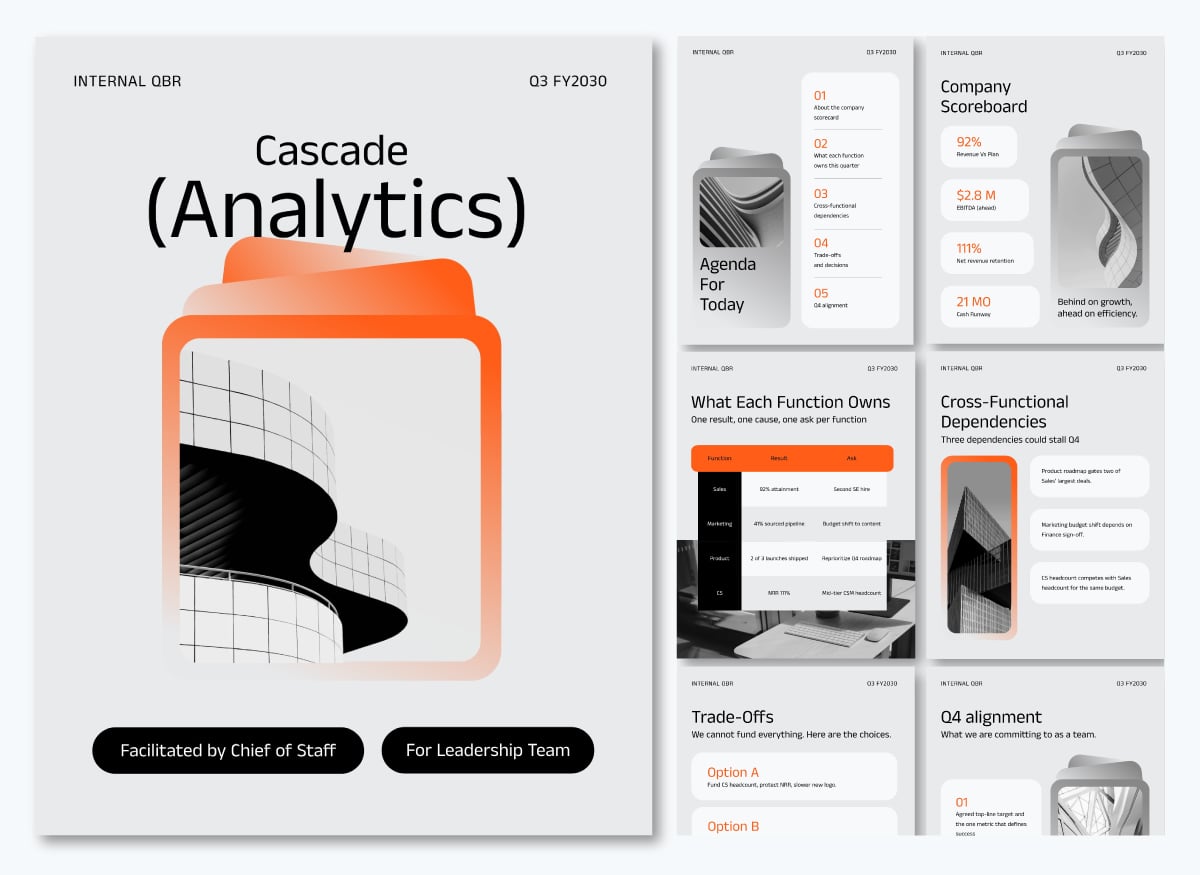
Visme has free QBR templates for both types, including client, partner, vendor, sales, marketing, HR and IT reviews. See templates for each type in our QBR templates and examples guide in the next chapter.
QBRs matter because most B2B growth now comes from existing accounts.
Gartner found that 73% of chief sales officers are prioritizing growth from existing customers. The QBR is where that growth is protected and planned. It also gives clients and leaders a regular, structured moment to confirm value, flag risks and agree on next steps.
Thera Martens, VP of Marketing at Visme, sees every QBR as part of the renewal conversation:
"Every CSM is customer-facing. Every QBR, onboarding deck, product update brief, and renewal narrative that leaves the building is either strengthening or weakening a relationship that determines NRR."
Here are seven outcomes that depend on running QBRs well.
A client who sees proven results every quarter has fewer reasons to leave. Skip the QBR, and the renewal conversation becomes the first time anyone discusses value. By then, the client may already be talking to a competitor. That's a real risk.
Forrester's 2024 State of Business Buying report found that 81% of buyers are dissatisfied with the providers they chose.
QBRs show warning signs while there's still time to act. Low adoption, a new decision-maker or a missed goal all come up in a well-run review. A champion who left the company is easier to replace in month two than in month eleven. Even a declined QBR invitation tells you something.
As David Karnstedt, CEO of Branch, shared in a Forbes Business Council article: "If you've been doing quarterly business reviews and suddenly they don't want one, that's a signal."
QBRs open the door to upsell and cross-sell conversations based on results, not sales pitches. When a client hits their goals, the next question is what they want to achieve next. A team that doubled its output with one product is often ready to talk about the next tier.
For example, a customer who has improved team productivity with one product may be ready to expand its use across other departments. This creates a natural opportunity to discuss account expansion without turning the QBR into a sales pitch.
Day-to-day contacts change roles and leave companies. A QBR keeps senior stakeholders informed, so the relationship doesn't depend on one person. When your main contact moves on, the VP who has seen four quarters of results is still there.
Internal QBRs make sure sales, marketing, customer success and product work toward the same targets. Without them, each team tracks its own metrics. Sales chases new logos, customer success chases renewals and no one sees the full picture.
A quarterly review forces teams to collect, clean and present their numbers. That matters, because only 35% of sales professionals fully trust their organization's data, according to Salesforce's State of Sales report. Regular QBRs give teams a reason to fix data gaps before they affect forecasts and budgets.
Documenting decisions, assigning responsibilities and setting deadlines gives teams a way to track commitments after the meeting. Reviewing those actions at the next QBR helps stakeholders assess progress and address unfinished work.
A strong QBR includes an agenda, a summary of results, KPIs against goals, wins, challenges and a plan for next quarter. The exact metrics change by team and client, but the structure stays the same.
For example, for a B2B SaaS customer, the QBR deck should also cover product adoption, usage trends, support activity, ROI against the customer's goals and renewal or expansion plans.
Here are eight components to include in your QBR, along with examples of how to present them.
What will the QBR meeting cover?
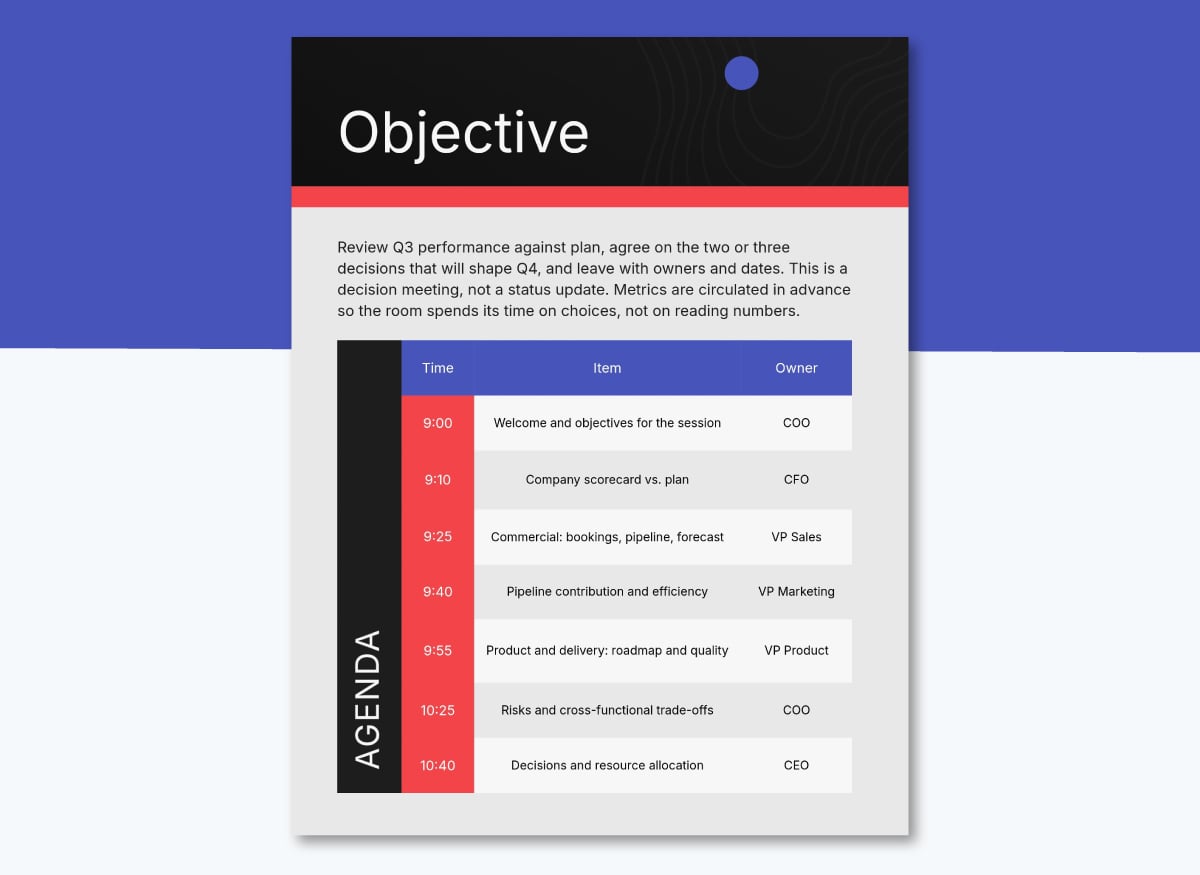
Share the agenda a few days before the meeting and include it as the first page of the QBR document. List each topic, the presenter and the time allotted, so attendees come prepared. Leave at least half the time for discussion and decisions.
A 60-minute customer QBR might spend 5 minutes on objectives, 15 on results, 10 on challenges, 20 on next quarter's goals and 10 on action items.
This is what a typical QBR agenda looks like:
What does the QBR document cover and what are the key insights?
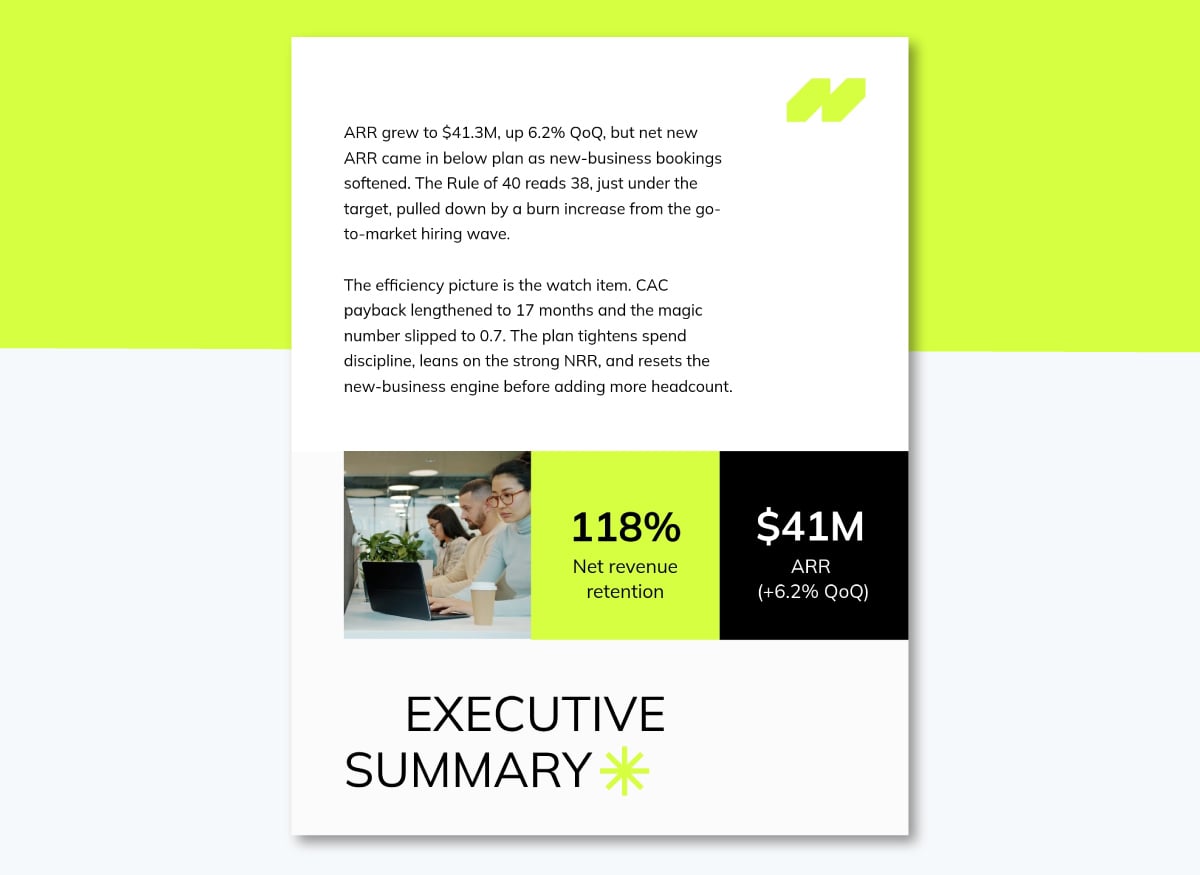
Open with a short summary of the quarter's key results. Executives often read only this part, so lead with the three or four numbers that matter most. For a SaaS client, that might be active users, hours saved, tickets resolved and days until renewal. For an internal sales QBR, it might be revenue against target, win rate, pipeline for next quarter and the one risk leadership needs to know about.
Many readers skim the summary, glance at a chart or two and move on, so the first page has to stand on its own. A one-page summary you can email before or after the meeting also works well, especially if the QBR is asynchronous or hybrid. These one-pager templates are a good starting point.
What does the data show?
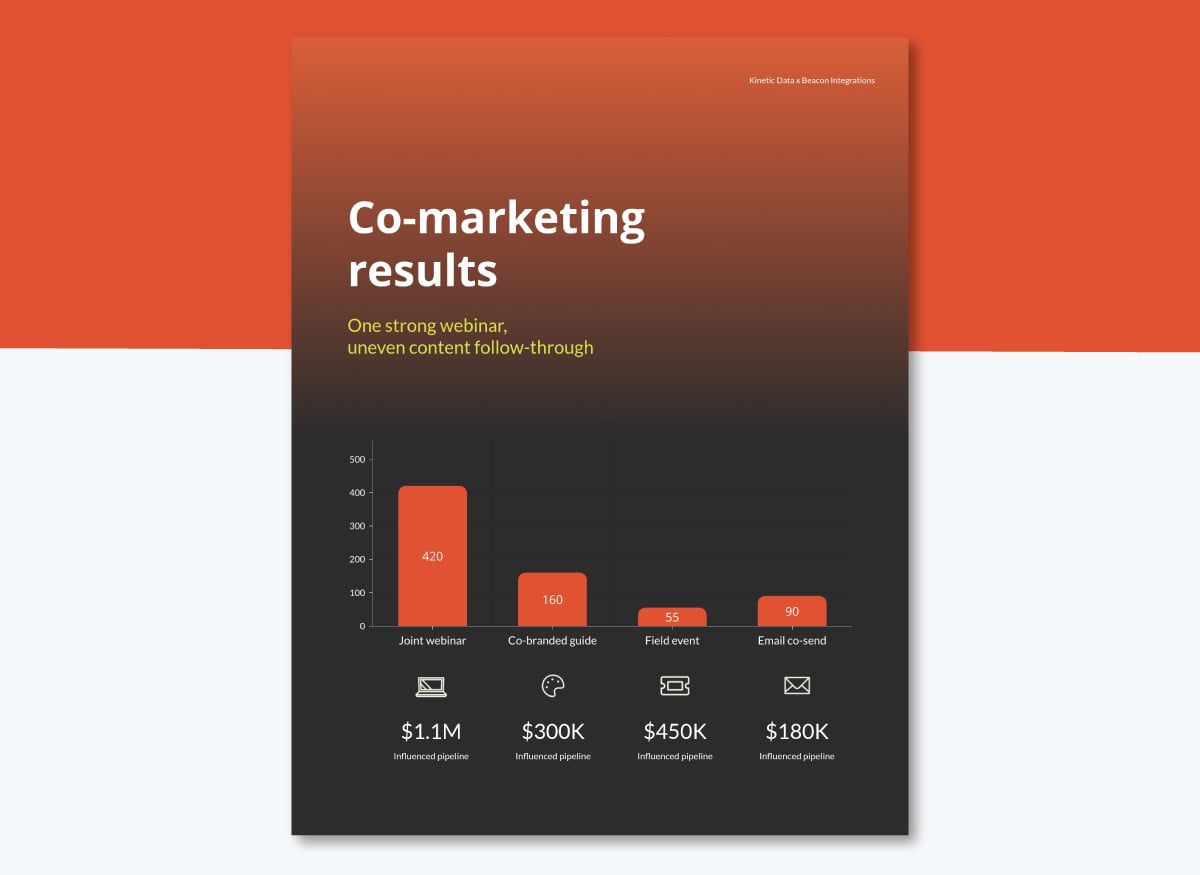
Show the numbers that connect to the client's or team's goals. For customer-facing QBRs, this usually means adoption, usage, ROI and support trends. For internal QBRs, it means revenue, pipeline, retention and budget. Keep it to five to eight KPIs, and show each one against the target and the previous quarter so the trend is clear. Explain any number that moved sharply before someone asks.
Visuals make metrics easier to read. Charts, progress bars and dashboards built with data visualization tools help attendees spot trends in seconds. For tips on framing numbers, see this guide to data storytelling.
What part of the data is the most important?
Highlight the quarter's biggest achievements. Tie each win to a business outcome, such as time saved, revenue gained or a project delivered early. "Your team now closes month-end reporting in two days, down from five" says more than a list of features. Credit the people on the client's side who made it happen. It gives your champion something to share with their boss.
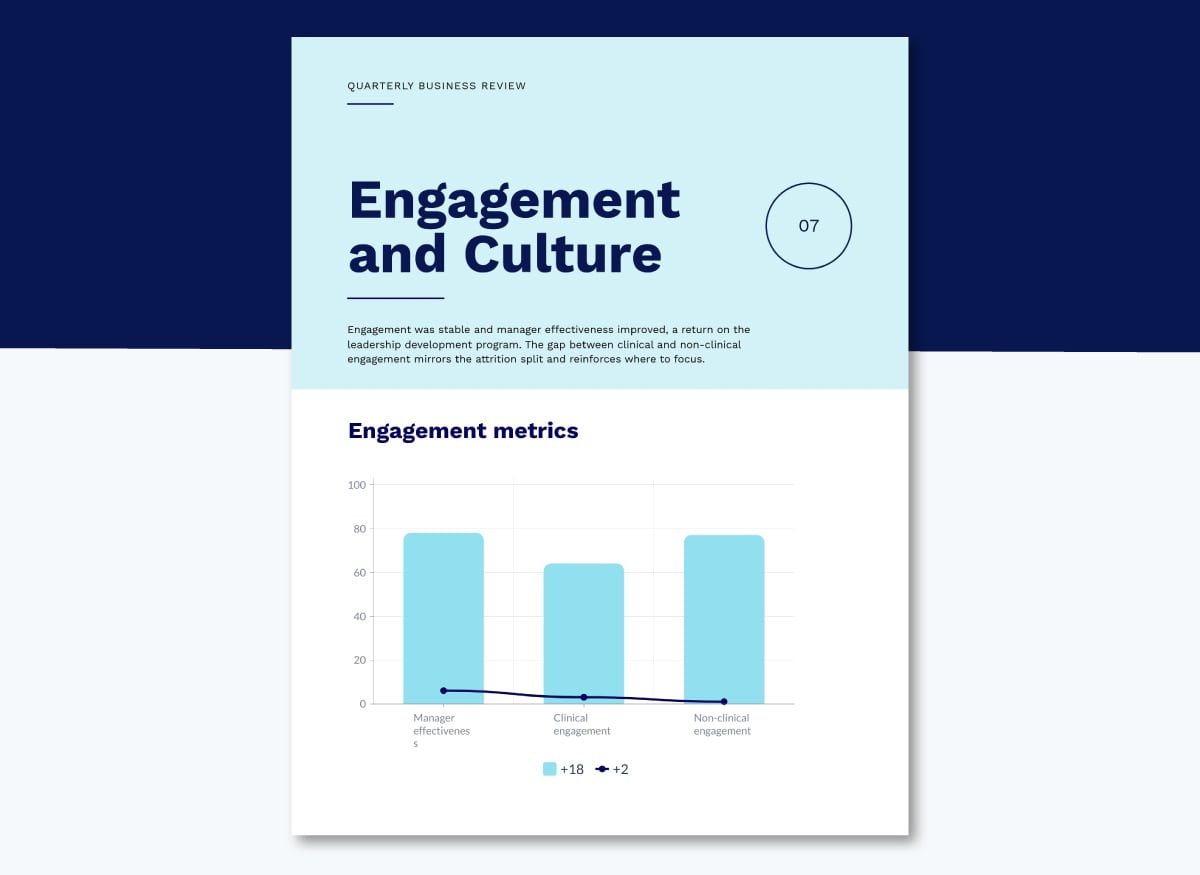
What problems did the data bring to the surface?
Address problems openly. Explain what happened, the impact and what you're doing to fix it. Clients and leaders trust teams that raise issues before they're asked. For each issue, show the cause, what you've already done and what you need from the other side. Give every risk an owner and a date, so the conversation moves to solutions.
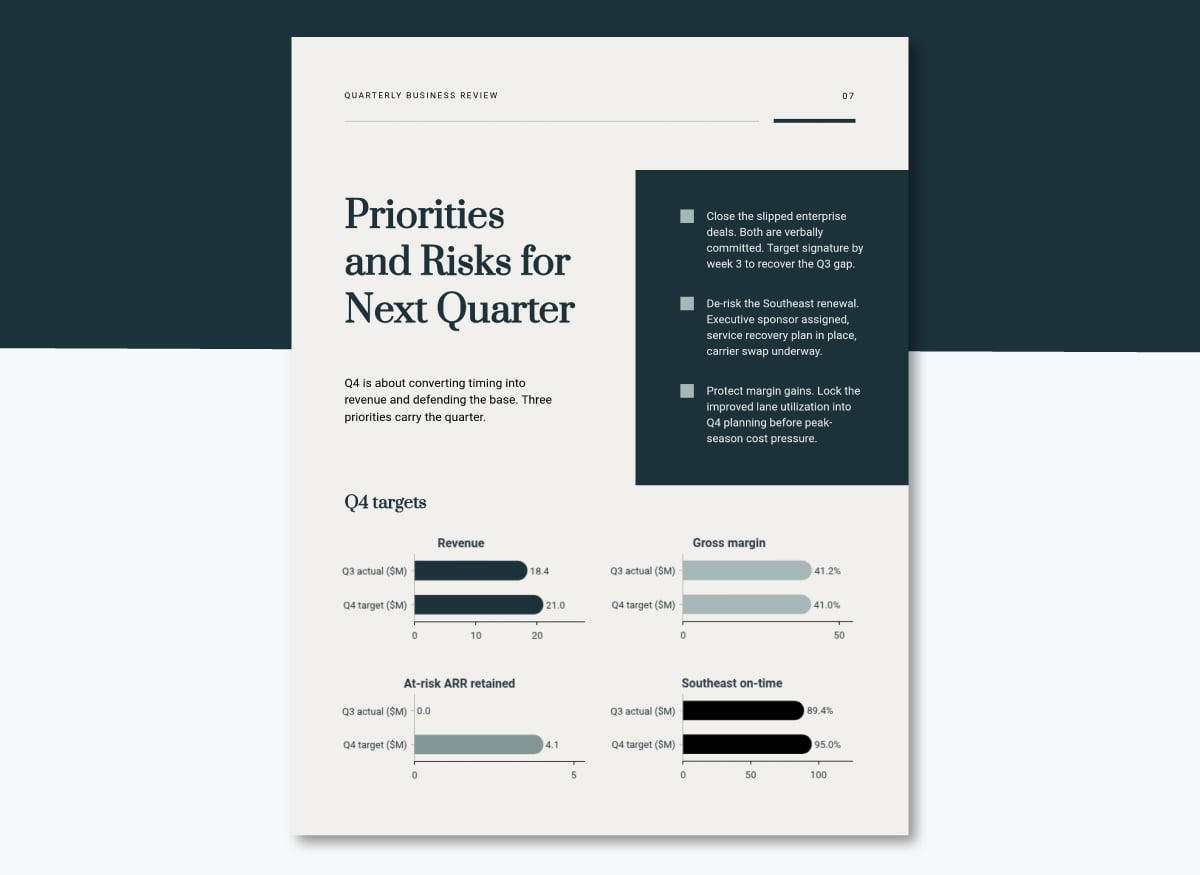
What comes next and what does the team commit to?
Propose goals for the next 90 days and show how they connect to longer-term plans. For customer-facing QBRs, include upcoming product releases or services that support the client's priorities. Keep it to three to five goals, each with a number and a date. For internal QBRs, tie each goal to the budget or headcount needed to reach it.
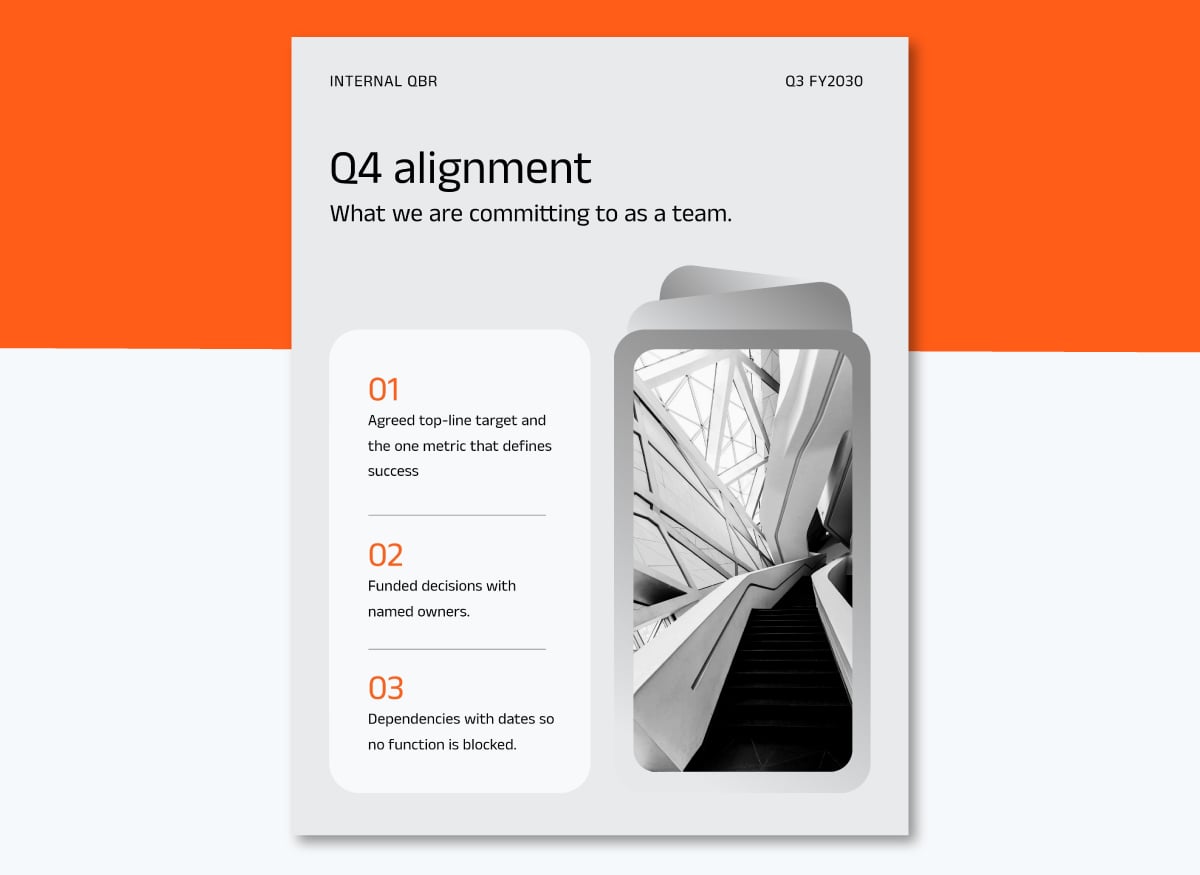
Who owns each action for the next quarter?
Close with a list of next steps, each with an owner and a due date. Send it in a recap within 24 hours of the meeting. List the client's actions as well as yours, since many follow-ups stall while waiting on the customer. Open the next QBR by reviewing this list.
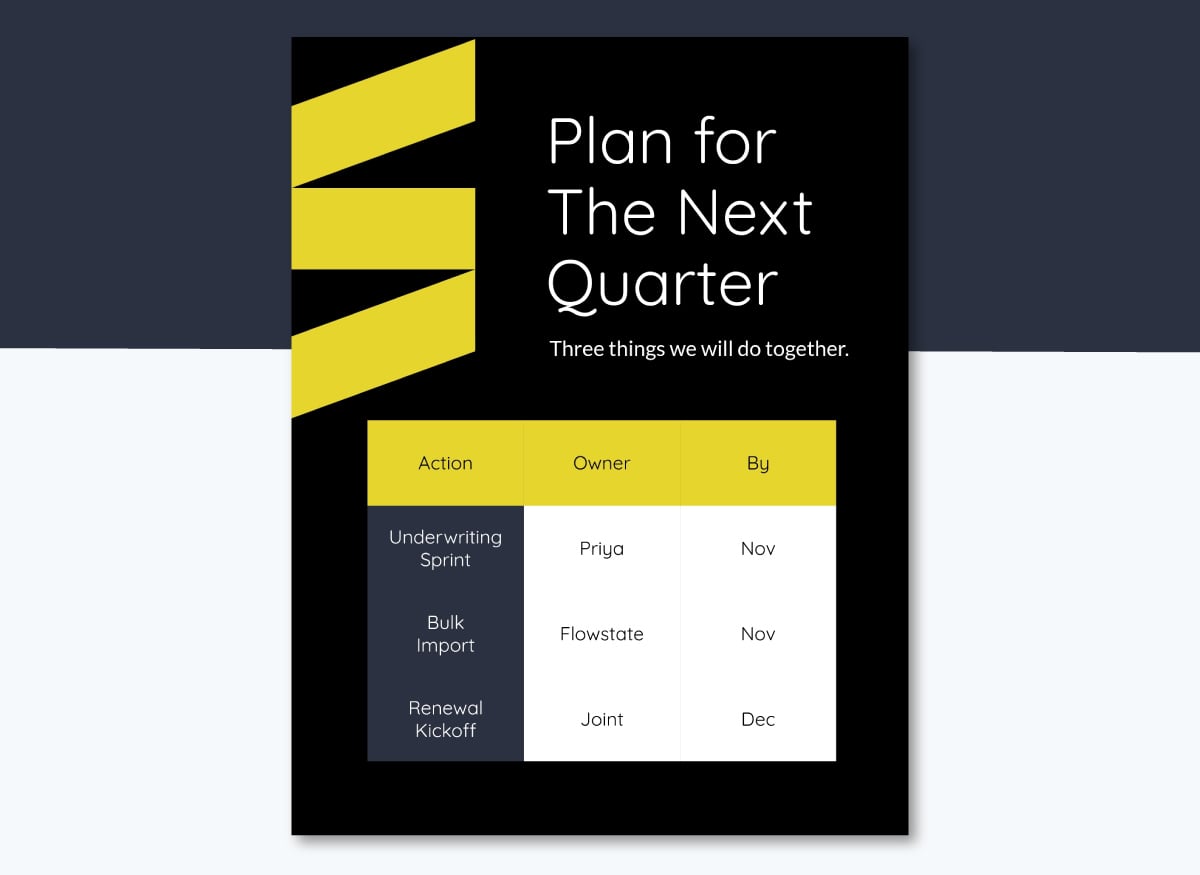
Need more formats for your quarterly data? Browse these quarterly report templates, sales report templates and progress report template along with our extensive library of free QBR templates.
A QBR runs in a cycle of five phases: prepare, build, share, meet and follow up.
Most teams start two to three weeks before the meeting. The action items agreed at one QBR become the starting point for the next, so the cycle repeats every quarter.
Made with Visme Infographic Maker
For the complete step-by-step guide including how to prepare the data, build the narrative, and handle difficult conversations in the room, see How to Prepare and Run a Quarterly Business Review.
Most teams use a mix of tools for a QBR: one where the customer data lives, one to build the presentation and one to track the actions agreed in the meeting. The right mix depends on how many accounts you manage, how much data you report on and who sees the final QBR.
For many CSMs, pulling numbers from the CRM, the customer success platform, spreadsheets and usage dashboards takes hours before they write a single line of the client's story.
Having the right tool at the right time can make the process much more efficient.
| Tool Type | QBR Stage | Best For | Tool Examples |
|---|---|---|---|
| CRM | Prep: pull revenue, renewal and pipeline data | Sales and account managers running revenue-focused QBRs | Salesforce, HubSpot |
| Customer Success Platform | Prep and follow-up: pull health and usage data, then track success plans | CS teams managing a book of SaaS or subscription accounts | Gainsight CS, ChurnZero, EverAfter, Kapta. For MSPs: ScalePad Lifecycle Manager, Humanize IT |
| Survey and Form Tool | Prep: collect NPS, satisfaction scores and stakeholder input before the meeting | Customer-facing QBRs that need the client’s own view of value, priorities and risks | Google Forms, SurveyMonkey, Typeform, UserTesting, Visme Forms |
| External Data Sources (Industry Reports, Market Research, Benchmark Databases) | Prep: add industry benchmarks, market trends and competitor context | Strategic or executive QBRs that compare results against the market | Gartner, Forrester, Statista |
| Spreadsheet | Prep: clean and combine data from internal and external sources | Small teams without a BI tool, or one-off analysis before the QBR | Microsoft Excel, Google Sheets |
| BI Dashboard | Prep: combine KPIs from several systems in one live view | Leadership teams running internal QBRs across departments | Microsoft Power BI, Tableau, Looker Studio |
| Presentation and Design Tool | Build: turn the data into a QBR presentation or report | Teams that need branded, visual QBRs that clients and executives can read on their own | Visme, Microsoft PowerPoint, Google Slides |
| Deck Automation Tool | Build: generate data-filled decks from one template | Teams running dozens of QBRs each quarter with the same structure | Matik, Rollstack |
| Project Management Tool | Follow-up: assign action items, owners and deadlines | Internal QBRs where next steps involve several teams | Asana, monday.com, ClickUp |
For a full comparison of QBR creation tools with features, pricing and ratings, see Best QBR Tools and Software.
Effective QBRs focus on outcomes, invite discussion and end with clear decisions. Routine QBRs repeat data everyone has already seen, and attendance drops over time.
That's a common problem with meetings in general. Atlassian research found that meetings are ineffective 72% of the time.
Make QBRs consistent across your team by giving everyone the same template, metrics and review process. Start from one shared QBR template with your brand applied, define the five to eight KPIs every QBR must show, and set an approval step before the meeting. Each CSM then tailors the content, not the structure.
Property management company Wellcome works this way. Every department builds from one shared library of branded templates, and locked assets keep outdated versions out of circulation. The team saves 35 to 40% of its time on content as a result.
A quarterly business review should include an agenda, an executive summary, last quarter’s goals, KPIs, wins, challenges, next-quarter goals and action items with owners. Choose metrics that connect directly to the client’s or team’s objectives. For B2B SaaS customers, add product adoption, usage trends, support activity and renewal or expansion plans.
To run a QBR, set clear objectives, gather and analyze the quarter’s data, build the QBR document, invite decision-makers, run a focused meeting and send a recap within 24 hours. Most teams start preparing 2 to 3 weeks before the meeting so they have time to check the numbers and review the draft.
A good QBR is short, focused on outcomes and built for discussion. It shows progress against agreed goals, addresses problems openly and ends with clear next steps and owners. Most fit in 10 to 15 pages or slides. See finished examples for every team in our QBR templates and examples guide.
Hold a QBR once every quarter, ideally a few weeks after the quarter closes so the data is complete. High-touch or fast-changing accounts may also need a monthly business review (MBR) in between. Smaller accounts sometimes move to twice-yearly reviews, with lighter check-ins or automated reports covering the gaps.
A QBR is a strategic review of a full quarter’s results and goals, usually with senior stakeholders. A regular check-in is a shorter, tactical meeting about day-to-day tasks, open tickets and immediate blockers. Check-ins keep work moving between QBRs. Learn how to keep both formats distinct in our guide to running a QBR.
Most customer-facing QBRs last 45 to 60 minutes, which leaves time for results, discussion and planning without losing attention. Internal QBRs often run 60 to 90 minutes because they cover several teams or departments. Company-wide quarterly reviews with all leadership can take half a day.
The QBR is one of several types of business reports your team produces each year. In this guide we covered all the critical information you need to get started with your own QBRs, from what the lifecycle looks like to what it needs to include for it to be effective.
Using Visme as your content platform makes the QBR production process faster, simpler and easy to scale. With just one QBR template that follows your brand, guidelines and guardrails, your team can create many more at scale.
Ready to build your next QBR and optimize the process for your team? See how Visme helps sales and account teams create branded presentations and reports in less time.
Design visual brand experiences for your business whether you are a seasoned designer or a total novice.
Try Visme for free