



14+ Employee Newsletter Examples, Ideas & Templates


In nearly all government agencies, non-profit organizations and businesses, RFPs are a critical part of the procurement process.
So, what is an RFP in business?
Whether it’s for a software system or a construction job, an RFP (Request for Proposal) is a way for organizations to announce they're accepting bid proposals.
An effective RFP process helps companies outline the project’s needs, compare options and assess what each potential vendor can actually deliver. Through this competitive process, organizations can find the right vendor that closely fits their needs, budgets and goals.
Writing an RFP can feel like a challenging task if you’re not sure where to begin.
In this guide, I’ll break down what an RFP is, why it matters, how you can master the process and make informed decisions that lead to the best possible outcome for your organization.
Oh, If you're short on time and looking to create a Request for Proposal you can check out this video below:
Quick Read
An RFP is a document a business, non-profit, or government agency creates to announce and outline the requirements for a specific project.
The RFP process helps organizations solicit bids from vendors and identify which one is best qualified to execute the project.
According to Anthony Usifo, a procurement specialist with over 15 years of experience, the RFP process is really about giving companies the chance to make a smart, informed choice.
Director at Privida Energy
“By opening the door to multiple vendors to submit their proposals, companies get to compare different offerings, solutions and pricing options side-by-side. It ensures they're not only getting a fair deal, but also finding the vendor that best aligns with their project needs and budget. It’s like shopping around for the perfect fit, but with much more transparency and rigor built into the process.”
Anthony Usifo
A well-written RFP provides clear expectations for both sides, including what needs to be done, when it needs to be done and how much it will cost.
RFPs may be available to any qualified company or can be issued by invitation exclusively to a selected group of firms.
For example, this request for proposal by Seed Global Health is open to any individual or firm qualified to provide website design services.
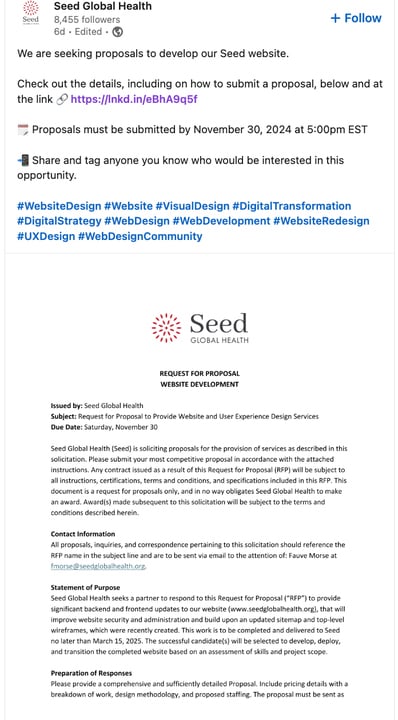
Source: Linkedin
When an RFP is exclusively sent to a selected few, companies usually just reach out to those companies directly via email, phone calls or virtual meetings.
Moreover, some businesses have dedicated online portals or vendor management systems where invited firms can access and download their RFPs, send bids and chat with the company.
RFP vs RFQ vs RFI: These are all procurement documents used in the process of sourcing goods and services, but each serves a different purpose.
Here's a table that highlights the differences between an RFP, RFQ and RFI.
| RFP (Request for Proposal) | RFQ (Request for Quotation) | RFI (Request for Information) | |
|---|---|---|---|
| What's It For? | To get detailed proposals on how vendors would tackle your project or provide a solution. | To find out exactly how much the product and service will cost. | To gather general information about products, services, or vendors without requesting a specific proposal. |
| When to Use It | When you have a project with specific needs but want to see different ways vendors might approach it. | When an organization knows exactly what it needs and is seeking price quotes from suppliers. | Typically issued in the early stages of procurement when you’re still exploring options and assessing the capabilities of different vendors. An RFI can help narrow down options before moving on to an RFP or RFQ. |
| Content | Detailed project requirements, scope of work, evaluation criteria, submission guidelines, deadlines, and specific questions for vendors. | A description of the goods or services needed, specifications, quantity, delivery requirements, and a request for pricing and payment terms. | General questions about the vendor’s services, capabilities, experience, product features, and any relevant certifications or qualifications. |
In summary, an RFI is for gathering information for your planned project, an RFQ is for getting price quotes on specific products or services and an RFP is for soliciting detailed proposals to meet specific project needs.
Creating an RFP isn’t a walk in the park.
No matter how simple it may look on the surface, there’s a lot of work that goes into writing an RFP.
You need to clearly define your project goals, gather insights from various teams, go through the actual writing process and then brace yourself for multiple rounds of reviews before you even think about sending it out.
So, why bother investing time into it?
Here are a few reasons why companies I've worked with prefer sending out RFPs over direct sourcing or a pre-approved list of vendors.
Let’s look at two different examples of a request for proposal: one from a B2B company and the second from a government agency.
CRM System Implementation for ABC Corp.
Issued on: November 11, 2024
ABC Corp. is seeking proposals from experienced vendors to implement a new Customer Relationship Management (CRM) system to streamline our sales, marketing and customer service operations. The selected CRM should integrate seamlessly with our existing systems and be scalable to support our growth. We invite vendors to submit their proposals, outlining their approach, experience and pricing.
The main objectives of this project are to enhance the efficiency of our sales, marketing and customer service teams through a robust CRM system. We are looking for a solution that can integrate with our existing tools, provide better reporting and improve overall customer experience.
The scope of the project includes the selection, customization and implementation of a CRM system. We expect the chosen vendor to:
At the completion of the project, the following deliverables should be provided:
Proposals should be submitted by December 1, 2024. We ask that you include:
Please submit your proposal to John Doe, Director of IT, at [email protected].
The proposals will be evaluated based on the following factors:
The total budget for the CRM implementation project is between $100,000 and $150,000. This includes software licensing, system integration, customization and post-launch support.
Here is the proposed timeline for the project:
If you have any questions about this RFP or need further clarification, please contact:
John Maxwell
Director of IT
ABC Corp.
Email: [email protected]
Phone: (555) 123-4567
There you have an example you can customize, but you’d probably be wondering: What should an RFP look like? I’ve shared a customizable RFP template for our second example.


This visually captivating RFP template invites innovative vendors to submit their creative designs for a fleet of approximately 185,000 police vehicles. The goal is to find a partner who can transform the look and function of police cars by incorporating advanced features like sturdy aluminum brackets, high-intensity discharge (HID) lighting and high-definition cameras.
In addition to the detailed scope of work outlining these essential requirements, this RFP provides an insightful overview of the organization, its mission and core values, previous projects, the anticipated delivery timeline and pricing details.
Before starting an RFP process, here are the preparatory steps you need to take to ensure everything runs smoothly:
Without a well-rounded RFP (Request for Proposal), vendors will struggle to understand your needs, so you’ll often end up with proposal responses that miss the mark.
Made with Visme Infographic Maker
Here are the essential sections that are always best to include:
Writing an RFP is like laying out the blueprint for a successful project.
You’re guiding vendors through what you need, why you need it and exactly how they can help.
Here’s how to write a professional request for proposal (RFP) that is both informative and engaging.
We’ll also share real-life examples of RRPs and expert insights to get your creative juices flowing.
Kick-off with a friendly but professional introduction. This should be a short but inviting overview of your company and why you’re issuing the RFP.
Think of it as a first impression — you want vendors to feel welcomed and have a positive perception of your company.
First impressions matter, so this is your chance to make it count!
To help vendors understand the project’s context, share brief information about your organization. This section isn’t just about what your company does, but also about why you’re looking for outside expertise. So include information about your industry, your team and any challenges you’re facing.
Check out this 17-page request for proposal from Salt River Project (SRP), an Arizona-based company, for a non-inverter-based long-duration energy storage (LDES) pilot facility. The intro captures key points about the:
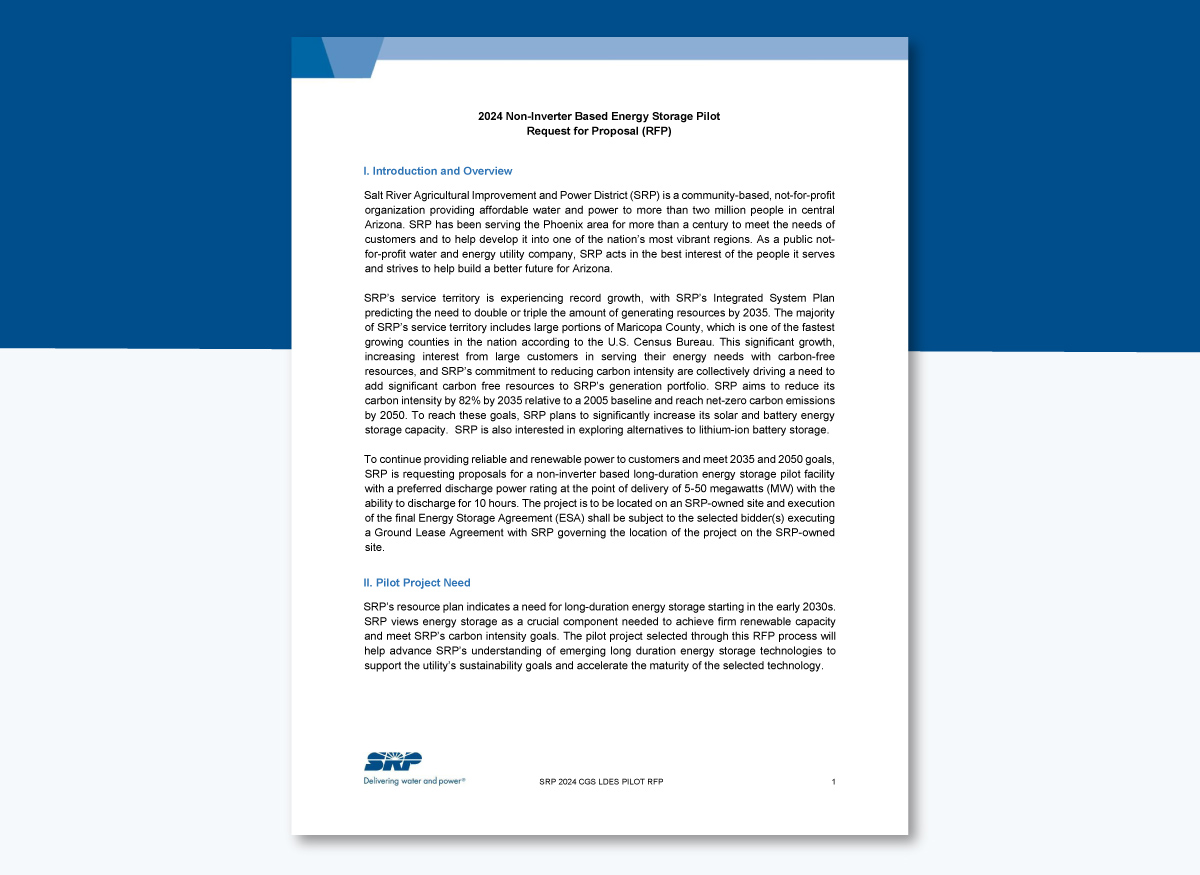
Source: SRPNET
Here’s where you set the expectations. Be crystal clear and focus on the “why.” This could be improving user experience, boosting productivity, or expanding service offerings. The goals and objectives keep everyone on the same page and help vendors understand the results you’re after.
In the case of Oak Valley College, their RFP goal is straightforward and to the point: “To enhance enrollment efforts, particularly focusing on graduating high school seniors within a 15-mile radius of Oak Valley Campuses in Santa Ana and Rialto.”
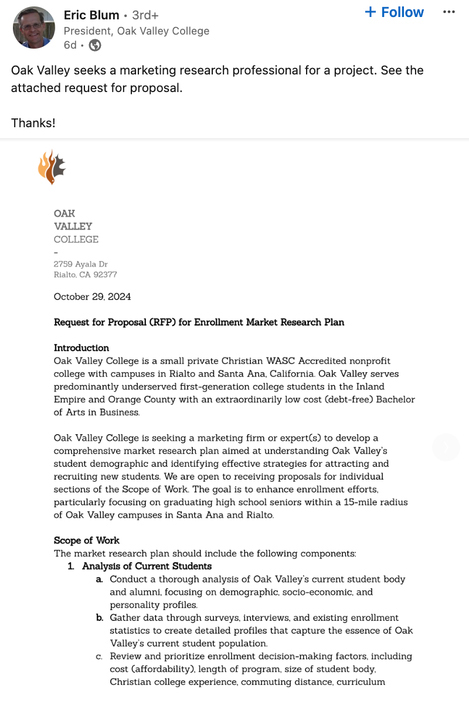
Source: Linkedin
The scope of work is the heart of your RFP—it’s where you spell out exactly what you expect from vendors. This could include specific products, services, reports or any tangible outcomes expected in the project.
For each deliverable, include a description, including any responsibilities, tools specifications, formats or standards that vendors need to meet.
The scope of work in this request for proposal for a comprehensive energy efficiency and sustainability program by the City of Desert Hot Springs is pretty exhaustive.
Source: City of Desert Hot Springs
Lay out a timeline that covers the entire project from proposal submission to final implementation. Include key deadlines, like the due date for proposals, when the project should kick off and any crucial milestones.
If you want to implement a recurring project update process, it’s essential to clearly outline those expectations as part of the project requirements.
For example, this RFP from the Washington State Department of Commerce provides an estimated schedule for procurement to the actual commencement of contract work.
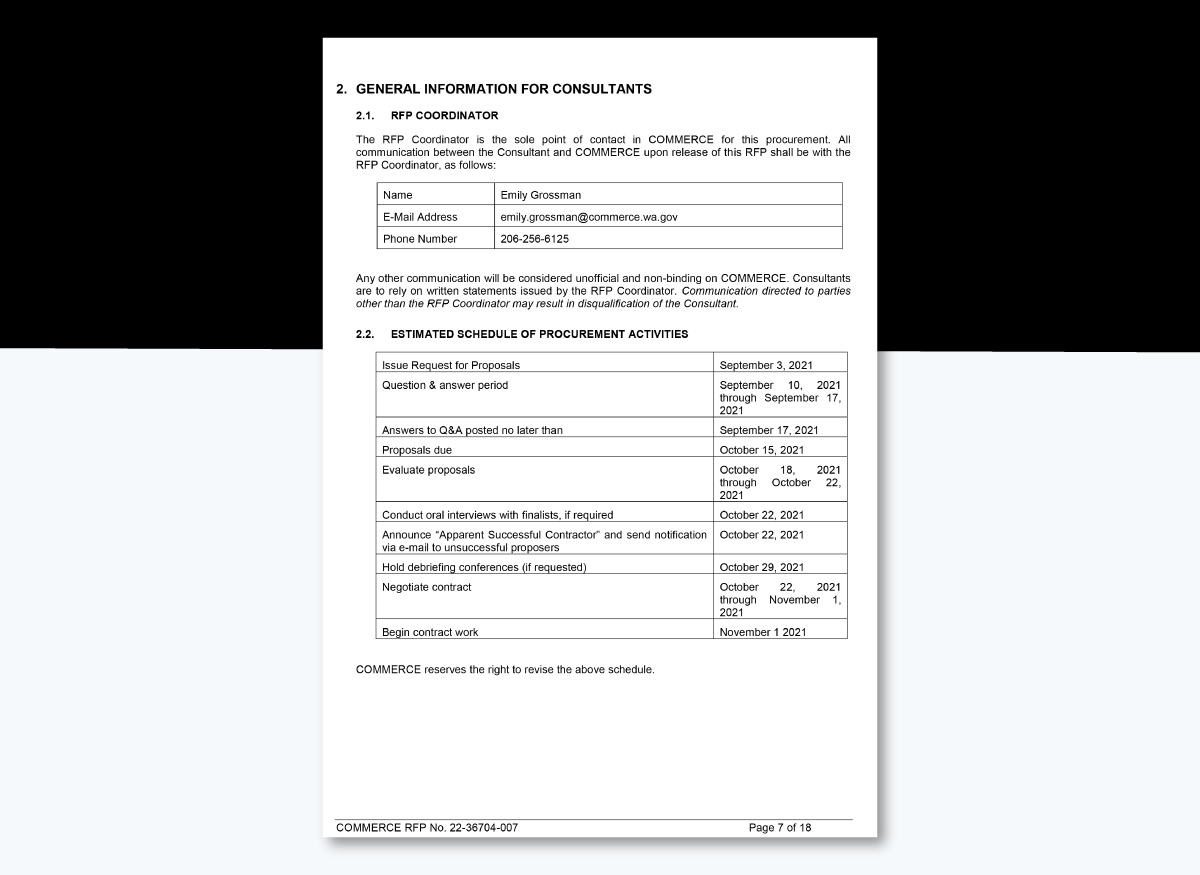
Source: WA Department of Commerce
Pro Tip: Break the scope down into phases if possible and include an estimated schedule the RFP process will follow along with dates.Budgets are the backbone of any project—they determine resources, influence investments, shape timelines and affect how much manpower a contractor can devote to getting the job done.
Takiya Green, a Non-Profit Capacity Building Consultant, has been around the block with RFPs—and lately, she’s noticed a trend that’s making it tougher for consultants to respond: RFPs with no clear budget or spending cap.
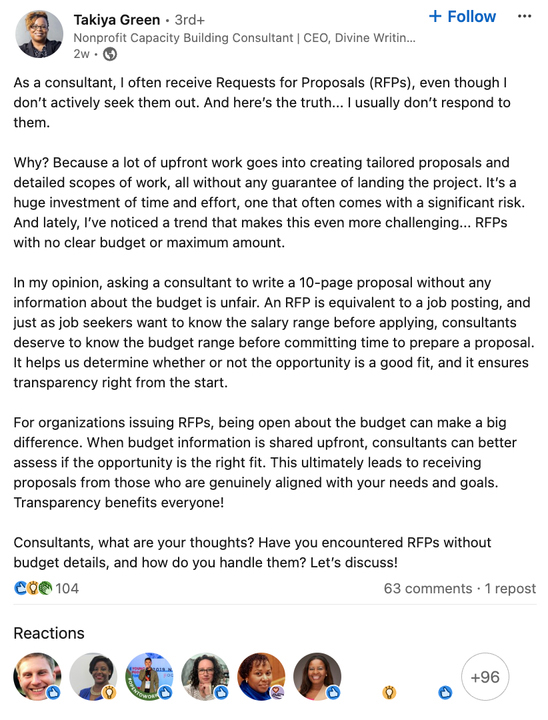
Source: LinkedIn
Takiya’s point drives home an essential truth: being upfront about the budget in your RFP isn’t just courteous—it’s crucial.
It sets firm financial boundaries and lets potential partners or vendors know if the project aligns with their own financial expectations.
In short, it helps suppliers figure out whether they can take on the job without stretching themselves thin.
Provide a budget range or specific dollar amount, along with any relevant funding limitations, payment terms and schedules.
Adding a cost breakdown also helps. This way, vendors can pull together realistic, thorough proposals based on what’s financially possible. But more importantly, it eliminates surprises or misalignments down the road.
Pro Tip: If you’re unsure about the budget, give a “not-to-exceed” figure or ask vendors to suggest a phased approach based on a preliminary budget. This flexibility can lead to innovative ideas within your financial limits.
Vendors want transparency about how you’ll assess their proposals, so laying out your criteria clearly makes a big difference.
This way, they’re not guessing—they know exactly what you’re looking for and can tailor their proposals to stand out in the areas that matter to you most.
Are you prioritizing relevant experience? Is a competitive price top of mind? Maybe you’re focused on finding someone who can meet a tight deadline, bring fresh creative ideas or have technical expertise that’s second to none.
When vendors know what you value, it helps them emphasize their strongest qualities and tailor their service proposal to what’s important to you.
Keep in mind that if you’re looking for specific experience, certifications, or technical skills, this is also the place to lay it all out. This helps weed out vendors who might not have the right expertise and makes the selection process easier.
Notice how this RFP from the City of Desert Hot Springs shares an overview of the evaluation criteria and then lists out the scoring criteria in bullet points.
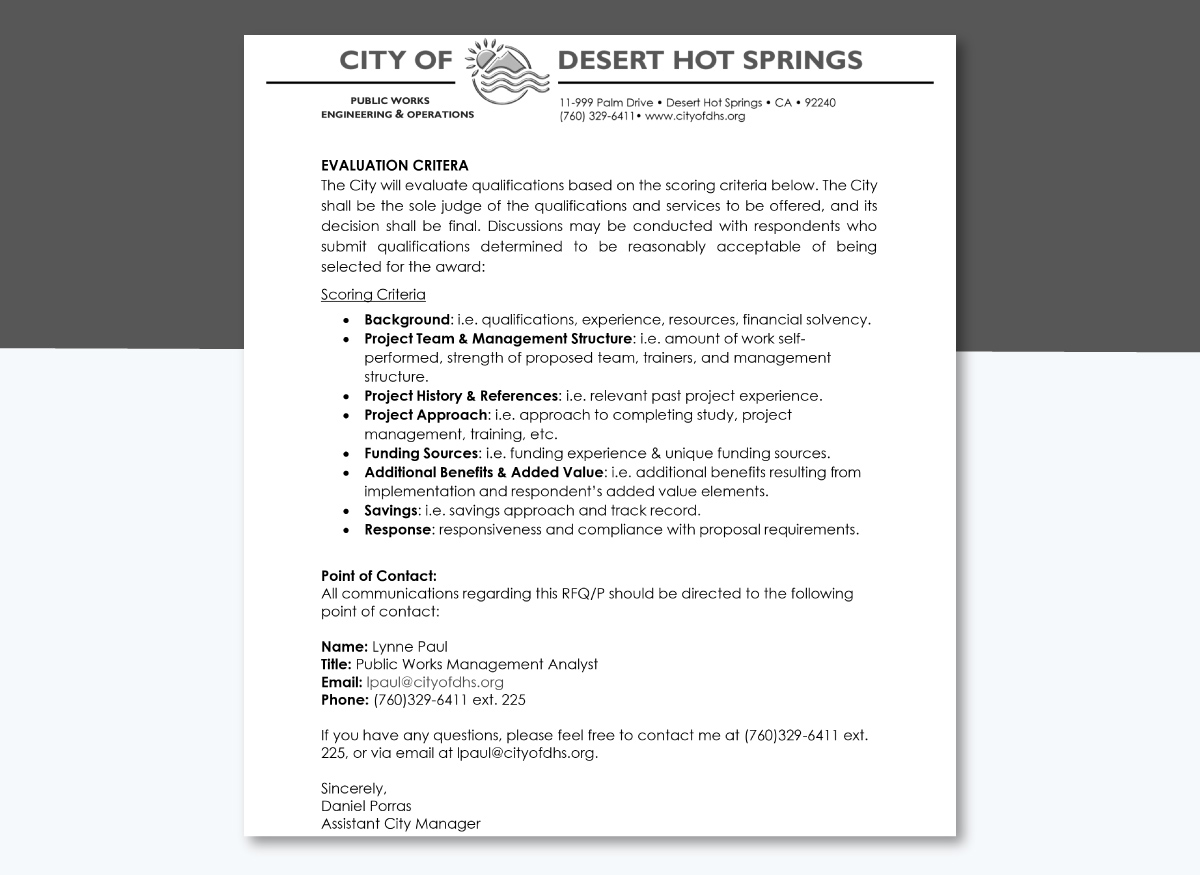
Source: City of Desert Hot Springs
Pro Tip: Rank your evaluation criteria in order of importance. For instance, if experience in your industry is most important, put it at the top of your list. Vendors will prioritize their responses to highlight their strengths in these areas.Every project has its share of bumps, whether it's tight timelines, complex technical requirements, regulatory restrictions or limited resources.
For example, if your project involves integrating new technology into your existing systems, vendors may need to account for compatibility, data migration or scalability issues, potential delays or extra testing to ensure smooth integration. Training, skill gaps and security concerns could also be a hurdle.
If this is something you foresee, it’s best to mention it early on in the RFP. Vendors will appreciate knowing this ahead of time. It helps them to assess whether or not they have the right technical capabilities to handle it or if additional support will be needed.
This is where you lay down the nitty-gritty: how vendors should format their project proposals, where to send them and any other requirements.
Should they include case studies or references? How many pages should the proposal be?
Giving clear instructions here makes the submission process smooth for everyone involved.
It’s always helpful to have a go-to person for questions or clarifications. Provide their name, email and phone number and let vendors know when and how to reach out. This avoids confusion and keeps communications streamlined.
Consider providing a checklist or summary of requirements so vendors can double-check that they haven’t missed anything before submitting their proposal.
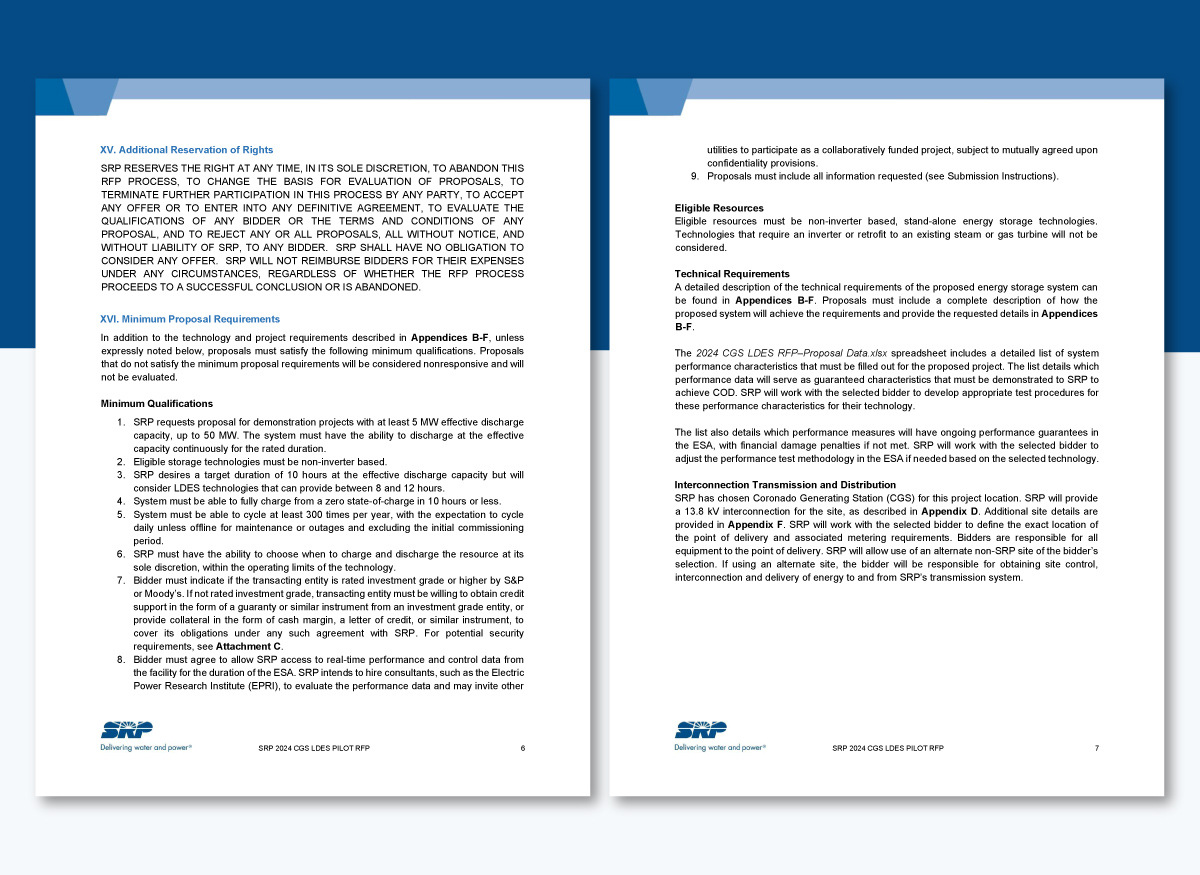
For example, the RFP process we mentioned earlier from the Salt River Project (SRP) has some clear and easy-to-follow guidelines for submitting proposals.
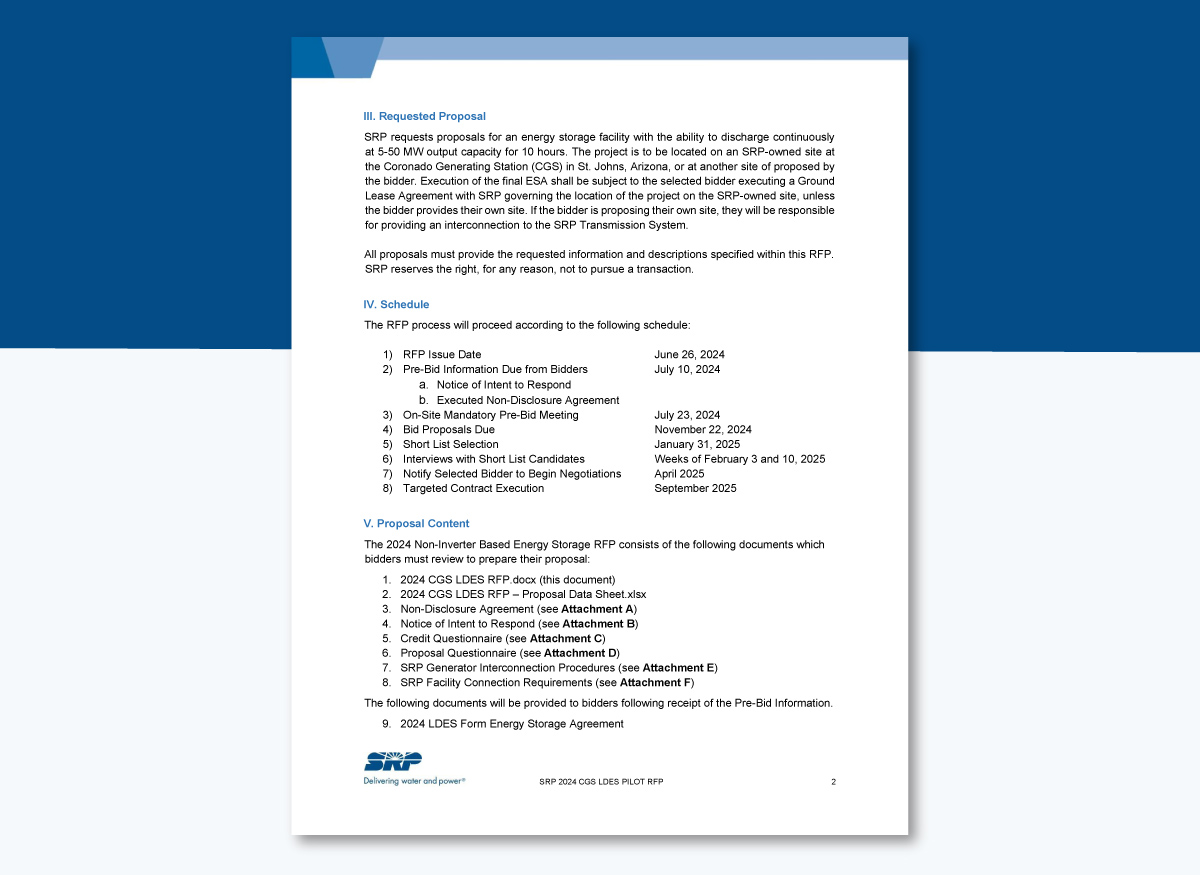
Source: City of Desert Hot Springs
Each department or stakeholder often has unique insights that can help shape a more comprehensive, accurate RFP.
For example, finance might provide perspective on budget limits, legal could flag compliance concerns and the project team can confirm whether timelines are realistic.
By gathering input from those who’ll be involved in the project, you reduce the risk of leaving out important details that might cause confusion or misalignment later. Schedule a quick RFP review meeting where key stakeholders can ask questions and give final feedback before it’s sent out.
This saves you from back-and-forth edits and creates a shared understanding of project goals and expectations.
Creating an RFP from scratch can be overwhelming and time-consuming.
So why go through the hassle and guesswork when you can make one quickly using Visme?
Whether you're creating RFPs for simple or complex projects or to serve different needs or departments, you'll find tons of templates, tools and features to streamline the entire process.
In this section, we’ll discuss how you can prepare and send RFPs using Visme.
To get started, log in to your Visme dashboard or sign up for a free account (if you're a new user). Then Click on Create New → Projects → Documents.
Browse through the templates below to find an RFP proposal or type the specific keywords (eg. RFP) and you’ll find dozens of options to get you started.
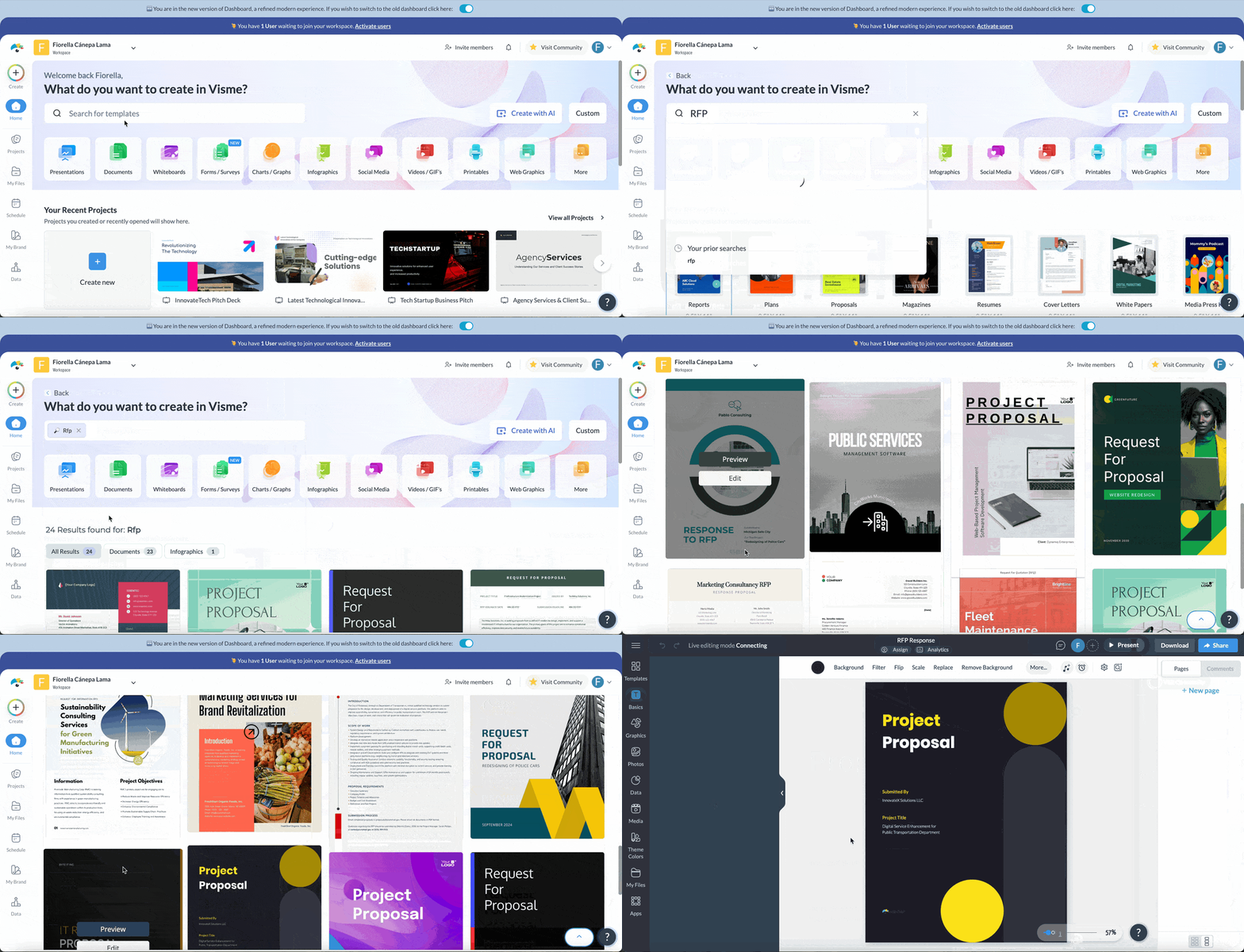
Visme offers a fantastic selection of professionally designed request for proposal templates to suit various industries.
Browse through the options and find one that fits your needs.
When selecting an RFP template, think about what best reflects your brand’s unique style, industry and project type.
If you’re not quite seeing something that resonates, don’t worry! Just pick an RFP template that reflects your desired aesthetic and customize it to your heart's content.
Pro Tip: On a tight deadline or just need a jumpstart on your RFP? Visme’s AI proposal generator is your best ally. Just give the tool a good rundown of the type of RFP you need, pick a design you like and you’ll have a polished RFP draft that you can customize.
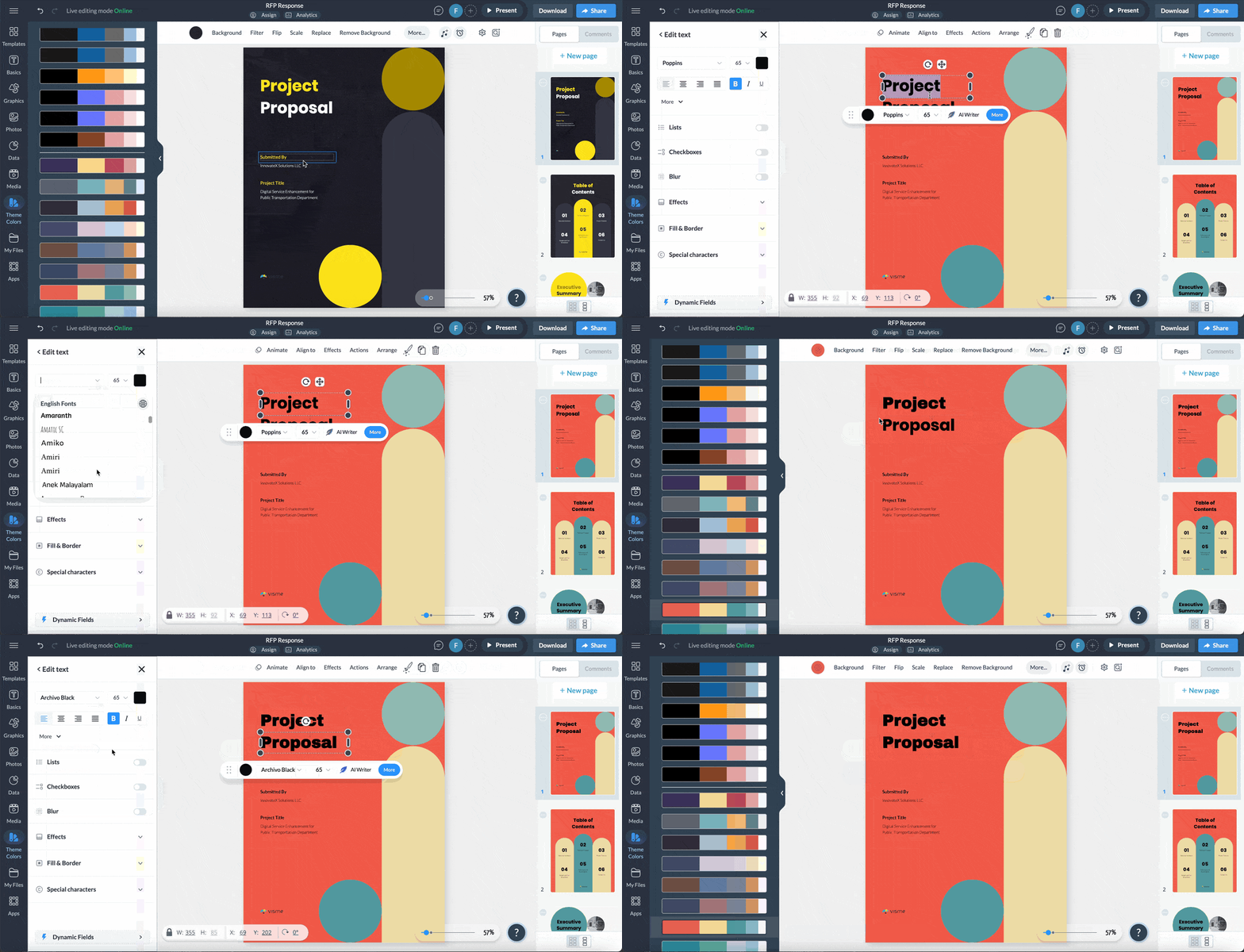
The best thing about Visme templates is that everything you see is fully customizable—from text, stock images, icons and colors.
Start by replacing the filler text with your RFP information and add new sections if necessary.
Don’t forget to personalize your RFP design to reflect your unique brand identity and aesthetic! Simply upload your brand kit or use the Brand Wizard—complete with logos, icons, fonts and color palettes—and transform the entire template theme with just a click.

Plus, you can seamlessly integrate your brand colors into all of the design elements and even the graphics, giving you limitless options for customization.
Next, upload relevant visuals or access millions of stock photos, icons, widgets, illustrations, characters and other visual assets from our extensive library to make your RFP proposal pack a punch. You can even make it interactive with pre-loaded 2D and 3D visual assets, animations and interactive elements.
Pro Tip: If you find yourself stuck writing RFPs or editing the text, use Visme’s AI text generator to help you out. Simply explain what you want to create and let AI do all the heavy lifting.
When everyone’s working together, the quality and efficiency of your proposals can really soar! Visme’s collaboration features and workflow management tools are a game-changer for this process.
They make it easy for your entire team to jump in together—share tips, leave feedback and comments, make edits and suggest improvements all in real-time. This interactive approach not only boosts creativity but also speeds up the writing process.
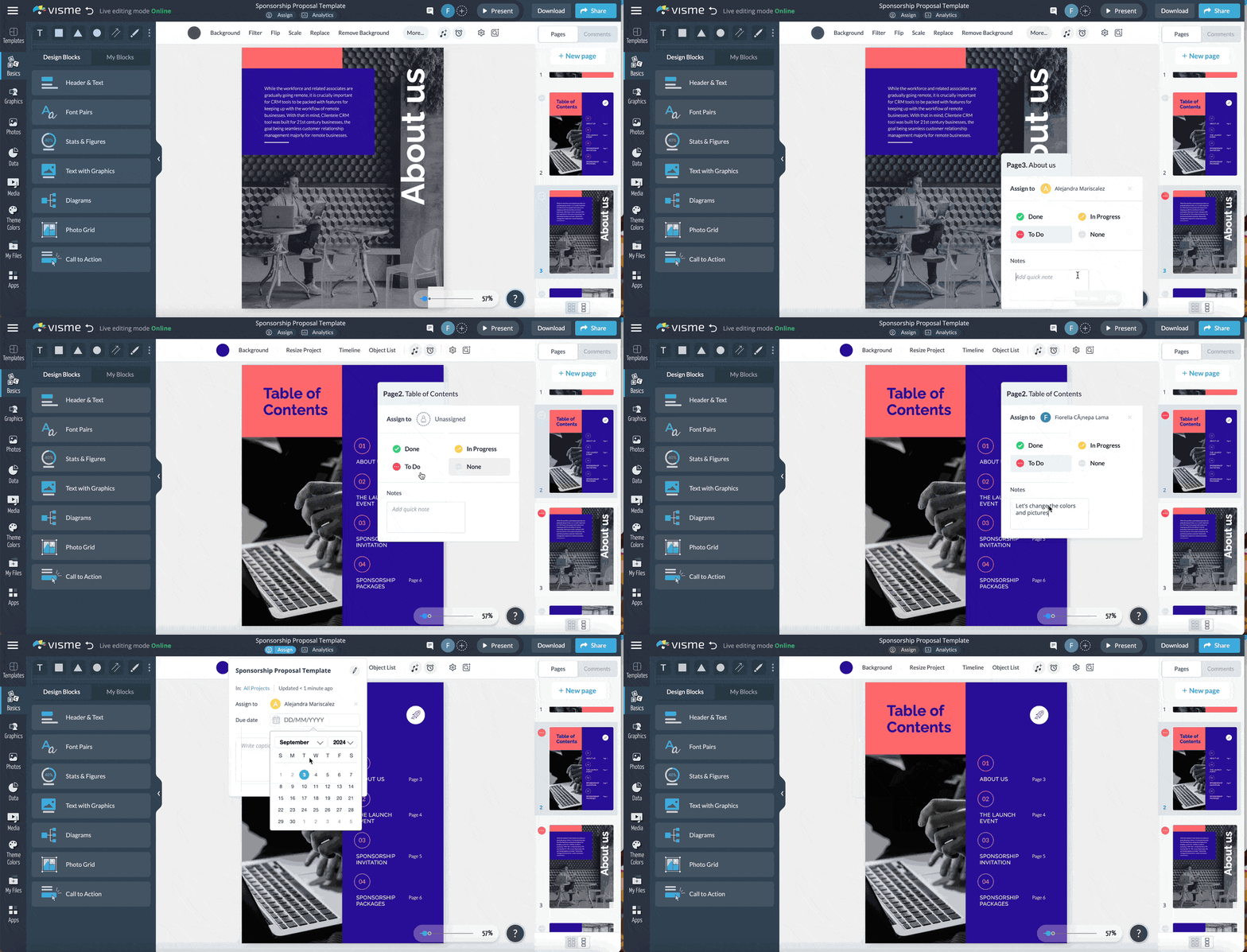
To manage the workflow process even better, you can assign different pages to different people to work on, leave notes or guidelines, assign due dates, review their work and track the entire process until it’s completed.
Once you've prepared the RFP, it's time to send them to your vendors or suppliers.
Visme lets you publish and share the RFP with your contacts through various channels.
And with Visme's analytics tool, you can see when the supplier has viewed your proposal and which parts they spent the most time on.
Here’s a step-by-step outline of the RFP (Request for Proposal) process, from planning to vendor selection:
1. Needs Analysis: The organization sending out the RFP begins by clarifying the project needs, requirements, goals, budget, timeline and the resources and expertise required to meet those needs.
*Note that even before the RFP process begins, some organizations issue a request for expression of interest (REOI) to survey the market and find out if there are enough qualified vendors interested in the upcoming project.*
2. Gathering Stakeholders and Setting Requirements: The organization assembles a team of stakeholders from relevant departments, such as finance, legal and operations, to provide input on the project. The team then establishes the evaluation criteria that will guide vendor selection, ensuring a well-rounded perspective on the project needs.
3. Drafting the RFP Document: The team develops the RFP document, including sections such as project background, scope of work, timeline, submission guidelines and evaluation criteria. They also include instructions on formatting and submitting responses. This document provides vendors with a clear understanding of the project requirements.
4. Issuing the RFP: Once the RFP is finalized, the organization distributes it to potential vendors. This may involve posting the RFP on public procurement platforms, sharing it directly with a pre-qualified list of vendors, or both. This step pulls in a competitive pool of vendors that meet the project’s criteria.
*Before issuing an RFP, organizations sometimes send out a request for qualification (RFQ) to narrow down the field of potential vendors. The RFQ focuses on verifying specific qualifications, such as experience, certifications, financial stability and expertise relevant to the project*
5. Communicating with Vendors: The organization offers a Q&A period for vendors to ask questions or clarify details. This may involve hosting a webinar, arranging a meeting or providing responses via email.
6. Receiving and Reviewing Proposals: The organization collects and organizes all vendor submissions in a centralized location. Then, they conduct a preliminary review to ensure each proposal meets the RFP requirements and screen out non-compliant responses early.
7. Evaluating Proposals: The evaluation team uses the established criteria to score each proposal based on factors such as expertise, cost and timeline. They then shortlist the top candidates who best meet the project’s needs. This systematic approach enables an objective comparison of vendors.
8. Interviewing or Conducting Presentations (Optional): For larger or complex projects, the organization may invite shortlisted vendors to present their proposals, clarify details through interviews or visit project sites. These presentations allow the evaluation team to ask additional questions and gain insights into each vendor’s approach. At this stage, the organization may ask the shortlisted vendors to submit a request for tender (RFT)–where the focus is specifically on price, compliance with specifications and the exact terms of execution.
9. Selecting the Winning Proposal: The evaluation team selects the vendor that best aligns with the project’s goals, budget and timeline. They notify the selected vendor, respectfully communicate the decision to the unsuccessful vendors and close the RFP process.
10. Negotiating and Finalizing the Contract: The organization works with the chosen vendor to negotiate the contract and project terms so that all parties are aligned on expectations. Both parties finalize and sign the contract, making the partnership official.
11. Kicking Off the Project and Monitoring Progress: The organization holds a kickoff meeting to set project expectations, review the project plan and establish communication protocols. They monitor progress regularly to ensure all milestones are achieved according to the agreed-upon timeline and deliverables.
The good news is that you don’t have to approach the RFP process manually. In fact, the right RFP software can make all the difference.
Of course, finding the right tool is the first step. There are plenty of options out there, each claiming to streamline your proposal process. In this section, we’ll look at the top RFP management software to help you find the best fit for your business needs.

Visme is a powerful tool for creating visually appealing RFPs, proposals, reports, presentations, plans and a variety of other business documents that truly stand out.
With its intuitive drag-and-drop editor and millions of design assets and branding tools, anyone—regardless of design expertise—can whip up scroll-stopping documents that pack a punch.
You don’t even need to spend hours on design; you’ll find an extensive library of professionally designed templates, including RFP, bid proposal, service proposal and product proposal templates—just to name a few.
When you need to show off some key data in your RFP, Visme has got you covered. You can integrate charts, graphs and even infographics into your RFP to make complex data easier to digest.
This is where it gets even better: Visme has a robust suite of AI-powered tools to streamline the design and content writing process. Plus, teams of all sizes can collaborate, share feedback, finalize the RFP and stay in the loop regarding tasks and deadlines.

PandaDoc is a document automation tool designed to help organizations create, share and manage various business documents, including RFPs.
Users can access prebuilt templates to get their proposals ready quickly, along with tools for customizing them. The best part is that you don’t need to start from scratch each time you create an RFP—just plug in the details and you’re good to go.
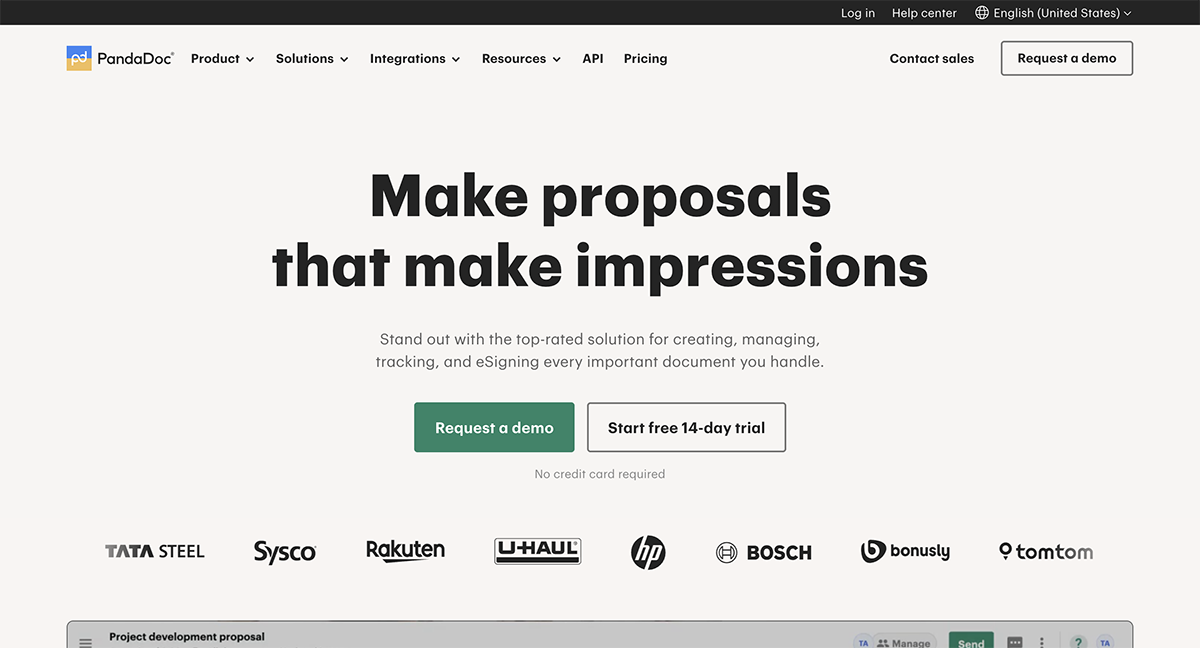
It streamlines the RFP process by offering features for digital signatures and automated tracking. Another feature I’ve found helpful is the collaboration tool that lets multiple team members work on the same document at once. You can leave comments, suggest edits and track changes in real time, which is especially useful when multiple people need to provide input or approval.

Responsive is a dedicated RFP management platform designed specifically to simplify both the creation and response process. It’s particularly useful if you're handling a lot of RFPs and need to manage the entire lifecycle—from creation to response management.
One of Responsive’s standout features is its content library, where you can store reusable content like standard responses, templates and answers. This is especially handy when you're responding to similar RFPs over time and don’t want to reinvent the wheel each time.
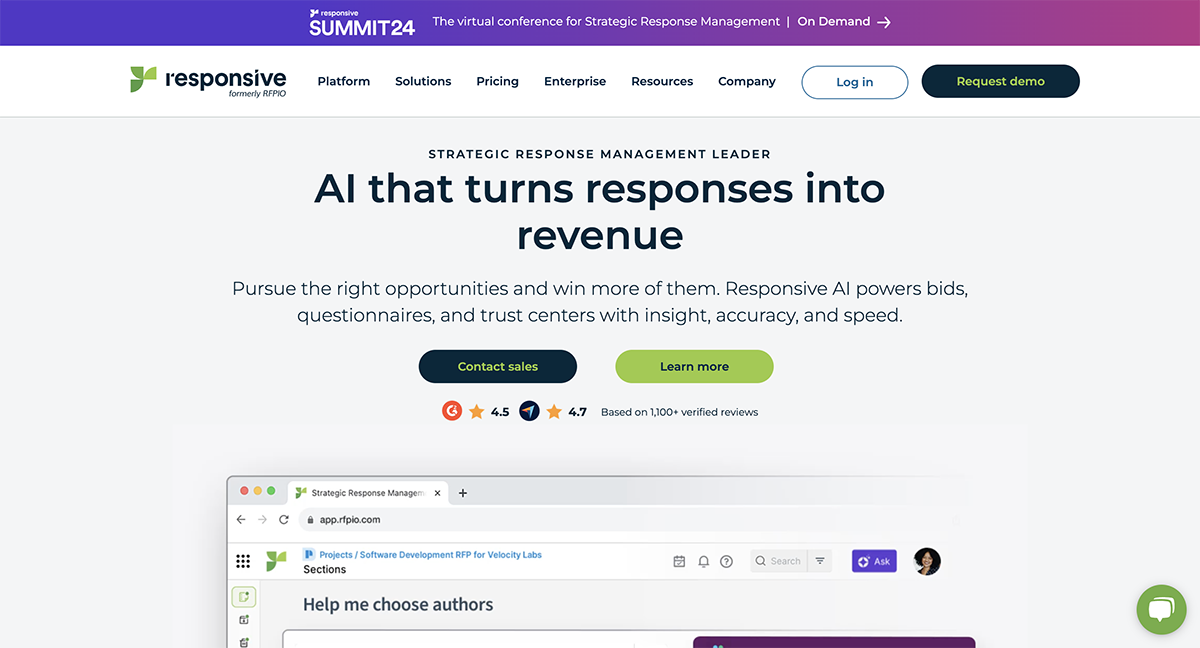
Responsive also uses AI-powered automation to suggest relevant responses based on your previous RFP answers, helping you fill in the blanks faster.
Once the RFP has been published and vendors submit their proposals, the next round of work begins. Below are the activities that typically take place:
1. Proposal evaluation: The first activity is to review proposals to filter out any that don't meet basic requirements.
2. Eliminate the first round of suppliers: Eliminate suppliers in this first round if their business proposals are poorly written, priced far above or below others or lack the right fit. Notify these suppliers and provide feedback on why they were eliminated.
3. Call references: For shortlisted suppliers, schedule reference calls with the entire RFP team as part of your due diligence checklist. Put together a due diligence report to share with higher-ups. These reference checks will help you verify the supplier's credibility, experience and reliability.
4. Host demonstrations: Arrange product demos or project presentations, either on-site or at the supplier’s location, to give the team and stakeholders hands-on experience with the supplier and product.
5. Best and Final Offer (BAFO): Allow suppliers to submit their best and final offer. This is more or less a chance for them to fine-tune their pricing and terms.
6. Supplier Selection: This is the final step in the RFP process and the start of the project. After a thorough RFP evaluation process, select the best supplier and prepare to move forward.
7. Review the Selection Process with Management: Draft a formal report detailing why suppliers were eliminated and why the winning supplier was chosen, using evaluation notes, reference call insights and demo feedback.
8. Debrief Non-Selected Suppliers: Many suppliers appreciate feedback on why they were not chosen and how they could improve future proposals. If possible, schedule debriefing sessions or official communication to provide constructive insights.
9. Project Kick-Off: After the contract is signed, the project moves into the implementation phase, starting with a kick-off meeting to align goals, introduce teams and set timelines.
Landing an RFP can feel like striking gold—it’s an exciting opportunity to show off what you can do and maybe even gain a long-term client relationship.
But make no mistake, you're not the only one aiming to win them over. With competitors lined up and ready, the stakes couldn’t be higher.
In fact, studies show that the average win rate for RFPs is around 43%—meaning, if you’re not putting your best foot forward, you’re already behind the eight ball.
Let’s break down how to create an RFP response that turns this opportunity into a win!
For a deeper dive into each of these steps, check out our full guide: RFP Response Templates & Best Practices to Win Your Next RFP Proposal. This article will walk you through every part of the process with practical tips and templates to help you craft a standout RFP response.
To make your stand out, you’ve got to do more than just follow the steps we shared earlier in the article.
Follow these RFP practices to make the most of your next RFP process.
An RFP (Request for Proposal) should be used in situations where a company needs to procure goods or services and requires detailed proposals from vendors or service providers.
It’s particularly useful when:
RFPs are commonly used across various types of organizations, especially those that frequently procure complex products, services, or solutions, including:
No, an RFP and a proposal aren’t the same thing.
An RFP (Request for Proposal) is a document a company puts out when they need a specific product or service. Basically, it’s an invitation for vendors or service providers to offer up their solutions.
A proposal, on the other hand, is a vendor’s response to the RFP. It’s where they explain how they’ll meet the project’s needs, along with their costs, timeline, methods and any experience they have with similar projects.
An RFP (Request for Proposal) and a Statement of Work (SOW) serve different purposes:
RFP (Request for Proposal)is a document used to solicit bids from vendors or service providers. It’s sent out at the beginning of the procurement process when you’re exploring options or trying to find the right vendor for the job.
Once you’ve selected a vendor, the Statement of Work (SOW) comes later. Its a detailed document that outlines exactly what tasks will be done, who’s responsible for what, the timeline and the deliverables. It serves as the roadmap for the work that will be carried out.
Yes, including a budget in your RFP is usually a good idea. A budget gives vendors a clear idea of the financial scope of the project and helps them tailor their proposals accordingly. It can also save time by discouraging vendors who aren’t a fit financially so you can focus on realistic, affordable options.
If you’re concerned about limiting creativity or flexibility, you can provide a budget range instead of a fixed amount. This way, vendors understand the limits but still have room to suggest innovative solutions within your budget.
Creating an RFP and evaluating proposals can be demanding in terms of both time and resources. The time it takes to write a Request for Proposal (RFP) can vary significantly based on several factors, including the project’s complexity, the number of stakeholders involved and the organization’s experience with RFPs.
Generally, writing an RFP can take anywhere from a few days to several weeks. Simple RFPs (for straightforward services or products) may take 1–2 weeks if requirements are clear. Complex RFPs (for large projects, technical solutions, or custom services) may require three weeks to six months to accommodate detailed specifications, stakeholder reviews and multiple rounds of edits.
RFPs can fail for several reasons, including:
Whether you’re kicking off a big project or looking for a new product, an RFP ensures you’re getting the best possible solutions while keeping things transparent and organized.
However, creating an RFP can feel like a tall order if you don’t have the right tools and processes in place. That’s where Visme comes in to simplify the entire journey.
From brainstorming your RFP’s structure to drafting your content, Visme’s extensive library of templates gives you a solid starting point, so you’re never staring at a blank page. Their intuitive editor makes it easy to customize your RFP and tailor it to your project’s specific needs.
What’s more, Visme supports seamless collaboration with your team. You can easily review, edit, and provide feedback on the RFP, all on the same platform.
Once you’re ready to send your RFP out, Visme offers multiple sharing options, and with built-in analytics, you can track how vendors engage with your RFP, so you can spot who’s interested and how they’re interacting with your document.
Ready to hit the ground running? Book a demo to discover how Visme can take the guesswork out of your next RFP and help you get the results that matter.

Design visual brand experiences for your business whether you are a seasoned designer or a total novice.
Try Visme for free







![How to Create a Practical Crisis Management Plan [+ Templates]](https://visme.co/blog/wp-content/uploads/2025/07/How-to-Create-a-Practical-Crisis-Management-Plan-Thumbnail.png)