10 Best Interactive Sales Presentation Software to Close More Deals

As sales teams grow, creating presentations becomes a shared workflow.
Reps need access to approved content they can quickly adapt for different prospects, while marketing and sales leaders need consistency across what the team creates and shares.
That changes how you should evaluate presentation software.
For the day-to-day sales content workflow, six things matter most:
But those aren't the only considerations involved in choosing software. Pricing, collaboration, AI capabilities, integrations, security, administration and compatibility with your existing presentations can also affect which platform makes the shortlist.
This buying guide compares Visme, Beautiful.ai, Canva Business, Pitch, Gamma, PowerPoint with Copilot and Google Slides with Gemini using these important criteria. You'll also see what to test before choosing a platform and how to calculate the cost of your current presentation workflow.
Most "best presentation software" rankings score templates, ease of use, and AI features.
These features matter as well. But they mostly answer one question: How easy is it to create a presentation?
But sales teams have much bigger problems. As more reps create, reuse and personalize sales content, keeping that content current becomes harder. A rep might pull slides from an old deck, add a customer story from another and reuse product information that marketing has since updated.
The result is sometimes called a “Frankendeck,” but inconsistent design is only part of the problem. The bigger issue is losing control over what buyers actually see.
Reps will end up working from different messaging, old product information, outdated proof points or different versions of the same presentation. At the same time, sales and marketing may have little visibility into which content gets used or what happens after it reaches a prospect.
This isn't a hunch. Visme's B2B Sales Content Benchmark found that:
That's not a design problem. It's a process and visibility problem, which is exactly why it needs to be part of how you evaluate the software,
So instead of evaluating only the presentation editor, evaluate the workflow around it. The right platform should help your team move from approved content to personalized buyer-facing material without creating unnecessary bottlenecks for sales, marketing or design teams.
The stages I’ve shared below are an evaluation model, not a research finding. Use them to identify which stage best reflects your current sales workflow and what you should prioritize when evaluating your options.
With a small sales team, a simple setup may be enough. Everyone knows where the latest deck lives, and when something changes, it’s easy to keep the team updated.
At this stage, prioritize a tool that helps reps create, personalize and share polished presentations without adding unnecessary steps to their workflow.
As you add reps, products, regions or customer segments, you’ll likely have more versions of your sales content. Now you’re not dealing with just a few decks anymore. Now there are multiple industry-specific decks, product presentations, proposals, customer stories, QBRs and presentation variations created for specific opportunities.
At this point, the buying questions are different. Can reps find the right content without searching through old folders? Can marketing update shared assets without chasing everyone who has used them? Can sales personalize an approved presentation without accidentally changing the parts that should stay consistent?
At a larger scale, ease of use is only one part of the evaluation. You also need to consider how the platform fits into your existing tech stack and IT requirements.
That may include user roles and permissions, SSO, user provisioning, approval workflows, CRM integrations and other administrative controls. These requirements can narrow your shortlist before you even compare templates, AI features or design capabilities.
Use the stage that best reflects how your team works today, but consider what you’ll likely need next. You don’t want to pay for enterprise controls you won’t use, but you also don’t want to replace the platform a year from now because you’ve already outgrown it.
Sales content has a lifecycle. A rep finds the content, personalizes it, shares it with a buyer, and, ideally, learns what happened afterward.
The easiest way to compare presentation software is to follow the same path your content takes.
Use these six criteria to evaluate the platforms on your shortlist.
Made with Visme Infographic Maker
Start with a simple question: How does a rep know they're using the latest version?
If the answer is a Slack announcement, shared-drive folder or a file named “FINAL_v6,” your process still depends heavily on individual discipline.
Look for a platform that gives reps one place to find approved presentations, templates, slides and reusable assets. Then check what happens as that library gets bigger.
Can admins update, archive or retire content? Can reps tell approved material from their own drafts? If an approved slide changes, do existing versions update or does every use create another independent copy? And can reps still find what they need when there are hundreds of assets?
Don't test this with a five-slide sample workspace. Ask the vendor to show you how content discovery works at a scale that resembles your own.
A Brand Kit and brand governance aren't the same thing. Storing approved colors, fonts and logos is useful, but sales teams also need to know what happens when reps start editing.
Which parts of the presentation can you protect?
Do different roles get different editing rights? And does certain content need approval before it goes to a prospect?
When comparing platforms, separate governance into five areas:
Made with Visme Infographic Maker
For example, Visme's Enterprise controls lets you lock the location, content and formatting of individual text boxes and apply editing permissions based on roles. Canva Business supports Brand Controls that restrict teams to approved colors and fonts and can require design approval. Microsoft also offers Brand Kits for appropriately licensed Copilot users.
The important point is not whether a platform has “branding.” It's how much control you have over what reps can change.
A platform can check every box on your procurement list and still struggle with adoption if reps find it slower than their current workflow.
So don't test “ease of use” in the abstract. Give a rep an approved presentation and ask them to tailor it for a real account. Have them update the industry context and problem statement, add a relevant customer story and personalize the company information.
Watch how much work it takes. Are they able to make those changes within the approved structure? How easily can they find and reuse approved slides and content? Do they need help from marketing or design? What requires them to leave the platform or search through other folders?
Apply the same test to AI features. Generating ten slides from a prompt may look impressive in a demo. But the more useful question is whether AI helps reps personalize content without creating off-brand designs, inaccurate information or generic messaging that needs extensive editing.
Have one of your own reps personalize one of your own decks during the trial or demo. Don't rely on the vendor’s salesperson to show you how easy the platform is.
Your team may create presentations in one platform, but buyers won't necessarily consume them there.
Some deals work well with trackable links that preserve interactive elements and capture engagement data. Others require PDFs that are easy to download and forward. Buyers may also request editable PowerPoint files for procurement or internal review.
Look at how your team has shared presentations across recent opportunities. Do reps need links, PDFs, PPTX files or offline access? Can recipients open shared links without an account? Can access be protected or revoked? And what happens to your fonts, charts, animations and embedded media when you export?
Test these workflows with a real presentation rather than relying on a feature list. A platform can be excellent for creating presentations and still be a poor fit if its output doesn't match how your customers prefer to consume them.
Trackable presentation links can give reps visibility they don't get from standard attachments, but the level of detail varies by platform.
Some tools report views. Others provide slide-level engagement, time spent, visit notifications or identifiable viewer data. A view tells you someone opened the presentation. Knowing which sections they returned to can give sales a more useful signal for follow-up.
When comparing analytics, look at the depth of information available:
For example, Visme Analytics can combine registration information with viewer and slide-level engagement. Pitch's Business plan supports advanced links with visits, slide views and time spent. Gamma provides detailed analytics on Pro and above, although viewers who aren't signed in may appear as anonymous.
Analytics become more valuable when the insights don't stop with the individual rep.
Consider whether the platform can help sales and marketing understand which presentations and slides reps use, which content buyers engage with and which assets are being ignored or need updating. Those insights can help teams decide what to improve, retire or create next.
Not every presentation platform provides that level of content intelligence. If organization-wide content usage, coaching and revenue-content intelligence are major requirements, your evaluation may start to overlap with sales enablement platforms such as Highspot and Seismic.
That doesn't necessarily mean you need a larger enablement platform. It means you should decide how much content intelligence your team actually needs before paying for it.
The six criteria above cover the sales content workflow.
Before making a final decision, consider the practical requirements that affect cost, adoption and fit with your existing tech stack.
Compare the plans that include the features you actually need, not the lowest advertised price.
SSO, advanced permissions, approvals, analytics and CRM integrations may require higher tiers. Also check seat minimums, billing terms and any required add-ons. Use the same team size and requirements when pricing each platform so you're comparing apples to apples.
Consider how sales, marketing, enablement and design contribute to the same presentation workflow.
Look for the collaboration features your process requires, such as real-time editing, comments, shared workspaces, review workflows, guest access and contributor roles. This is different from governance. Governance controls what people can change. Collaboration covers how content is created, reviewed, approved and handed off between teams.
Don't compare platforms based on whether they have AI. Compare what the AI actually helps your team do.
Test whether it can generate presentations, work from existing content, personalize approved material, rewrite copy or adjust layouts while preserving your brand.
Use the same existing deck and sales brief across your shortlist so you can compare the quality of the output and the editing required afterward.
Look at where presentation software needs to fit into your existing sales workflow, particularly your CRM, cloud storage and communication tools.
An integration logo alone doesn't tell you much. Check what the integration actually allows reps to do, such as accessing sales content from the CRM, importing customer data, sharing presentations or sending engagement data back to a deal or contact record.
If IT has specific requirements, check them early rather than after you've selected a preferred platform.
Depending on your organization, that may include SSO, user provisioning, role-based permissions, two-factor authentication, audit logs and centralized administration.
Check plan restrictions too. Some security and administrative features are only available on enterprise tiers.
If you already have a large library of PowerPoint presentations, test both import and export before switching platforms.
Check how fonts, layouts, charts, animations and other elements survive the move. If buyers request editable PowerPoint files, export a real presentation and open it in PowerPoint to see what remains editable.
Consider how the platform will handle more reps, content, products, regions and permissions as the team grows. You need enough room to grow without paying today for enterprise capabilities you may never use.
Made with Visme
| Buying Factor | Visme | PowerPoint + Copilot | Google Slides + Gemini | Canva Business | Beautiful.ai | Pitch | Gamma |
|---|---|---|---|---|---|---|---|
| Team Pricing |
|
Microsoft 365 subscription + applicable Copilot licensing | Google Workspace subscription; Gemini included in eligible Workspace plans | $250/user/year
Enterprise: Custom pricing |
Team: $40/user/month billed annually
Enterprise: Custom pricing |
|
|
| Brand Governance and Control | Brand Kit, branded templates and shared content; advanced permissions, approvals and editing controls on Enterprise | Organization templates and PowerPoint Brand Kits with eligible Copilot licensing | Organization themes and templates | Up to 100 Brand Kits, Brand Controls and approvals on Business | Centralized templates and slide library, locked slides and brand controls on Team | Custom templates, fonts and shared asset library; template controls on paid team plans | Custom branding/themes on eligible paid plans |
| AI-Assisted Creation and Personalization | AI presentation generation plus AI writing, design and editing tools; branded AI workflows available on eligible plans | Copilot can create and edit presentations using prompts, files and organizational content | Gemini can generate slides and presentations using prompts and reference content | AI tools support presentation creation, rewriting and branded content generation | AI-assisted presentation creation with automated layouts and design | AI presentation creation, rewriting and editing tools | AI-first presentation generation, rewriting and content restyling |
| Team Collaboration | Comments, annotations, shared folders and live editing; advanced roles and approval workflows on Enterprise | Real-time coauthoring through Microsoft 365 | Real-time collaboration, comments and version history | Real-time collaboration, comments, permissions and approvals | Real-time collaborative editing, shared libraries and version control on Team | Collaborative editing, comments, guests, teamspaces and workspace roles | Shared workspaces and team collaboration features |
| Content Management and Reuse | Folders, Slide Library, content blocks, templates and team assets | SharePoint/OneDrive and organization templates support storage and reuse | Drive and shared drives support file organization | Folders, Brand Templates, Brand Kits and reusable brand components | Centralized slide, template and asset libraries | Workspace library, collections, templates and assets | Workspace organization and reusable themes/templates |
| Version History and Content Updates | Version history plus centrally managed templates and reusable content; shared slides can be updated across presentations | Version history through Microsoft 365; centrally managed templates and files through SharePoint/OneDrive | Version history plus centrally managed files through Drive and Shared Drives | Version history plus centrally managed Brand Templates and assets | Version control and centrally managed shared slides/templates | Version history plus shared workspace content and templates | Version history and shared workspace content |
| Sharing and Export Options | Shareable links plus PDF, PPTX, HTML5 and other exports on eligible plans | PPTX, PDF and Microsoft 365 sharing | Google links plus PPTX, PDF and other downloads | Shareable links and multiple download formats | Secure sharing plus PDF and editable PowerPoint export | Sharing links, PDF and PowerPoint export on eligible plans | Shareable links plus PDF, PPTX, PNG and Google Slides export |
| PowerPoint Import and Export | Imports PowerPoint files; PPTX export available with limitations | Native PowerPoint format | Opens/imports PowerPoint files and exports to PPTX | Imports PowerPoint presentations and exports to PPTX | PowerPoint import and editable PowerPoint export available | PPTX import; PowerPoint export on eligible plans | PowerPoint import and PPTX export available |
| Buyer Engagement Analytics | Presentation and slide-level analytics; more advanced viewer data available on higher tiers | No comparable native prospect-level presentation analytics | Activity Dashboard is primarily Workspace collaboration visibility, not dedicated prospect engagement analytics | Design insights available, but not positioned as dedicated sales-prospect analytics | Viewer and slide analytics plus engagement alerts on Team | Advanced links can track visits, slide views, time spent and email capture | Detailed analytics and advanced sharing on Pro |
| Sales and Business Integrations | Integrations available; CRM integrations including Salesforce/HubSpot listed on Enterprise | Broad Microsoft ecosystem and third-party integrations | Google Workspace ecosystem and Marketplace integrations | Apps and integrations ecosystem; custom integrations on Enterprise | Integrations available; Salesforce workflows should be verified against the required use case | HubSpot plus Slack and other integrations; API available on select plans | API and connectors available on eligible plans; Enterprise adds connector/API governance |
| Security and Administration | SSO, 2FA, custom roles, permissions and other controls on Enterprise | Microsoft 365 identity, security and admin controls | Google Workspace identity, security and admin controls | SSO and SCIM are Enterprise features | SSO, SCIM, advanced permissions and audit/change logs on Enterprise | SSO and SCIM on Enterprise, minimum 30 seats | SSO on Business; SCIM and advanced admin controls on Enterprise |
| Content Beyond Presentations | Proposals, documents, one-pagers, infographics, forms, microsites and more | Primarily presentations within PowerPoint; wider Microsoft 365 suite handles other formats | Primarily presentations within Slides; wider Workspace suite handles other formats | Documents, whiteboards, social content, video, websites and other visual formats | Primarily presentations | Presentations and pitch rooms | Presentations, documents, websites and other AI-generated content |
Once you know what your team needs, the list gets easier to narrow down.
If a consistent presentation design workflow is the priority, Beautiful.ai is worth considering. Beautiful.ai automates much of the design work and gives teams shared libraries, locked slides and version control. But teams that regularly create proposals, one-pagers and other sales collateral may still need another tool for that work.
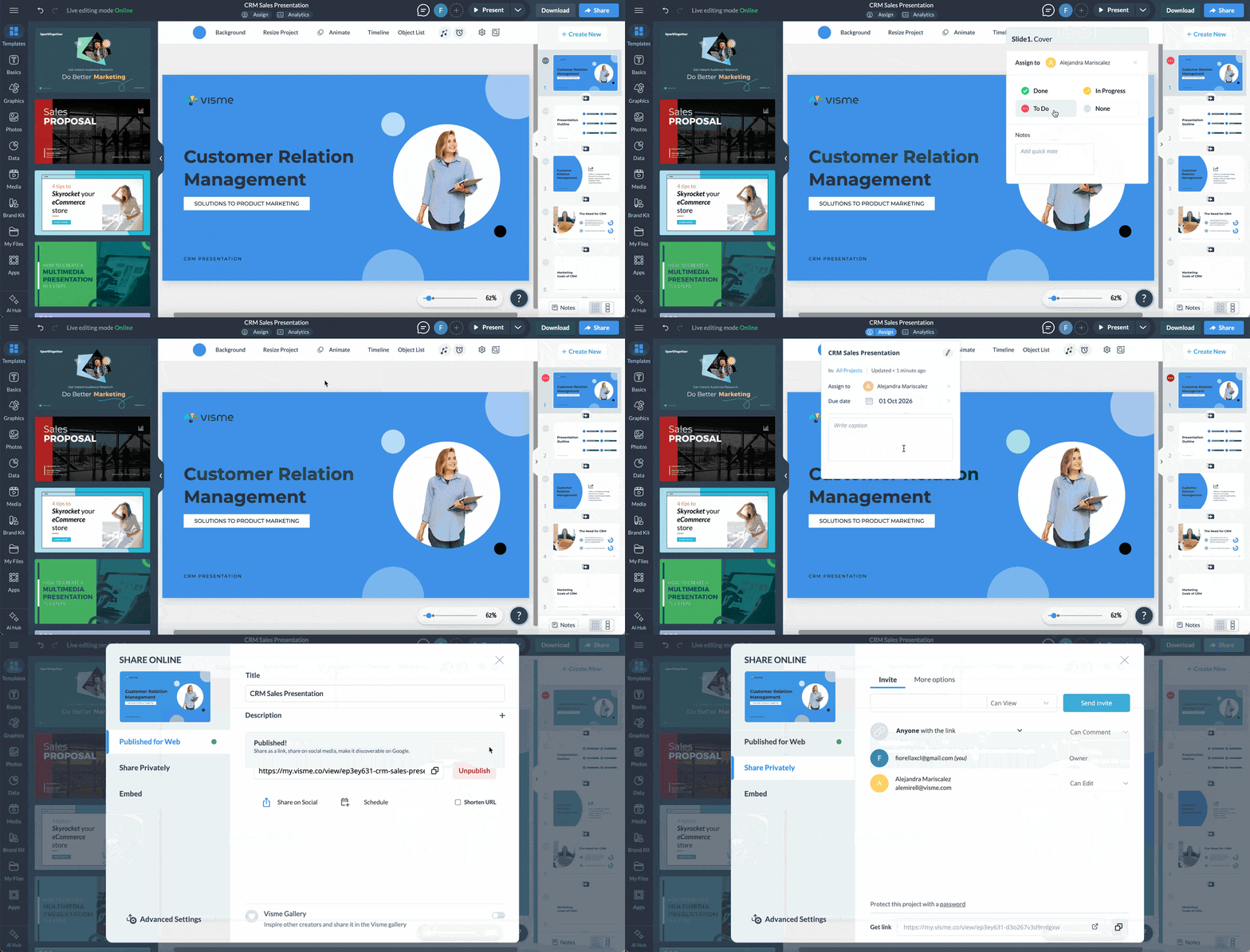
Visme makes more sense when sales needs to create and manage more than presentations. Reps can work on decks, proposals, one-pagers and leave-behinds in the same workspace instead of using separate tools for each format. Marketing can set up approved templates and reusable content, control brand elements and limit what reps can change.
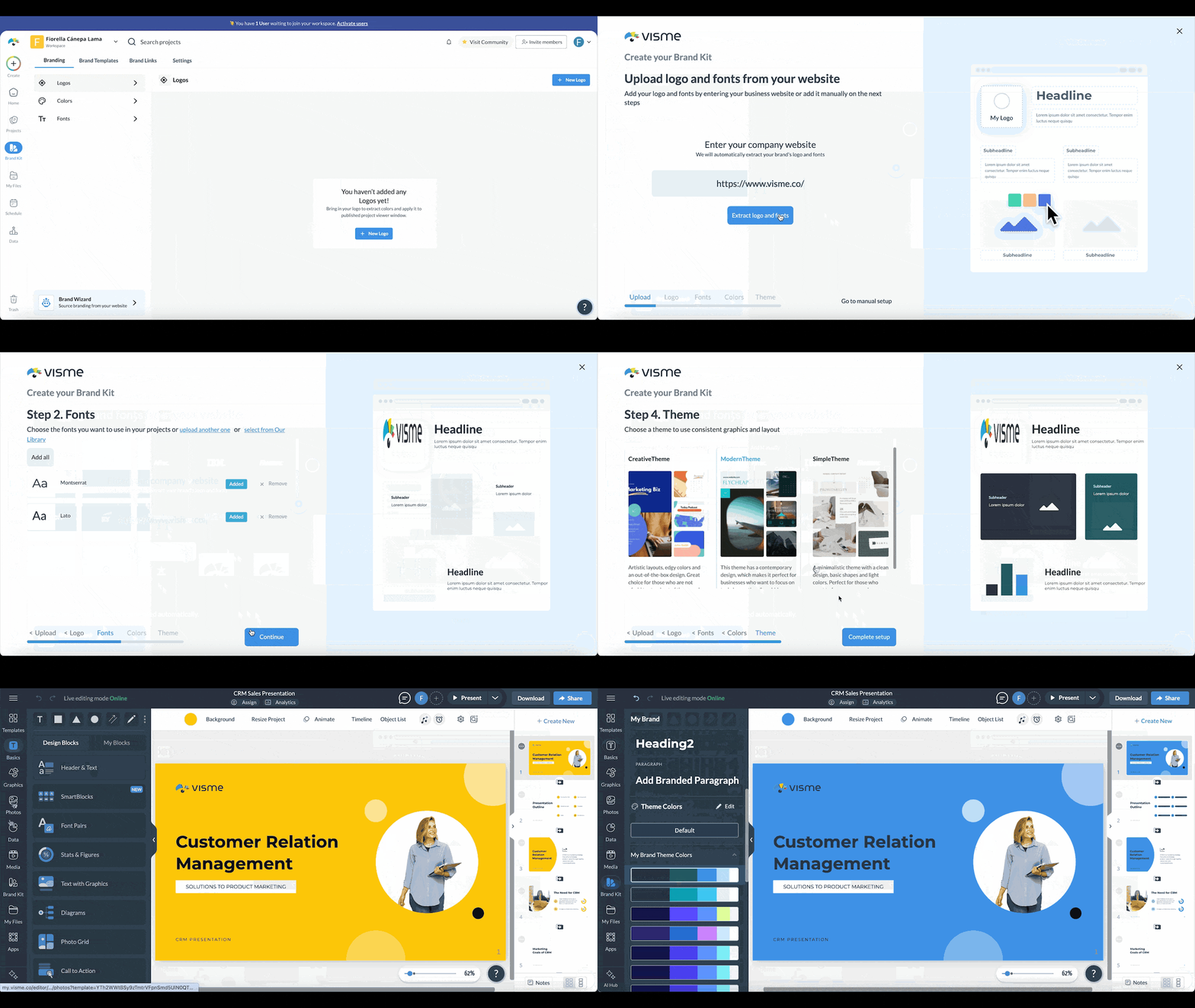
That gives sales room to personalize content for each prospect without starting from scratch or asking marketing to review every deck. Teams can also share presentations through links and track how prospects engage with them. For larger sales teams, Visme brings creation, brand control, content management and engagement analytics into the same workflow.
If marketing creates most of the content sales uses, Canva Business may be enough. Canva supports presentations alongside social graphics, documents, videos and other marketing content, with Brand Controls and approvals to help teams stay consistent. But if prospect engagement matters to your sales team, check whether the analytics provide the level of detail your reps need.
For smaller teams that mainly want to create and personalize decks quickly, Pitch and Gamma are also worth testing. Pitch supports collaborative editing, shared teamspaces and trackable links. Gamma uses AI to speed up presentation creation and includes analytics, although external viewers may appear as anonymous when they aren't signed in.
You may not need to move away from PowerPoint or Google Slides. If your buyers regularly ask for editable files and your team doesn't need detailed engagement analytics, staying with tools your reps already know may make sense. Copilot and Gemini also bring AI assistance into those existing workflows.
If you need to manage content, track usage and measure performance across the entire revenue organization, presentation software may not go far enough. At that point, you may need to compare sales enablement platforms such as Highspot and Seismic instead.
New software has an obvious price. Your current process usually doesn't.
The cost is spread across reps searching for slides, marketing maintaining duplicate versions, designers fixing avoidable formatting problems and enablement chasing people after content changes.
Before comparing subscription prices, estimate what the current workflow costs.
Use this formula:
Number of reps × hours per month spent finding, building or rebuilding sales content × loaded hourly cost × 12
Don't estimate the hours from a conference room. Ask several reps to track the time for a few weeks. The difference between “I probably spend an hour” and actual behavior can materially change the business case.
Include time spent:
Don't multiply the cheapest advertised seat price by your headcount. Price the plan that includes your must-have requirements.
If you need SSO, advanced analytics, approvals or CRM integrations, those features may move you into a different tier.
Calculate:
Annual seat cost + implementation/migration cost + training + any required add-ons
Then compare that with the cost of the current process.
The goal isn't to prove that new software is always cheaper. It's to make sure you're comparing total cost with total cost.
For a sales team of that size, look beyond templates and basic editing. Content management, brand controls, personalization, sharing and prospect engagement data are likely to matter more as more reps create and reuse sales content.
Visme and Beautiful.ai both offer team features in these areas, while Canva Business may suit teams where marketing creates most of the content sales uses. PowerPoint and Google Slides can still work well if your team mainly shares files and doesn’t need detailed engagement analytics.
Start by giving reps one place to find approved sales content rather than relying on files saved across shared drives, inboxes and individual computers.
Look for presentation software that lets admins manage approved content, update or retire old versions and make the latest material easy for reps to find. This reduces the chances of an outdated deck or slide making its way into a sales conversation.
Yes. Look for tools that let admins control what reps can and can’t edit.
For example, marketing might lock logos, fonts, layouts and other brand elements while leaving prospect-specific sections open for editing. A rep can then change the industry, customer challenge or relevant proof points without rebuilding the presentation or changing protected elements.
Visme, Beautiful.ai, Pitch and Gamma offer presentation analytics, although the level of detail and the plans that include these features vary.
Depending on the platform and sharing settings, analytics may include presentation views, individual slide views, time spent and viewer information.
If prospect-level analytics matter to your sales team, test the feature with an external viewer before buying. Don’t assume that “presentation analytics” means the same thing across every platform.
It depends on how the buyer needs to use the presentation.
A link can preserve interactive content and, depending on the platform, provide engagement data after you share the presentation. PDFs are easy to download, forward and open without access to the presentation platform.
Many sales teams will need both. Use links when the online experience and engagement data matter, but keep PDF or PPTX export available for buyers who need files for procurement, internal review or offline use.
Cost depends on the platform, plan and features your team needs, so multiplying the advertised per-user price by 25 may not give you the true cost.
Features such as SSO, advanced analytics, permissions and other enterprise controls may require higher-tier plans or custom pricing. Compare your shortlist using the same 25-user scenario and include the features you actually need.
Start with the reason you’re replacing it.
If the problem is managing sales content across a growing team, look for stronger content management, brand controls, easy personalization, link-based sharing and engagement analytics. If your team also creates proposals, one-pagers and other sales collateral, check whether the platform can handle those formats too.
Don’t overlook export options. Some buyers will still ask for PDF or PowerPoint files regardless of which platform your sales team uses.
Visme and Canva overlap, but they serve sales workflows differently.
Visme combines presentations, proposals, one-pagers and other sales content with brand controls, sharing and presentation analytics. Canva supports a much broader range of marketing and creative content and may make more sense when sales primarily uses content created by marketing.
The better fit depends on whether you’re buying primarily for the sales workflow or for content creation across the wider organization.
The main difference is how the two fit into the sales content workflow.
PowerPoint gives teams a familiar presentation editor, offline editing and broad PPTX compatibility. Visme adds a shared workspace for creating and managing different types of sales content, along with brand controls, link-based sharing and engagement analytics.
If your team mainly creates and sends presentation files, PowerPoint may already cover what you need. If you want more control over how sales content is created, shared and measured, those additional capabilities become more important.
The best choice isn't necessarily the platform with the longest feature list. It's the one that makes it easier for reps to find the right content, personalize it for the deal and get it in front of buyers, while giving marketing and sales leaders the control and visibility they need.
Visme brings that workflow into one platform. Teams can create and manage presentations, proposals and other sales content, keep approved assets and brand controls in place, collaborate across teams, share content in different formats and track buyer engagement.
If those are the gaps you're trying to solve, see how Visme can support your sales team.

Design visual brand experiences for your business whether you are a seasoned designer or a total novice.
Try Visme for free